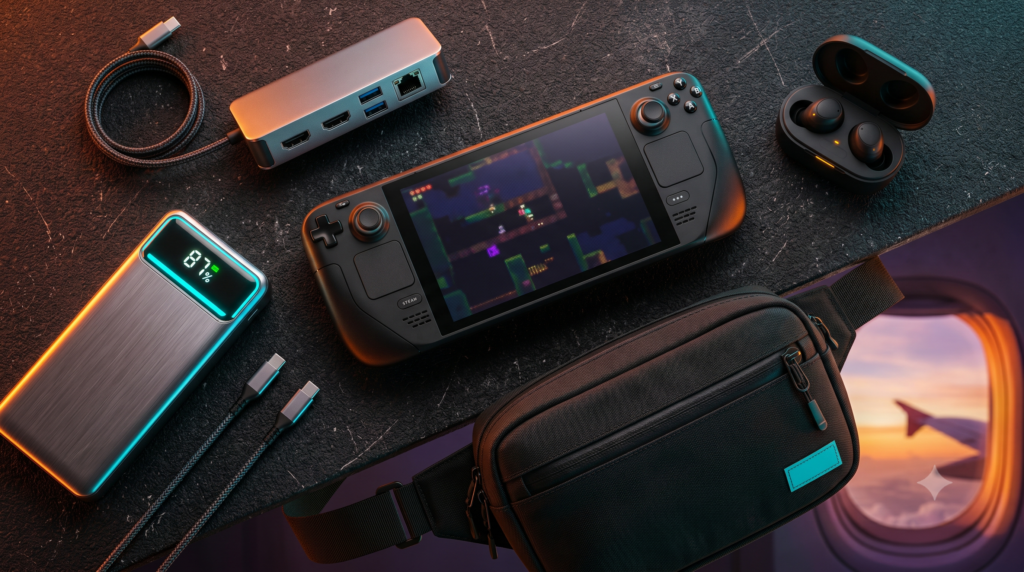
Must-Have Travel Accessories for the Steam Deck OLED & ROG Ally X
More Portable Gaming & Tech Guides
The golden era of portable PC gaming has officially arrived. Devices like the Steam Deck OLED and the ASUS ROG Ally X allow you to play massive AAA titles like Cyberpunk 2077 or Elden Ring at 60 frames per second while sitting on an airplane or lounging in a hotel room.
But there is a catch. PC graphics require massive amounts of electricity, and modern games demand hundreds of gigabytes of storage. If you pack your handheld console raw into a backpack for a 6-hour flight, it will die before you even cross a state line, and you will run out of storage space before you leave the airport.
The Travel Reality Check
| Factor | Base Console (No Accessories) | The Travel-Ready Setup |
|---|---|---|
| AAA Game Battery Life | ~1.5 to 2.5 Hours (Max) | 6+ Hours (With 140W Power Bank) |
| Storage Capacity | 512GB (Holds 4-5 large games) | 1.5TB+ (Entire Steam Library) |
| Hotel Room Gaming | Staring at a 7-inch screen | Docked to the Hotel 4K TV |
| Bluetooth Audio Latency | Noticeable audio delay via standard BT | Zero Lag (2.4GHz Dongle Earbuds) |
To truly unlock your handheld’s potential, you need to build a portable ecosystem. At Desk & Console, we travel constantly with both the Deck OLED and Ally X. Here are the 5 absolute must-have travel accessories to keep your console charged, protected, and fully loaded with games.
Do not try to charge a Steam Deck or ROG Ally with a cheap gas station phone charger. Handheld PCs require Power Delivery (PD). The Steam Deck needs a minimum of 45W, and the ROG Ally requires 65W to activate “Turbo Mode.” If you buy a cheap power bank, your console’s battery will slowly drain even while plugged in!
Anker 737 Power Bank (PowerCore 24K)
If you only buy one accessory on this list, it must be this one. The Anker 737 is the undisputed holy grail of handheld PC power banks. Its massive 24,000mAh capacity will recharge your Steam Deck OLED from 0% to 100% almost 1.5 times, easily tripling your gaming time on a long flight.
More importantly, it outputs a staggering 140 Watts of power. This means it can easily trigger the coveted “30W Turbo Mode” on the ROG Ally X, which requires a strict 65W continuous flow. It features an incredible smart digital display that shows you exactly how much time is left until the battery is empty, and it is explicitly designed to sit right under the legal 100Wh limit for TSA airplane carry-on luggage.
✓ What We Love
- 140W output easily charges Handheld PCs, MacBooks, and iPads simultaneously
- Digital LCD screen provides highly accurate battery health metrics
- TSA approved for airplane travel
- Recharges itself incredibly fast (0% to 100% in ~50 minutes with a 140W brick)
✕ Keep in Mind
- It is a heavy, dense brick; you will definitely notice the weight in your backpack
SanDisk 1TB Extreme microSDXC
You download Baldur’s Gate 3, Red Dead Redemption 2, and Cyberpunk 2077… and your console’s storage is completely full. When traveling, you don’t have access to high-speed internet to constantly delete and re-download games. You need physical storage.
The SanDisk 1TB Extreme is the gold standard for handhelds. You cannot just buy a cheap SD card from the drug store; PC games require fast data access. The SanDisk Extreme carries the crucial A2 Application Class rating, meaning it reads and writes random game data files fast enough to prevent stuttering and texture pop-in. Games load off this tiny chip remarkably fast, almost matching the internal SSD.
Check Price on Amazontomtoc Arccos Carrying Sling Bag
The hard case that comes with the Steam Deck is incredibly bulky and literally cannot hold a charger. The tomtoc Arccos Sling Bag fixes this massive oversight. It is custom-molded to fit the exact dimensions of both the Steam Deck and the ROG Ally perfectly.
The interior features a patented “W-shaped” padded bumper that protects the console’s screen and ensures the joysticks are never clicked or crushed while zipped up. Most importantly, it features deep secondary zipper pockets that easily hold the massive Anker 737 power bank, a wall charger, and your wireless earbuds. You just sling it across your chest and walk through the airport hands-free.
Check Price on AmazonJSAUX 6-in-1 Docking Station
Playing a handheld console on a flight is amazing, but what happens when you get to your hotel room? Staring at a 7-inch screen while sitting in bed isn’t ideal. The JSAUX 6-in-1 Docking Station is essentially a magic trick that turns your handheld back into a traditional home console.
You drop your Steam Deck or ROG Ally into the aluminum stand, plug the built-in USB-C cable into the top, and run an HDMI cable to the hotel’s 4K television. You can now sit back on the bed with a Bluetooth Xbox controller and play your entire PC library on a massive TV screen. It features a 100W power delivery passthrough, keeping your console fully charged while docked.
Check Price on AmazonSoundcore VR P10 Wireless Gaming Earbuds
If you connect standard Bluetooth AirPods to a Steam Deck or ROG Ally X, you will notice a 0.5-second audio delay. This means you fire a gun, and hear the gunshot a half-second later. It is incredibly distracting in fast-paced games. You need 2.4GHz wireless. The Soundcore VR P10 Earbuds fix this perfectly.
They come with a tiny USB-C dongle that plugs directly into the top of your console. This creates a zero-latency, lag-free connection. Even better, the dongle features a pass-through port, meaning you can still plug in your Anker power bank and charge the console while using the earbuds! They block out airplane engine noise beautifully without the bulk of a full headset.
Check Price on AmazonTo truly make your handheld console a primary travel rig, you cannot rely on the battery and storage it shipped with. By upgrading to the massive Anker 737 Power Bank and a fast 1TB SanDisk Extreme MicroSD, you guarantee uninterrupted gaming on any flight. Consolidating all of this gear into the stylish tomtoc Sling Bag completes the ultimate, TSA-approved mobile battle station.
Frequently Asked Questions (FAQ)
Can I bring a power bank for my Steam Deck on an airplane?
Yes, but there is a strict legal limit. The TSA and FAA mandate that any lithium-ion battery brought on a commercial flight must be under 100 Watt-hours (Wh) or roughly 27,000mAh. It must be kept in your carry-on bag, not checked luggage. High-end power banks like the Anker 737 are engineered specifically to sit right below this legal limit (86.4Wh), making them perfectly legal to fly with.
Does the ROG Ally X need a specific power bank?
Yes. The ASUS ROG Ally is incredibly power-hungry. To unlock the device’s “30W Turbo Mode” (which provides maximum FPS), your power bank and charging cable must be capable of outputting at least 65W of continuous Power Delivery (PD). If you use a cheap 20W or 30W phone charger, the console will slowly drain battery even while plugged into the wall.
Do microSD cards load games slower than the internal SSD?
Technically yes, but practically no. While internal NVMe SSDs are much faster on paper, both the Steam Deck and ROG Ally X are highly optimized to load games flawlessly from A2 U3 rated microSD cards. In real-world testing, game loading times from a premium microSD card are usually only 2 to 4 seconds slower than the internal drive, with absolutely zero impact on in-game framerates.