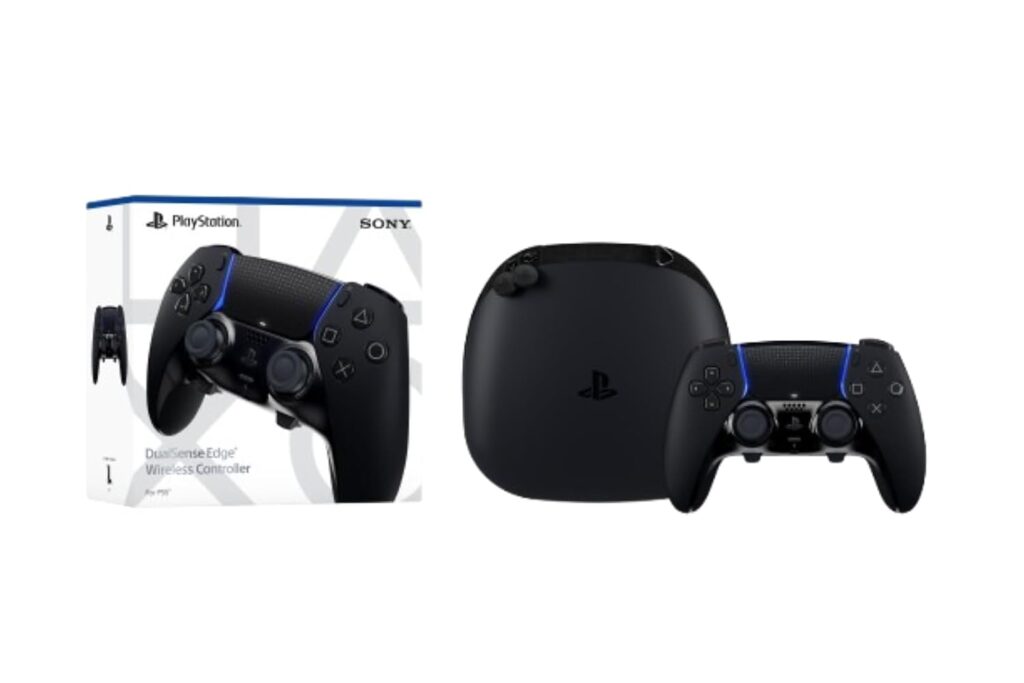
The DualSense Edge is Sony’s high-end controller for PS5. It keeps the standard DualSense features, such as haptic feedback and adaptive triggers, and adds hardware and software controls aimed at players who want to customise how they play. The question is whether those additions are worth the higher cost and the shorter battery life.
This guide explains what the Edge adds, where it falls short, and who it suits, so you can decide without relying on a product list. Every claim below links to the page it came from.
What the DualSense Edge adds
According to Sony’s announcement and product page, the Edge adds these features on top of the standard DualSense:
- Two back buttons. Two swappable back-button sets come in the box, half-dome and lever. Either set can be mapped to another button input, so you can jump or crouch without taking your thumb off the right stick.
- Adjustable triggers. You can shorten trigger travel and change trigger dead zones. Sony gives faster inputs in shooters and finer throttle control in racing games as examples.
- Stick tuning. You can adjust stick sensitivity and dead zones, which is how far a stick moves before the game registers it.
- Saved profiles and an Fn button. You can save control setups to profiles and switch between them with the Fn button during play. The same button adjusts game and chat volume balance.
- Swappable stick caps. Three types are included: standard, high dome and low dome.
- Replaceable stick modules. Each stick module can be fully replaced. Replacement modules are sold separately.
- A locking cable and a case. The braided USB-C cable locks in with a connector housing, so it is less likely to slip out. The carrying case lets you charge the controller over USB while it is stored.
The trade-off: battery life
Sony has said the Edge’s operating time is moderately shorter than the standard DualSense, because it fits more features into the same shape. Sony did not give a figure in the statements we found. Reviewers who timed it reported about six hours (Push Square) and roughly seven hours from full (TechRadar). If you play long sessions without a cable, plan to charge often or play wired.
Does it fix stick drift?
Not on its own. A replaceable module does not stop a stick from wearing out. What it changes is the fix: when a stick wears, you swap that one module rather than replace the whole controller. Sony sells replacement modules for the Edge only, and they do not fit other controllers.
Who the Edge suits, and who should skip it
A good fit if you
Play shooters or other competitive games and want back buttons and short trigger travel without a third-party controller. Also a good fit if you switch games often and want saved profiles, or have had drift before and want a module you can replace.
Consider skipping if you
Mostly play single-player games with the standard layout, play long sessions away from a cable, or want more than two back buttons.
How we checked
Sources and limits (checked 28 October 2026)
- Features come from Sony’s announcement on the PlayStation Blog and the PlayStation.com product page.
- Box contents and dimensions come from a Currys UK listing. The dimensions are listed for the white version; the black version’s listing did not show them.
- Battery information comes from Sony’s statement as reported by Trusted Reviews, and from the times measured by Push Square and TechRadar.
- We have not tested the controller ourselves.
- Not confirmed: an official battery figure from Sony, the controller’s weight, and current prices.
DualSense Edge specifications
| Specification | DualSense Edge | Source |
|---|---|---|
| Back buttons | 2, with half-dome and lever sets included | PlayStation Blog |
| Stick caps | Standard, high dome, low dome | PlayStation Blog |
| Stick modules | Replaceable; replacements sold separately | PlayStation Blog |
| Adjustments | Remapping, stick sensitivity and dead zones, trigger travel and dead zones, saved profiles | PlayStation Blog |
| Cable | Braided USB-C with locking connector housing | PlayStation Blog |
| PC connection | USB cable or Bluetooth | PlayStation.com |
| Charging station | Works with the DualSense charging station (sold separately) | PlayStation.com |
| Dimensions | 66 x 160 x 106 mm (H x W x D), white version | Currys UK |
| Battery life | Not listed on the sources we checked; Sony says moderately shorter than the DualSense | Trusted Reviews |
| Weight | Not listed on the sources we checked | None |
Sony DualSense Edge Wireless Controller
Strengths: back buttons and trigger adjustments built into Sony’s own controller, profiles you can switch during play, and stick modules you can replace.
Trade-offs: shorter battery life than the standard DualSense, only two back buttons, and replacement modules cost extra.
Frequently asked questions
Is the DualSense Edge worth it in 2026?
It is worth it if you will use the back buttons, trigger adjustments and profiles, and you can live with shorter battery life. If you mainly play casually with the standard layout, the standard DualSense covers the core features.
How long does the DualSense Edge battery last?
Sony has not published a figure. It says battery life is moderately shorter than the standard DualSense. Reviewers measured about six to seven hours per charge.
Does the DualSense Edge stop stick drift?
No controller is drift-proof. The Edge lets you replace a worn stick module on its own instead of replacing the whole controller.
Can I use the DualSense Edge on PC?
Yes. Sony says it connects to a PC with the included USB cable or by Bluetooth.
Does it work with the DualSense charging station?
Yes. Sony lists the Edge as compatible with the DualSense charging station, which is sold separately.
More controller guides
Sources
- PlayStation Blog: Introducing the DualSense Edge wireless controller
- PlayStation.com: DualSense Edge wireless controller
- PlayStation Direct: Stick module for DualSense Edge
- Currys UK: DualSense Edge, white (box contents and dimensions)
- Trusted Reviews: Sony statement on battery life
- Push Square: measured battery life
- TechRadar: measured battery life
- Tom’s Guide: DualSense Edge review