Best Powered USB Hubs That Won’t Disconnect Your Gaming Mice Mid-Match
Few moments in competitive gaming are as infuriating as lining up a clutch shot in a ranked match only to hear the dreaded Windows hardware disconnect chime. Your mouse freezes for two seconds, your tracking drops, and your character stands completely exposed.
The culprit behind random peripheral stuttering is almost never the mouse sensor itself. Instead, it is voltage instability across under-powered USB host controllers. When modern optical sensors running at 1000Hz, 4000Hz, or 8000Hz polling rates are combined with RGB mousepads, external sound cards, and webcams on a basic passive hub, the aggregate current demands overwhelm the single 5V 900mA power allocation supplied by your motherboard port.
As esports hardware pushes toward extreme lightweight designs—exemplified in our technical analysis of the Finalmouse vs Razer Viper Mini Signature Edition showdown—their high-speed wireless dongles require absolute current consistency to avoid dropping USB tracking packets. Furthermore, when pairing low-latency mice with speed-focused fabrics reviewed in our guide to the best mousepad surfaces for low-sensitivity tracking, zero-drop sensor stability is mandatory to maintain fluid arm swipes across wide desk spaces.
Why Gaming Mice Disconnect: USB Voltage Architecture
1. Current Brownouts and 5V Rail Sag
Unpowered hubs share a single 4.5W (5V 900mA) USB 3.0 motherboard bus limit. When an external SSD or RGB desk accessory pulls transient current spikes, voltage collapses below 4.75V, causing the mouse microcontroller to shut down and reboot.
2. MTT Controller Bandwidth Bottlenecks
Cheap USB hubs utilize Single Transaction Translator (STT) chips that throttle all downstream ports to the speed of the slowest connected device. Modern gaming requires Multiple Transaction Translator (MTT) chips to isolate high-speed mouse packets from low-speed peripherals.
3. 2.4GHz USB 3.0 RF Interference
Unshielded USB 3.0 ports emit broadband radio frequency noise between 2.4GHz and 2.5GHz. Placing a wireless mouse receiver adjacent to an unshielded data cable drops packets; heavy metal chassis provide vital physical Faraday shielding.
Curated Setup Guide & Technical Spec Comparison
| Powered Hub Model | Port Configuration | Dedicated AC Power Supply | Internal Controller Architecture | Enclosure & RF Shielding | Best Scenario |
|---|---|---|---|---|---|
| Anker 10-Port 60W Hub | 7 USB 3.0 Data + 3 PowerIQ Charge | 12V / 5A (60W Dedicated Adapter) | Dual Realtek MTT Chipsets | Matte Polycarbonate with Thermal Vents | Complex battlestations with high-drain streaming gear |
| Sabrent 7-Port 36W Hub | 7 USB 3.0 Data Ports | 12V / 3A (36W Dedicated Adapter) | Genesys Logic GL3520 MTT | Individual Mechanical LED Push-Buttons | Direct peripheral power isolation and fast switching |
| TP-Link UH700 | 7 USB 3.0 Data Ports | 12V / 2A (24W External Supply) | VIA VL812 Low-Latency Controller | Foldable Cable Chassis with LED Indicators | Reliable competitive gaming on a clean budget |
| ORICO 7-Port Aluminum | 7 USB 3.0 Data Ports | 12V / 2.5A (30W Dedicated Adapter) | VIA VL817 High-Efficiency Core | Solid Anodized Aluminum (Anti-EMI) | Esports setups needing structural 2.4GHz shielding |
| StarTech.com 4-Port Industrial | 4 USB 3.0 Industrial Screw-Lock | Terminal Block / DC Jack (Up to 65W) | Renesas uPD720210 Industrial MTT | Heavy-Gauge Steel with 15kV ESD Protection | Tournament rigs and zero-tolerance under-desk mounting |
1. Anker 10-Port 60W Data Hub with PowerIQ
When streaming gear, external DACs, macro keypads, and high-polling mice share a single workstation, power delivery cannot be an afterthought. The Anker 10-Port 60W Data Hub completely eliminates power-related peripheral crashes by integrating a massive 60W external power supply. This ensures that every individual data port receives full 900mA current without siphoning power from adjacent ports.
Internally, Anker deploys dual Realtek MTT controllers that manage data packet queues independently. Unlike cheap splitters that introduce packet collisions when multiple devices poll simultaneously, this hub guarantees uninterrupted packet pacing for high-refresh gaming mice. If you are integrating this hub into a compact laptop battlestation, explore our comprehensive technical guide on the best USB-C docking stations for single-cable laptop setups to ensure your host connection provides sufficient PCI Express lanes.
Strengths
- 60W external power supply guarantees zero voltage drop under peak transient loads
- Dual MTT controller architecture isolates mouse polling packets from bulk data transfers
- 3 dedicated high-amperage PowerIQ ports charge phones and wireless gamepads rapidly
- Built-in surge suppression protects expensive custom esports peripherals
Trade-Offs
- 60W power transformer brick requires dedicated cable raceway space under your desk
- Polycarbonate chassis is lightweight, requiring double-sided tape for secure desk placement
2. Sabrent 7-Port USB 3.0 Hub with Individual Power Switches
The Sabrent 7-Port USB 3.0 Hub solves a critical software bug that plagues competitive PC gamers: background device waking and controller polling conflicts. By providing individual tactile mechanical switches for each port, Sabrent lets you physically sever data and power connections to secondary gamepads, webcams, or flight sticks without constantly unplugging cords.
When fine-tuning input response across competitive games—as outlined in our technical breakdown on how to overclock your controller polling rate on PC safely—isolating your active input device on a clean electrical bus prevents Windows DirectInput polling conflicts. The included 36W adapter ensures all 7 ports operate at continuous, rock-solid 5V levels.
Strengths
- Individual mechanical toggles isolate unused devices to eliminate driver conflicts
- Dedicated 36W power adapter supplies reliable current across all 7 downstream ports
- Vibrant LED indicators provide instant confirmation of active data channels
- Slim horizontal form factor mounts cleanly along desk monitor shelves
Trade-Offs
- Bright blue LEDs cannot be dimmed or disabled in dark bedroom setups
- Included host USB cable is relatively short at 2.5 feet, requiring an extension for floor PC towers
3. TP-Link UH700 7-Port USB 3.0 Hub
For gamers seeking a no-nonsense, stable peripheral hub without flashy aesthetics, the TP-Link UH700 delivers enterprise-grade electrical stability at a fraction of the cost. Powered by a dedicated 24W wall adapter, the UH700 regulates downstream voltage using intelligent circuit protectors that prevent electrostatic discharge (ESD) from zapping sensitive mouse microcontrollers.
The VIA VL812 chipset is celebrated for low-jitter packet timing, ensuring your 1000Hz mouse updates deliver smooth, linear tracking curves without timing jitter. Setting this compact hub alongside a clean tenkeyless board—such as those featured in our roundup of the best TKL tenkeyless keyboards for extra desk space—keeps your entire peripheral footprint organized, responsive, and clutter-free.
Strengths
- VIA VL812 controller maintains excellent packet timing consistency for 1000Hz mice
- Hardware power button allows rapid system-wide peripheral power resets
- Built-in over-voltage protection prevents damage during thunderstorm power fluctuations
- Compact, discreet piano-black enclosure tucks neatly behind monitor stands
Trade-Offs
- Glossy finish is prone to surface micro-scratches and dust attraction
- 24W total capacity is sufficient for peripherals but tight for multiple spinning external hard drives
4. ORICO 7-Port Aluminum Powered USB 3.0 Hub
Wireless gaming mice operate on the 2.4GHz ISM radio frequency band—the exact frequency where unshielded USB 3.0 data transfer generates severe electromagnetic interference. The ORICO 7-Port Aluminum Powered Hub acts as a physical Faraday shield. Its heavy anodized aluminum enclosure blocks stray RF emissions from leaking outward and interfering with your wireless mouse dongle.
In addition to RF isolation, the chassis features an angled 32-degree ergonomic incline, making it easy to plug in mouse charging cables or wireless receiver extension docks with one hand. The VIA VL817 processor provides modern power-management architecture, ensuring that even if you hot-plug a secondary USB device mid-game, your primary mouse signal never blinks or stutters.
Strengths
- Solid aluminum alloy unibody provides exceptional physical RF interference suppression
- Angled 32-degree front face provides effortless one-handed peripheral swapping
- Detachable host cable allows easy replacement with longer custom-length cables
- Efficient thermal dissipation keeps internal controller chips cool during long gaming sessions
Trade-Offs
- Brushed aluminum chassis can conduct minor static tick if ungrounded on thick carpets
- Lacks individual power toggle switches
5. StarTech.com 4-Port Industrial Metal USB 3.0 Hub
If you demand absolute reliability for tournament setups or sit-stand desk cable channels, the StarTech.com 4-Port Industrial USB 3.0 Hub represents commercial-grade perfection. Engineered for harsh industrial environments, this unit features a rugged steel chassis equipped with 15kV Level 4 electrostatic discharge (ESD) protection. In dry, winter conditions where static shocks commonly freeze consumer USB ports, the StarTech hub grounds surges harmlessly away from your gaming rig.
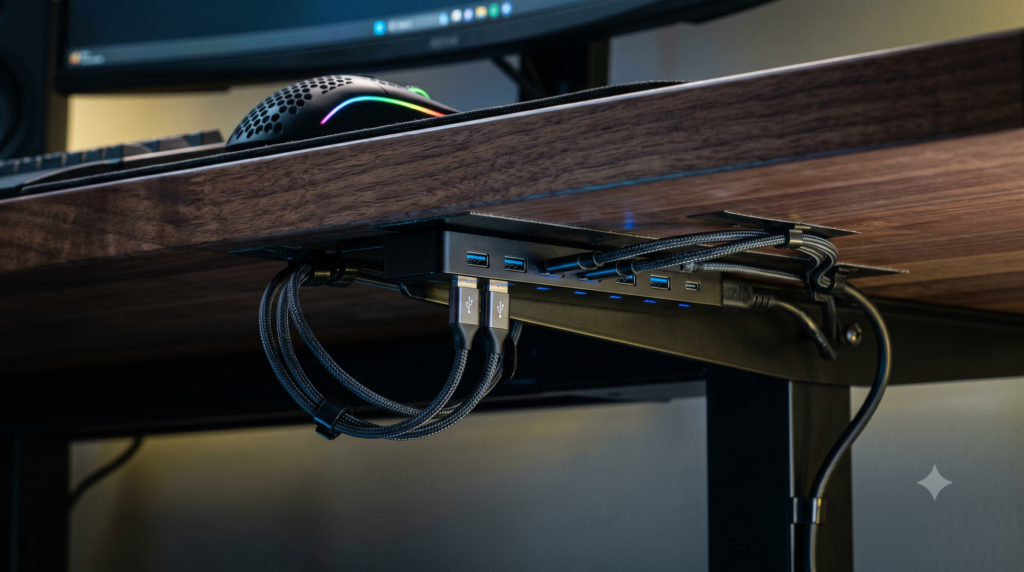
Unlike consumer plastic hubs that dangle loose among cable bundles, StarTech includes built-in mounting flanges that screw directly into the underside of your desk frame. Every USB port is reinforced to prevent port-wobble and intermittent contact loss. If you require zero-tolerance hardware that will never drop a peripheral under any circumstance, this is the definitive benchmark.
Strengths
- 15kV ESD air protection prevents static discharge from freezing mouse microcontrollers
- Integrated steel mounting flanges screw directly into desk undersides for zero wobble
- Dual power options support industrial terminal blocks or standard DC barrel adapters
- Renesas industrial MTT chipset delivers uncompromised high-speed packet integrity
Trade-Offs
- Premium industrial price tag significantly higher than consumer alternatives
- AC power supply must be selected separately depending on chosen terminal voltage
Windows Optimization: Eliminating USB Selective Suspend
Even with a world-class powered USB hub, Windows power management settings can sneakily cut power to your peripherals. Windows includes a default power-saving feature called USB Selective Suspend that allows the operating system to put individual USB ports into a low-power sleep state when it believes they are idle.
To prevent Windows from cutting communication to your gaming mouse during matches:
- Press the Windows Key, type Edit Power Plan, and hit Enter.
- Click Change advanced power settings.
- Expand the USB settings menu, then expand USB selective suspend setting.
- Set both On battery and Plugged in to Disabled.
- Next, open Device Manager, expand Universal Serial Bus controllers, right-click your primary USB Root Hub, select Properties, navigate to the Power Management tab, and uncheck “Allow the computer to turn off this device to save power.”
Performance & Gear Hub: Complete Your Setup
Stabilizing peripheral power delivery is one vital pillar of building an elite gaming environment. Explore our complementary technical blueprints for high-bandwidth displays, workspace organization, and power cable management:
Frequently Asked Questions
Why does my gaming mouse disconnect for a split second during intense gameplay?
The primary cause is USB bus power brownout. When unpowered or passive hubs draw too much aggregate current across multiple RGB devices, external drives, or webcams, the 5V rail momentarily drops below operating thresholds. This resets the mouse sensor microcontroller. A second common culprit is Windows USB Selective Suspend, which powers down inactive USB host controllers.
Can plugging a gaming mouse into a USB hub cause input latency?
Quality powered hubs equipped with Multiple Transaction Translator (MTT) chipsets handle standard 1000Hz gaming mice with negligible latency penalty (under 1 millisecond). However, cheap Single Transaction Translator (STT) hubs bottleneck when mixing low-speed devices with high-speed peripherals. For ultra-high 4000Hz or 8000Hz esports polling rates, direct motherboard rear I/O connections or dedicated MTT hubs are recommended.
Why do wireless gaming mice stutter when plugged into USB 3.0 hubs?
Operating USB 3.0 ports generate broadband electrical noise in the 2.4GHz to 2.5GHz radio frequency spectrum. When a 2.4GHz wireless mouse receiver is seated immediately adjacent to an unshielded USB 3.0 data cable, this electromagnetic radiation causes packet loss and cursor stutter. Using aluminum-shielded hubs or a short USB extension dock resolves the issue.
What is the difference between an unpowered bus hub and an externally powered USB hub?
A bus-powered hub relies strictly on the single 5V 900mA (4.5W) power allocation provided by your motherboard port, dividing that minimal current among all connected devices. An externally powered hub utilizes a dedicated AC wall transformer (typically 24W to 60W), supplying full, uninterrupted current and stable voltage to every port simultaneously.