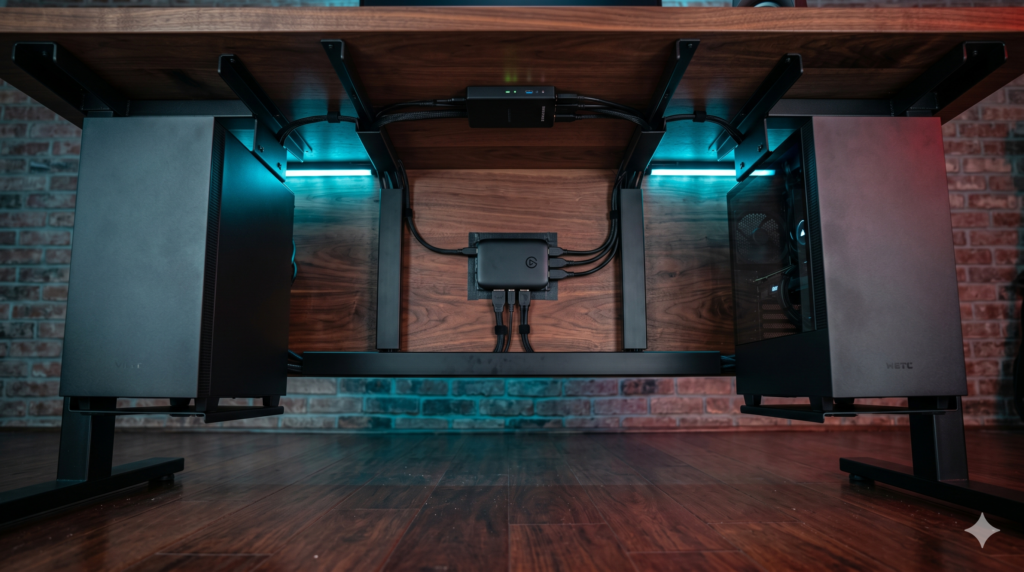
The Minimalist Streamer Layout: Hiding Dual PCs and Capture Cards for COD Creators
Competitive Call of Duty creators face a brutal technical dilemma: Warzone requires uncompromising frame rates and pristine 240Hz frame pacing, but broadcasting a high-bitrate stream demands dedicated encoding resources. Running a dual-PC setup completely solves the encoding bottleneck, yet it often turns a minimalist creator space into a chaotic nest of heavy power supplies, duplicate peripherals, and dangling HDMI cables.
Achieving a truly bare desktop does not mean compromising your competitive gaming edge. By elevating computer chassis beneath the desk frame and routing video capture interfaces inside high-capacity steel trays, you maintain an ultra-clean workspace while reserving maximum surface depth for mouse movements. Review our comprehensive desk depth guide for low-DPI arm aimers in Call of Duty to evaluate how removing hardware towers from your desk improves flick consistency and posture.
Technical Architecture: Concealing Dual PCs and Capture Hardware
1. Zero-Latency HDMI 2.1 Pass-Through
Warzone gameplay requires uncompressed local monitor pass-through with active VRR and G-Sync support. External HDMI 2.1 capture interfaces mount inside under-desk wire trays, eliminating PCIe motherboard space constraints on the streaming rig.
2. Structural Load Distribution
Suspending two mid-tower systems adds 50 to 80 pounds of deadweight. Steel under-desk mounts distribute load directly across desktop frame studs, keeping standing desk motors synchronized without dragging cords during height transitions.
3. Ground Loop & Peripheral Switching
Bridging two separate systems on different power circuits introduces 60Hz ground hum and electromagnetic GPU coil whine. Passive audio transformers and low-latency USB switches eliminate interference and allow one keyboard and mouse to command both rigs.
Under-Desk Dual-PC Streaming Hardware Comparison
| Hardware Component | Mounting / Form Factor | Bandwidth & Specs | Primary Routing Function | Best Scenario |
|---|---|---|---|---|
| Elgato 4K X | Raceway Mount (External USB-C) | HDMI 2.1 (4K144 / 1440p240 VRR) | Sub-desk Video Capture | High-FPS Call of Duty gameplay on 240Hz monitors |
| VIVO Under-Desk Mount | Steel Under-Desk Bracket | Supports up to 66 lbs (Steel Frame) | Chassis Suspension | Suspending mid-towers off floors and desktops |
| Scandinavian Hub Tray | Under-Desk Welded Mesh Trays | Dual 17-Inch Trays (34″ Total Span) | Power & Loom Concealment | Separating AC power lines from signal cables |
| UGREEN USB 3.0 Switch | Desk Lip Flush Mount | 5 Gbps (4 Inputs to 2 Hosts) | Peripheral Switching | Sharing one keyboard and mouse across both PCs |
| BESIGN Ground Loop Filter | In-Line 3.5mm Barrel | Passive 1:1 Audio Transformer | EMI & Hum Suppression | Eliminating GPU buzz on stream broadcast lines |
1. Elgato 4K X External Capture Card
Competitive Call of Duty demands uncompromised input response and pristine visual clarity. Internal PCIe capture cards permanently tie your video capture to the streaming PC motherboard, making chassis placement and sub-desk wiring rigid. The Elgato 4K X transforms streaming architecture by delivering full HDMI 2.1 passthrough in an ultra-compact external footprint that mounts directly inside an under-desk raceway with heavy-duty hook-and-loop tape.
By supporting 1440p at up to 240Hz with complete Variable Refresh Rate (VRR) and HDR10 pass-through, your local gaming display experiences zero dropped frames or micro-stutters. Meanwhile, the USB 3.2 Gen 2 10Gbps pipeline feeds an uncompressed video signal to OBS on your secondary streaming rig, leaving your desktop surface entirely clear.
Strengths
- Full HDMI 2.1 architecture enables 1440p 240Hz zero-latency monitor pass-through
- Hardware VRR and G-Sync compatibility prevents frame-pacing stutter in Warzone
- Ultra-compact external footprint easily tucks inside under-desk wire raceways
- Eliminates the requirement for open PCIe slots in secondary streaming chassis
Trade-Offs
- Requires a dedicated 10Gbps USB-C connection on the streaming rig for high framerates
- High-gauge certified HDMI 2.1 cables require deliberate under-desk bend radiuses
2. VIVO Heavy-Duty Under-Desk PC Mount
Placing two computer cases on top of your desk consumes over 35 inches of desktop length, ruins clean wall backdrops, and amplifies fan acoustics. The VIVO Heavy-Duty Under-Desk PC Mount bolts directly into the underside of solid wood, butcher block, or steel-frame desks, suspending heavy cases safely above floor carpets.
Suspending both systems allows height-adjustable desks to move freely without straining cable bundles. When deploying dual PCs, mount the gaming chassis on your primary cable-tray side and the streaming chassis toward the opposite leg. This separation prevents thermal exhaust crossover and maintains optimal airflow across internal components.
Strengths
- Frees massive amounts of desktop surface area for wide low-DPI mouse sweeps
- 135-degree smooth swivel provides instant access to rear motherboard I/O ports
- Heavy-gauge steel construction prevents chassis sway during intense gameplay
- Lifts cases off carpet floors to significantly reduce power supply dust intake
Trade-Offs
- Requires a solid desk surface with at least 0.75-inch thickness for secure screw bite
- Oversized dual-chamber cases exceeding 8 inches wide will not fit the clamp cradle
3. Scandinavian Hub Under-Desk Cable Tray System
A dual-PC streamer workstation requires managing twice as many power supplies, DisplayPort lines, USB connections, and capture boxes. Standard narrow plastic raceways choke thick wiring looms. The Scandinavian Hub Cable Tray System provides an open-wire steel mesh architecture that dissipates heat while holding oversized surge protectors and power bricks beneath your desk.
Because dynamic broadcast audio requires high-gauge cabling, pair this raceway with our dedicated guide on how to cable manage thick XLR cords under your desk. Isolating your balanced audio lines to the outer wire rungs prevents high-voltage AC cables from inducing electromagnetic hum into your broadcast microphone feed.
Strengths
- Open-wire mesh architecture dissipates heat from multi-outlet surge protectors
- Generous channel depth accommodates thick HDMI 2.1 cables and capture interfaces
- Dual-tray system allows dedicated physical separation of power and audio lines
- Heavy-duty welded steel construction eliminates tray sagging under load
Trade-Offs
- Open steel wire requires velcro wraps to prevent thin cables from slipping through
- Requires drilling pilot holes into the desk underside during initial setup
4. UGREEN 2-in-4-Out USB 3.0 Peripheral Switch
Nothing ruins a minimalist setup faster than having two keyboards and two mice cluttering a desk mat. Traditional display KVM switches introduce video input latency and break adaptive sync. The optimal architecture routes monitors directly to their respective graphics cards and utilizes a dedicated low-latency USB switch for your input peripherals.
The UGREEN USB 3.0 Switch mounts flush beneath the desk front lip using heavy-duty mounting tape. With a single button press, your mechanical keyboard, mouse, webcam, and macro controller switch between your gaming and streaming PCs. If your workstation runs high-draw webcams and audio interfaces, review our analysis of the best powered USB hubs that will not disconnect gaming mice mid match to guarantee continuous bus power across both operating systems.
Strengths
- Eliminates duplicate desktop peripherals for a clean single-keyboard setup
- Zero input latency penalty for standard 1000Hz gaming mice and keyboards
- External 5V micro-USB power port maintains connection stability on RGB gear
- Compact chassis mounts out of sight directly beneath the front desk bevel
Trade-Offs
- 1 to 2 second operating system handshake delay when switching host focus
- Does not support ultra-high 4000Hz/8000Hz mouse sensor packet rates smoothly
5. BESIGN Ground Loop Audio Noise Isolator
When two PCs connected to separate power supplies share an analog audio connection, ground loop hum is almost inevitable. High-draw graphics cards running Warzone at maximum frame rates leak high-frequency coil whine through motherboard grounding planes, creating an unbearable buzz on your stream broadcast.
The BESIGN Ground Loop Isolator houses a passive 1:1 audio transformer that physically breaks the electrical ground path between the gaming PC output and the streaming PC input. It eliminates electrical buzz without altering voice clarity. To ensure pristine sound across your entire broadcast, connect this filter in line with our recommendations on how to configure a dedicated audio mixer to isolate footsteps in Warzone.
Strengths
- Instantly removes GPU electrical coil whine and 60Hz power cycle hum
- Passive architecture operates without external power or charging cords
- Tiny in-line form factor tucks completely out of sight inside cable trays
- Preserves stereo frequency response without muffling spatial audio cues
Trade-Offs
- Can produce a minor (1-2dB) roll-off on extreme sub-bass below 30Hz
- Only functions on 3.5mm analog connections (not applicable to digital USB routes)
Clean Under-Desk Layout and Controller Integration
Executing an invisible dual-PC setup requires organized cable discipline. Mount your high-capacity raceways along the rear desk underside, positioning your audio isolator and USB switch on separate brackets from high-voltage AC cables.
For competitive Warzone creators using customized gamepads, integrate a dedicated under-desk USB-C disconnect cable at the front edge of your workspace. Pair this with our technical guide on the best pro controllers for PC Call of Duty with Hall Effect paddles to maintain high polling response and zero thumbstick drift while keeping your playing surface clear of loose cords.
Performance & Gear Hub: Complete Your Setup
Concealing dual PCs and capture cards is the foundation of a distraction-free gaming environment. Explore our companion technical blueprints for workspace acoustics, premium desk engineering, and stealth black aesthetics:
Frequently Asked Questions
Will an external capture card introduce input lag to my primary gaming monitor?
No. Modern external capture interfaces like the Elgato 4K X use a zero-latency hardware pass-through pipeline. The video signal passes through to your competitive gaming monitor via an uncompressed hardware bypass, meaning your local 1440p 240Hz refresh rate and frame delivery remain completely untouched.
How do you prevent under-desk PC mounts from pulling out of standing desks?
Stability depends on desktop material density and fastener depth. Use heavy-gauge steel brackets fastened with 3/4-inch wood screws into solid hardwood, butcher block, or high-density fiberboard (MDF). Never install heavy CPU mounts into hollow-core honeycomb paper desks without dedicated reinforcement plates.
Why does my secondary streaming PC emit a buzzing noise when running Call of Duty?
This is caused by an electrical ground loop exacerbated by high GPU current draw. Under heavy gaming loads, graphics cards induce small voltage ripples along the system ground rail. Connecting an in-line 3.5mm ground loop noise isolator between the audio output and input completely breaks the ground path and eliminates the buzz.
Can a USB 3.0 switch handle high-polling gaming mice without stuttering?
Quality USB 3.0 switches handle standard 1000Hz gaming mice and keyboards without measurable latency penalty. However, for ultra-high 4000Hz or 8000Hz esports polling rates, connect the mouse receiver directly to the gaming PC rear I/O to avoid micro-stutter from controller hub buffering.