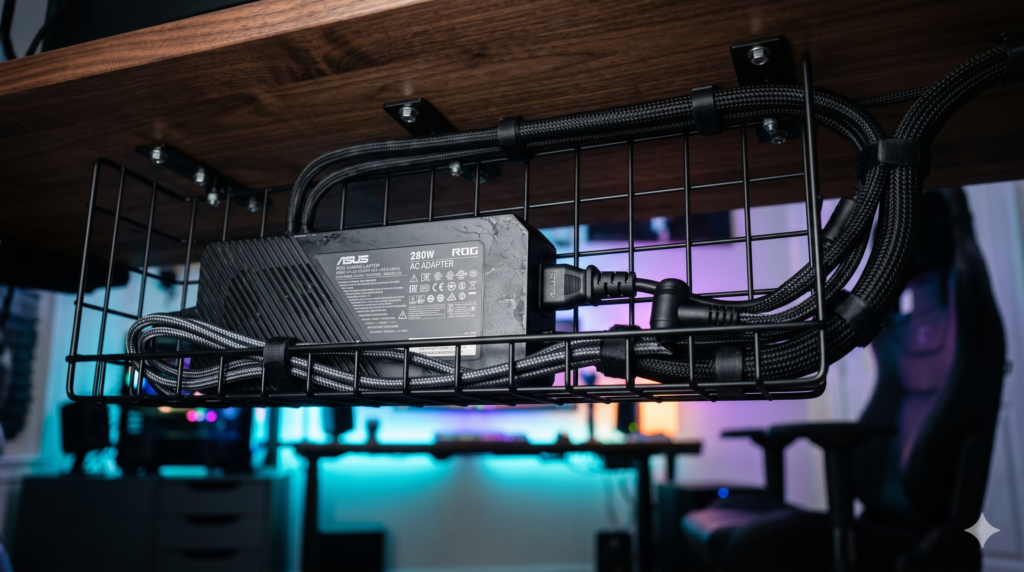
How to Hide Massive Gaming Laptop Power Bricks Under Your Desk
Building a modern desktop replacement workstation with a high-TDP gaming laptop offers tremendous flexibility. You dock a multi-core machine beside a high-refresh display, achieving clean battlestation ergonomics. Yet beneath the desk surface, reality strikes: an awkward, 3-pound, 330W power brick lies on the floor like an industrial brick, anchored by thick, inflexible cables that ruin an otherwise pristine setup.
Clean cable management functions as structural architecture. If you run your machine docked on an articulating arm, pair your under-desk tray with our technical recommendations on how to mount a heavy gaming laptop to a monitor arm without sagging. Furthermore, managing heavy power leads alongside audio lines demands strict physical separation, detailed in our guide on how to cable manage thick XLR cords under your desk.
Under-Desk Power Brick Mounting Comparison Matrix
| Mounting Method | Thermal Dissipation | Structural Load Limit | Cable Clearance | Safety Rating |
|---|---|---|---|---|
| Enclosed Plastic Cable Box | Near Zero (Thermal Trap) | Rests on Floor Only | Pinches thick DC cables | Hazardous for 200W+ bricks |
| Adhesive J-Channel Raceway | Moderate | Fails (Adhesive peels under 3 lbs) | Too narrow for wide laptop bricks | Unstable over time |
| Direct Underside Adhesive | Poor (Traps heat against wood) | Fails (Heat melts standard adhesive) | Severe port tension | High risk of sudden drop |
| VIVO Steel Wire Basket | Optimal (360° Convection) | 15+ lbs (Mechanical / VHB) | Ample space for natural bend arcs | Certified Safe for 330W |
Physical Constraints: Cable Bend Radius & Heat Dissipation
Taming high-wattage gaming power bricks involves solving two mechanical constraints:
Physics 1 The Minimum Cable Bend Radius
Unlike flexible phone cables, heavy-duty DC barrel lines use low-gauge copper wiring protected by thick rubber jackets. Forcing these stiff cables to make a tight 90-degree turn immediately as they leave the power brick collar stresses internal solder joints. High-amperage lines require at least two inches of straight extension before beginning a gradual arc to prevent internal shorts.
Physics 2 Convective Air Cooling
High-wattage laptop adapters lack internal cooling fans, relying strictly on passive thermal radiation across their plastic shells. Suspending the adapter inside an open wire grid allows rising thermal air currents to escape naturally, preventing internal heat accumulation. If you manage an intensive clamshell workstation, review our analysis on whether it is safe to game with your laptop closed in clamshell mode.
Physics 3 Separation of High and Low Voltage Leads
High-current laptop power supplies generate subtle electromagnetic fields. To protect unshielded gaming peripherals, route the primary 120V AC input along the outer perimeter and keep delicate mouse cables isolated via powered USB hubs that won’t disconnect your gaming mice mid-match.
1. VIVO Heavy Duty Under Desk Wire Basket
The VIVO Heavy Duty Under Desk Wire Basket is the benchmark mounting solution for massive gaming laptop power supplies. Its open steel grid allows 360-degree ambient airflow around the brick, preventing the thermal throttling that occurs when power adapters are confined in solid trays.
With a generous 4.8-inch depth, it easily holds the widest 330W adapters from Alienware, Razer, and Lenovo Legion lying flat beside a surge protector. Its wide wire spacing permits thick power cables to exit naturally without hitting restrictive metal walls. If you travel frequently and prefer not to unbind this heavy setup, consider packing a companion 100W GaN charger for gaming laptops to leave this primary brick permanently mounted at home.
Strengths
- Open steel wire architecture guarantees optimal passive convective cooling
- Generous 4.8-inch tray depth accommodates bulky 330W bricks with ease
- Welded steel structure eliminates tray sagging under heavy hardware loads
Trade-Offs
- Requires mounting clearance under the desk frame free of center support beams
- Included hardware designed for solid wood surfaces (requires tape for glass)
2. 3M VHB Heavy Duty Double Sided Mounting Tape
Standard wood screws cannot be driven into tempered glass surfaces or hollow-core honeycomb desks (like the popular Ikea Linnmon or Lagkapten). Screws driven into cardboard honeycomb rip out under the weight of a heavy power brick.
3M VHB (Very High Bond) Double Sided Tape provides an industrial chemical alternative to mechanical fasteners. Applying this acrylic foam tape across the mounting brackets of the steel wire basket distributes shear stress evenly across the tabletop underside. Its visco-elastic core absorbs mechanical shocks and thermal expansion, holding heavy steel wire baskets securely without surface drilling.
Strengths
- Creates an industrial-strength bond without drilling into fragile materials
- High temperature resistance prevents adhesive softening near warm components
- Distributes load evenly to prevent localized cracking on tempered glass
Trade-Offs
- Requires full 24-hour cure time before placing heavy weight into the basket
- Surface must be rigorously degreased with isopropyl alcohol before application
3. Cable Matters Right Angle AC Power Cord
Standard factory AC power cords feature rigid, straight rubber collars that protrude 3 to 4 inches directly out of the adapter before bending. This added length frequently prevents the brick from sitting horizontally inside under-desk channels.
The Cable Matters Right Angle AC Power Cord routes the heavy input lead at an immediate 90-degree angle the millimeter it leaves the C13 socket. This compact connection saves critical horizontal clearance, allowing the power brick to rest flush against the back frame of the desk without cable kinking.
Strengths
- 90-degree collar saves up to 3 inches of horizontal basket clearance
- Prevents mechanical lever stress on the power brick C13 socket
- Heavy-duty 18 AWG copper gauge supports high-amperage power bricks
Trade-Offs
- Ensure your power supply utilizes a standard 3-prong C13 connector (not C5)
- Fixed 90-degree orientation must align with your tray exit direction
4. Alex Tech Expandable Braided Cable Sleeve
Even with the power supply secured under the desk, the thick, rigid DC barrel cord must still reach your laptop. Running this thick black line independently exposes visible cable clutter.
The Alex Tech Expandable Braided Cable Sleeve bundles your heavy DC power cord alongside your high-speed display and USB lines into a single, uniform umbilical harness. Its self-wrapping split design allows you to insert or branch cables out at any height, which can then be fastened flush along a monitor mount spine for a floating workstation look.
Strengths
- Consolidates thick DC cords, monitor lines, and USB leads into one sleek harness
- Self-wrapping split design allows quick cable additions without disconnecting gear
- Durable woven PET mesh protects wiring from abrasion against metal desk frames
Trade-Offs
- Cut ends must be singed with a lighter to prevent fraying
- Requires measuring cable cluster thickness prior to diameter selection
Step-by-Step Under-Desk Mounting Protocol
Follow this installation sequence to ensure your power supply remains securely mounted without falling or overheating:
Step 1 Select the Thermal Zone
Never mount a high-wattage power brick directly above your knee or thigh resting area, where ambient radiant heat causes discomfort. Position the wire basket near the rear corner of the desk, aligned with your monitor arm clamp to keep the vertical cable run as short as possible.
Step 2 Secure the Tray (Mechanical vs Adhesive)
Solid Wood Tops: Mark pilot holes on the underside, pre-drill with a 1/8-inch wood bit, and fasten the VIVO basket brackets using the included 3/4-inch screws.
Glass & Hollow Core Tops: Clean both the metal bracket faces and desk underside with 90%+ isopropyl alcohol. Apply 3M VHB tape across the bracket flanges, press firmly against the tabletop for 60 seconds, and allow 24 hours for the bond to cure before loading the heavy power brick.
Step 3 Route the Umbilical Line
Plug the right-angle AC cord into your power strip, lay the power brick flat in the basket, and bundle the DC output wire alongside your display cables inside the braided sleeve. Fasten the sleeve to your monitor arm spine using hook-and-loop ties, ensuring sufficient slack at articulation joints.
Laptop Battlestation & Cable Architecture Hub
Mastering under-desk cable management is a key pillar of building a distraction-free battlestation. Explore our companion technical blueprints for laptop docking, desktop ergonomics, and minimalist workspace design:
Frequently Asked Questions
Is it safe to put a gaming laptop power brick inside a plastic cable box?
No. High-performance gaming laptop adapters (230W to 330W) produce massive amounts of radiant heat under full GPU and CPU loads. Sealing them inside an enclosed plastic box restricts natural convective airflow, creating a thermal chamber that triggers power delivery throttling, warps the casing, and presents an electrical hazard. High-wattage power bricks require open-air steel wire trays.
How do you mount a heavy laptop power brick to a glass or hollow desk without drilling?
For tempered glass desks or hollow-core honeycomb table tops where screws cannot bite, use industrial-grade 3M VHB (Very High Bond) acrylic foam tape. Apply the tape to the flat mounting brackets of a steel wire basket, press firmly against a cleaned surface, and allow the chemical bond to cure for 24 hours before loading the power brick.
Why is the bend radius critical on thick laptop DC power cords?
Gaming laptop DC power cords contain thick copper wire gauges to safely deliver high current. Forcing a sharp 90-degree bend near the power brick collar stresses internal strands and solder joints, leading to frayed rubber, intermittent power cuts, and damaged power supplies. Cables should extend straight for at least two inches before beginning a gradual bend.
How do you route a thick DC barrel cord up to a floating laptop mount?
Bundle the DC power cord alongside your display and USB lines inside a single split braided cable sleeve. Fasten the sleeve along the articulating spine of your monitor arm using reusable hook-and-loop ties, creating an organized umbilical line that relieves port tension.