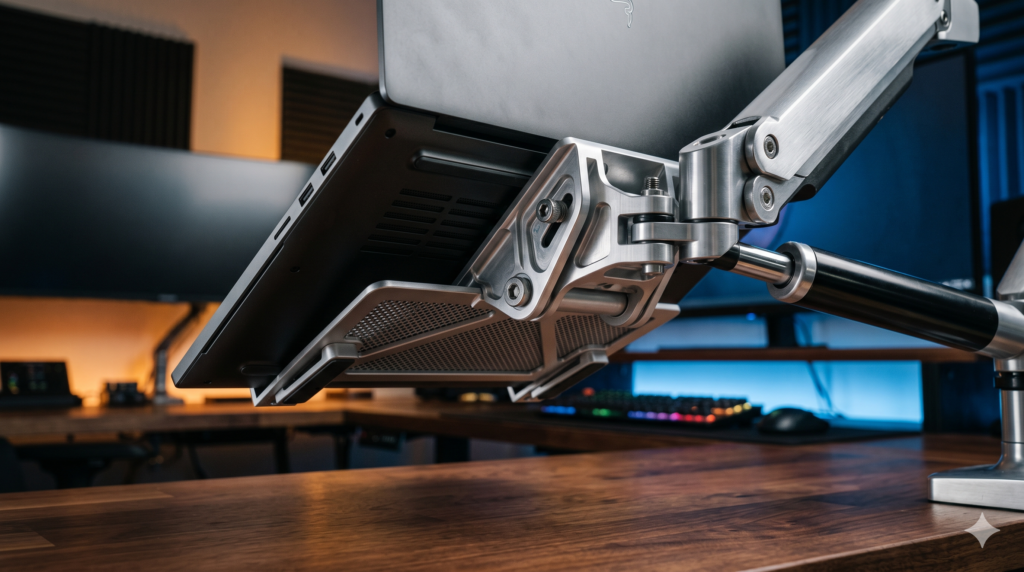
How to Mount a Heavy Gaming Laptop to a Monitor Arm Without Sagging
An optimized battlestation requires ample surface area. When utilizing an extended desk mat for low-DPI arm aiming alongside a full-sized mechanical keyboard, having an expansive 16-inch or 17-inch gaming laptop resting directly on your desktop consumes vital tracking territory.
Integrating a floating laptop mount creates seamless multi-display ergonomics. Perfecting your secondary screen height and focal depth is detailed in our guide on how to perfectly align your gaming laptop screen with a 27-inch monitor. Establishing ideal sightlines also reduces neck strain, as explored in our benchmarks on optimal monitor height, distance, and tilt for competitive FPS gaming. To keep your display cables and heavy DC power leads clean along the mount spine, consult our techniques for hiding webcam and microphone cables on dual monitor arm setups.
The True Payload Formula
A monitor arm supports the cumulative weight of the entire structural assembly, not just the laptop:
An entry-level monitor arm rated for “14 lbs maximum” operates near its breaking threshold when holding an 11-pound horizontal tray. Forward rotational torque multiplies the mechanical force applied to the tilt joint. Mounting a heavy gaming laptop requires an arm rated for at least 20 to 30 pounds.
Heavy-Duty Laptop Mounting Hardware Comparison Matrix
| Hardware Component | Mechanism / Material | Rated Load Capacity | VESA Pattern | Primary Anti-Sag Benefit |
|---|---|---|---|---|
| Ergotron LX Desk Mount | Constant Force Mechanical Spring | Up to 25.0 lbs (11.3 kg) | 75x75mm / 100x100mm | Solid steel tilt-pivot hinge holds heavy forward torque without drooping |
| VIVO Premium Heavy Duty Arm | High-Capacity Pneumatic Cylinder | Up to 33.0 lbs (15.0 kg) | 75x75mm / 100x100mm | Over-engineered cylinder effortlessly counterbalances thick chassis |
| WALI Ventilated VESA Tray | Solid Welded Steel Plate | Up to 22.0 lbs (10.0 kg) | 75x75mm / 100x100mm | Deep retaining lips and cutout vents prevent slipping and thermal choking |
| 3M Anti-Slip Silicone Pads | High-Friction Silicone Rubber | Adhesive Backed Grips | Universal Surface Fit | Stops metal-on-metal sliding during aggressive desk typing vibrations |
1. Ergotron LX Desk Mount LCD Arm
When elevating a premium $2,000+ gaming laptop, structural reliability is paramount. The Ergotron LX Desk Mount LCD Arm is regarded as the gold standard in heavy-duty display articulation. Unlike entry-level mounts that rely on sealed nitrogen gas cylinders prone to gradual pressure loss, the Ergotron LX utilizes a mechanical steel coil spring system that maintains calibrated tension indefinitely.
Its defining anti-sag feature is its all-steel tilt-pivot assembly. Because a horizontal laptop tray projects its center of gravity outward, the tilt joint absorbs massive continuous leverage. The Ergotron LX features an adjustable friction collar that locks the tilt angle rigid, ensuring zero forward droop. Building out an uncompromising setup around high-grade mounting arms is a cornerstone of our foundational guide to essential gear for PC gaming setups.
Strengths
- Patented mechanical spring mechanism never loses lifting tension over time
- Reinforced tilt-pivot hinge completely prevents forward tray tipping
- Exceptional all-metal build eliminates desk-typing vibrations and wobble
Trade-Offs
- Premium investment compared to basic pneumatic consumer arms
- Requires initial hex wrench adjustment to calibrate high-tension springs
2. VIVO Premium Aluminum Heavy Duty Monitor Arm
If you want heavy-duty lifting capacity at an accessible price point, the VIVO Premium Heavy Duty Monitor Arm (STAND-V101G1) offers extraordinary mechanical headroom. Engineered to support massive 32-inch to 49-inch ultrawide gaming displays, its pneumatic cylinder counterbalances heavy gaming laptops without straining the piston seal.
By rating the arm for 33 pounds, an 11-pound combined laptop-and-tray payload operates well within the cylinder’s optimal performance band. The internal gas spring provides fluid, one-finger height repositioning, while integrated under-arm routing channels conceal thick power cords and display cables.
Strengths
- 33-pound weight limit provides abundant overhead for thick 17-inch chassis
- Integrated cable management channels conceal heavy power and display wiring
- Excellent price-to-performance ratio for heavy-duty pneumatic arms
Trade-Offs
- Requires firm tightening of the tilt-tension bolt during initial assembly
- Large base footprint requires 3.5 inches of desk overhang for the clamp
3. WALI Ventilated Laptop VESA Tray
A high-capacity monitor arm requires a secure structural platform to interface with the laptop chassis. The WALI Ventilated Laptop VESA Tray resolves the two primary hazards of laptop mounting: thermal choking and physical slippage.
Gaming laptops draw cold intake air through the bottom chassis to feed internal vapor chambers. Solid mounting plates choke these fans, causing immediate thermal throttling. The WALI tray features extensive ventilation cutouts that allow unobstructed bottom airflow, complementing quiet ambient acoustics like those achieved when selecting alternatives to Corsair iCUE case fans for airflow optimization. Furthermore, its front retaining lip and adjustable side clamps securely anchor chassis up to 1.5 inches thick, preventing forward slips when the arm is tilted.
Strengths
- Wide ventilation pattern prevents bottom fan choking and thermal throttling
- Tall front retention lip accommodates thick gaming chassis with ease
- Rigid steel construction eliminates tray bending under heavy corner loads
Trade-Offs
- Adjustable side arms may block low-profile side ports on select laptops
- Bare steel surface benefits from adding rubber friction padding
4. 3M Anti-Slip Silicone Rubber Grips
Even with front retaining clips, resting a metal or smooth plastic laptop chassis directly against a painted steel VESA tray creates a low-friction interface. Rhythmic vibrations from typing or desktop movement can cause the laptop to slowly shift out of alignment.
Applying 3M Anti-Slip Silicone Rubber Grips across the contact rails of the VESA tray creates an ultra-high-friction barrier. The laptop’s factory rubber feet bite into the silicone pads, locking the machine in place even when the tray is articulated at downward typing angles.
Strengths
- High-tack silicone prevents lateral sliding and micro-shifting during typing
- Absorbs mechanical vibrations transferred through the desk frame
- Protects the underside of premium laptop chassis from metal scratching
Trade-Offs
- Tray surface must be thoroughly cleaned with alcohol prior to adhesion
- Requires strategic placement to avoid blocking laptop intake grilles
Step-by-Step Tension Adjustment Guide (Eliminating Sag)
Even commercial-grade monitor arms will sag out of the box. Gas-spring cylinders and mechanical springs are shipped with minimal factory tension to prevent rapid expansion during unboxing. Calibrate your mount using this sequence:
Step 1 Assemble the Full Working Payload First
Never attempt to calibrate spring tension on an empty arm. Bolt the VESA tray to the mounting bracket, adhere the silicone grips, seat your laptop, and connect your power and display cords. Tension must be balanced against the total operating mass of the system.
Step 2 Calibrate the Main Lift Cylinder
If the arm gradually sinks toward your desk surface, push the arm down until it rests completely horizontal. Locate the primary hex adjustment bolt at the central elbow joint. Insert your Allen wrench and rotate toward the “+” (Plus) indicator. You may need 10 to 18 full revolutions to build sufficient counter-pressure to float a 7-pound gaming machine.
Step 3 Lock the Tilt-Pivot Joint
If the arm holds its height but the laptop tray tips forward, locate the tilt-tension bolt positioned directly behind the VESA mounting plate. Because the horizontal laptop tray extends the center of gravity forward, tighten this bolt firmly using an Allen wrench or socket tool to lock the tilt angle rigid.
Laptop Battlestation & Ergonomics Hub
Mastering floating laptop mounting unlocks clean desktop ergonomics. Explore our companion technical blueprints for multi-display alignment, monitor arm cable concealment, and battlestation hardware:
Frequently Asked Questions
Why does my monitor arm sag when holding a gaming laptop?
Monitor arms sag with laptops primarily due to an offset center of mass. Unlike flat computer monitors that distribute weight close to the VESA plate, a laptop rests horizontally across a tray. This creates a forward lever arm that multiplies rotational torque against the tilt-pivot hinge, causing standard arms to droop forward.
What VESA pattern is standard for laptop mounting trays?
Nearly all laptop VESA trays feature dual-hole compatibility supporting both 75x75mm and 100x100mm patterns. This allows them to bolt directly to any standard monitor arm mounting bracket using standard M4 screws.
Can mounting a gaming laptop on a VESA tray block its cooling vents?
Yes, if using a solid metal or plastic plate. High-performance laptops pull cold air directly through bottom chassis vents. To prevent thermal throttling, you must use a ventilated steel tray featuring wide geometric cutouts that expose fan intakes to ambient air.
What weight capacity monitor arm is required for a heavy gaming laptop?
To account for dynamic leverage, follow the 20% Overhead Rule. Combine the weight of your laptop (typically 5.5 to 8.5 lbs), the steel VESA tray (3 lbs), and heavy power cables (1 lb). An 11 to 12.5 lb total payload requires an arm rated for at least 20 to 30 lbs to guarantee rigid tilt resistance.