Best Alternatives to Corsair iCUE Case Fans
For the last decade, building a high-end gaming PC almost guaranteed you were buying Corsair case fans. They looked incredible, the RGB was blindingly bright, and they were the undisputed kings of the enthusiast market.
But the PC building community has largely reached a breaking point. For years, Corsair relied on proprietary cable connections. If you wanted 6 fans in your case, you had to route 12 separate cables through the back of your chassis into an expensive, bulky Commander Pro hub. Furthermore, their iCUE background software has become notoriously bloated, consuming massive amounts of system RAM and occasionally causing micro-stutters in competitive games.
At Desk & Console, we believe you shouldn’t have to pay a massive “Corsair Tax” to get a clean, cool, and stunning PC build. The hardware market has experienced an open-standard revolution. You can now buy premium fans that daisy-chain together magnetically and plug directly into your motherboard without needing a single drop of third-party software. Here are the 5 absolute best alternatives to Corsair iCUE case fans on the market right now.
Proprietary Hubs vs Standard ARGB
| Feature | Corsair iCUE Fans | Standard 5V ARGB Fans |
|---|---|---|
| Cable Connections | Requires Proprietary Hubs | Plugs Directly into Motherboard |
| Required Software | iCUE (Heavy Background App) | None (Uses BIOS or Mobo Sync) |
| Daisy Chaining | Only on hyper-expensive “Link” models | Standard on modern alternatives |
| Price per Fan | $35 – $50+ | $5 – $30 |
This is the universal standard for PC lighting. Almost every modern motherboard (ASUS, MSI, Gigabyte, ASRock) has these pins. If you buy standard 5V ARGB fans, you don’t need a USB hub or third-party bloatware. You plug the fan directly into the motherboard, and your BIOS controls the lights natively.
Lian Li UNI Fan SL-Infinity 120 (3-Pack)
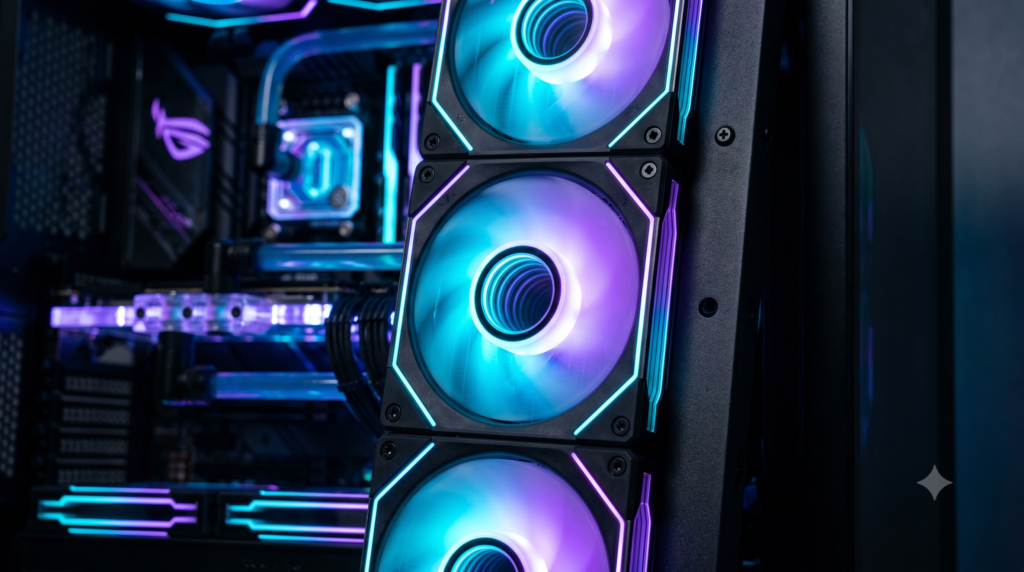
If you want the absolute most stunning RGB aesthetic on the market, the Lian Li UNI Fan SL-Infinity is the definitive premium alternative to Corsair. Lian Li invented the daisy-chain fan trend, and their interlocking mechanism is flawless. You slide three fans together, and they lock securely with a single cable coming off the end of the cluster.
Aesthetically, they are untouchable. They feature a mesmerizing “infinity mirror” illusion in the center hub and along the side edges. If you build in a panoramic glass case (like the O11 Dynamic or NZXT H9), the side-edge infinity mirrors create a tunnel of light that standard Corsair rings simply cannot replicate. Furthermore, Lian Li’s L-Connect 3 software is significantly lighter on system resources than iCUE.
✓ What We Love
- Flawless snap-together daisy chaining eliminates cable mess
- Infinity mirror edges provide the best aesthetic on the market
- L-Connect software is lightweight and easy to use
- The included controller hub accepts standard ARGB accessories
✕ Keep in Mind
- They carry a premium price tag (though still cheaper than Corsair iCUE Link)
Phanteks D30-120 Daisy-Chain Fans
If you prioritize cooling performance just as much as RGB, Corsair’s standard fans are notoriously weak when mounted to AIO liquid cooling radiators. The Phanteks D30-120 solves this by making the fan frame 30mm thick (compared to the standard 25mm). That extra 5mm allows for massively angled fan blades that shove air through thick radiators effortlessly.
Phanteks utilizes a brilliant daisy-chain system where plastic bridge clips physically lock the fans together, hiding the connection screws behind sleek aesthetic cover plates. The D30 uses ultra-smooth, perfectly diffused D-RGB “Halos” lighting. Crucially, they use a standard 3-pin ARGB connector, meaning they plug directly into your motherboard without requiring any proprietary Phanteks software.
✓ What We Love
- 30mm thickness delivers elite static pressure for AIO radiators
- Screw cover plates create a seamless, monolithic look
- Standard 5V ARGB connects directly to the motherboard (Zero software needed)
- Available in both standard and ‘Reverse Airflow’ blade orientations
✕ Keep in Mind
- The 30mm thickness means they might not fit in very tight SFF (Small Form Factor) cases
ARCTIC P12 PWM PST A-RGB (3-Pack)
If you want top-tier cooling performance and beautiful RGB but refuse to spend $100 on case fans, the ARCTIC P12 A-RGB 3-Pack is the undisputed champion of the budget PC building community. For roughly the price of *one* Corsair fan, ARCTIC gives you an entire 3-pack of high-performance fans.
While they don’t physically snap together like Lian Li, ARCTIC uses PST (PWM Sharing Technology). Each fan cable has a built-in splitter. You plug fan #2 directly into the cable of fan #1, and so on. You still only have to route a single cable to your motherboard. The P12s are legendary in the PC community for being whisper-quiet and pushing air better than fans triple their price.
✓ What We Love
- The absolute best price-to-performance ratio in PC building
- PST cables drastically reduce cable clutter without expensive proprietary hubs
- Fluid Dynamic Bearings ensure years of silent operation
- Standard 5V ARGB completely bypasses third-party software bloat
✕ Keep in Mind
- The RGB is isolated to the fan blades (no fancy outer ring lights)
Thermalright TL-C12C-S (3-Pack)
In recent years, Thermalright has completely disrupted the PC cooling market by offering insane value. The Thermalright TL-C12C-S is the go-to fan for builders on a strict, unyielding budget.
You can routinely pick up a 3-pack of these fans for around $15. Despite the rock-bottom price, they use standard 3-pin ARGB connectors that sync flawlessly with Asus Aura, MSI Mystic Light, or Gigabyte RGB Fusion. They feature silicone anti-vibration pads on the corners and provide shockingly bright, vibrant lighting that puts older budget fans to shame.
Buy Thermalright TL-C12C-SNoctua NF-A12x25 chromax.black
If you are abandoning Corsair because you are entirely sick of RGB lighting, software glitches, and cable hubs, the ultimate endgame fan is the Noctua NF-A12x25 chromax.black. Noctua is the Rolex of PC cooling. They do not care about RGB; they care strictly about acoustics and absolute maximum airflow.
The A12x25 is made from a proprietary liquid-crystal polymer (Sterrox) that prevents the fan blades from warping at high RPMs. The blade tip clearance is incredibly tight, meaning it pushes an insane amount of air through radiators while remaining entirely silent. The “chromax.black” version finally ditches Noctua’s infamous brown-and-beige color scheme for a stunning, stealthy black aesthetic with swappable colored anti-vibration pads.
Buy Noctua NF-A12x25If your goal is to replicate the stunning visual aesthetic of high-end Corsair setups but entirely eliminate the cable mess behind your motherboard, the snap-together Lian Li UNI Fan SL-Infinity is the definitive premium upgrade.
However, if you want incredible cooling performance and standard motherboard RGB sync without breaking the bank, grabbing a 3-pack of the ARCTIC P12 A-RGB is the smartest financial choice you can make for your PC build.
Frequently Asked Questions (FAQ)
How do I control ARGB fans without Corsair iCUE?
If you purchase fans with a standard 5V 3-pin ARGB connector (like the Lian Li, Phanteks, or ARCTIC fans listed above), you plug them directly into your motherboard’s ARGB header. You can then use your motherboard’s built-in, lightweight software (like ASUS Armoury Crate or MSI Mystic Light). Better yet, you can use highly regarded, open-source RGB applications like SignalRGB or OpenRGB to sync your entire PC without bloatware.
What are daisy-chain case fans?
Daisy-chaining is a technology that allows multiple PC fans to physically interlock or plug into one another. Instead of running a PWM cable and an RGB cable from every single fan to the motherboard (which creates a massive cable nest), a cluster of three daisy-chained fans only requires one single cable to exit the cluster. This makes PC building vastly easier and cleaner.
Can I mix different fan brands in my PC case?
Yes. If the fans use standard 4-pin PWM headers for power and 5V 3-pin ARGB headers for lighting, you can mix and match brands within the same PC case. However, keep in mind that visually matching the LEDs across different brands can be difficult, as different manufacturers use varying LED densities and color calibrations.