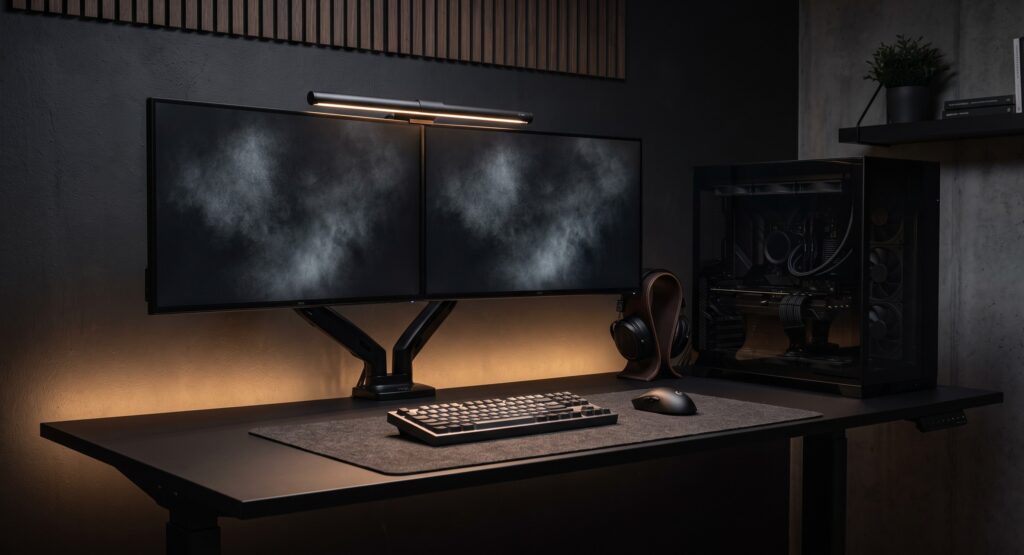
Stealth Black Gaming Setup: Matte Black Parts List (2026)
A stealth black gaming setup swaps colorful lighting for matte black surfaces, hidden cables and a single, controlled light source. This guide lists five parts that suit that look: a case, a standing desk, a keyboard, a mouse and a monitor light. For each one we explain why it fits and where it falls short of a true blackout build.
How we picked these
This is a research-based guide, not a hands-on test. We chose these parts from manufacturer listings and published reviews, and we have not built this exact setup or benchmarked it. Specs are the manufacturers’ claims. Several of these products have newer versions, so check that the Amazon link goes to the model you want.
Parts at a glance
| Part | Role | Stealth fit | Check first |
|---|---|---|---|
| Corsair 4000D Airflow | PC case | Black case with a mesh front and glass side panel | Glass tint, fan lighting, GPU length |
| FlexiSpot electric standing desk | Desk | Black top and frame options | Exact model, size, lift capacity |
| Logitech G915 TKL | Keyboard | Low-profile, but backlit with RGB | Legibility with lighting off; current version |
| Logitech G PRO X Superlight | Mouse | Plain shell, no lighting | Original vs. newer version; right-hand shape |
| BenQ ScreenBar | Monitor light | Replaces a desk lamp | Monitor bezel, curved screens, webcam |
If you work at the same desk, our guide to minimalist desk setups for gamers who work from home covers the layout side.
The five parts
Corsair 4000D Airflow
A popular mid-tower with a perforated front panel for airflow and a tempered glass side. In black it suits a dark build, and Corsair’s listing mentions cable-routing space behind the motherboard tray. Note that the glass is usually a standard panel, so look closely at the product photos to see how dark it is. Dark components inside will help a build look less busy. Also note that this is an airflow-focused case with a mesh front, so it looks different from a fully closed case.
Why it makes the list
- Plain black styling without branding clutter
- Mesh front is designed for cooling
- Rear cable-routing space for a tidy interior
Limitations
- Glass lets internals show, so tidy cabling matters
- Fans or components with lighting will undermine the look
- Check GPU, cooler and radiator clearances for your parts
FlexiSpot Electric Standing Desk (black)
FlexiSpot sells many standing desks, and they differ in size, motor type, height range and weight capacity. Pick the model that fits your room and your gear, and choose a matte black top and frame to match the theme. A dark desktop tends to reflect less light than a glossy or light one, though glare also depends on your lighting. Add the weight of a PC tower and monitors when checking the lift rating.
Why it makes the list
- Black finishes available to match the build
- Adjustable height for sitting and standing
- Frame leaves room for under-desk cable trays
Limitations
- Dark matte tops can show dust and fingerprints
- Specs vary by model, so verify size and lift capacity
- Assembly is a two-person job for some models
Logitech G915 TKL
A low-profile wireless mechanical keyboard in a compact layout, with a slim metal-topped body. It is not a zero-RGB part: it has per-key backlighting, which you can switch off or set to a single color in Logitech’s software. With the backlight off the key legends can be hard to read in a dark room, so decide whether you can live with that. Logitech has released newer versions of this keyboard family, so confirm which one the link points to.
Why it makes the list
- Slim profile suits a minimal desk
- Wireless, which means one less cable
- Lighting can be set to a single color
Limitations
- Per-key RGB is built in
- Low-profile switches limit keycap choice
- Lighting changes depend on Logitech software
Logitech G PRO X Superlight
A very light wireless mouse with a plain shell and no lighting, which makes it an easy fit for a stealth build. Logitech lists a weight of under 63 grams for the original version, and a newer Superlight model exists, so check which one your link points to. The shape is symmetrical, but its side buttons are on the left, which suits right-handed use. Whether the shape is comfortable depends on your grip and hand size.
Why it makes the list
- No lighting and no loud branding
- Very light, which many players prefer
- Wireless
Limitations
- Shape is not for every grip or hand size
- No adjustable rests or extra thumb buttons
- Check the version before you buy
BenQ ScreenBar
A light bar that sits on top of the monitor and points down at the desk, so you don’t need a lamp base taking up surface space. BenQ designs it to light the desk rather than the screen. How well that works depends on your monitor and room, so we make no claim of zero glare. BenQ sells several versions, such as the ScreenBar, ScreenBar Plus and Halo, that differ in features and monitor compatibility, so check which one suits your screen.
Why it makes the list
- Frees desk space compared with a lamp
- Gives a single, low-key light source
- Powered over USB
Limitations
- Needs a flat enough top edge on the monitor
- Curved or very thin monitors can be a problem
- A top-mounted webcam may get in the way
Making it look stealth
- Match finishes. Mix matte black parts, and avoid glossy plastic and bright logos where you can.
- Hide the cables. Use black cable trays and ties under the desk so wires fall into shadow.
- Control the lighting. Turn off or set a single color for anything with RGB, including case fans and the keyboard, and keep one task light.
- Plan for dust. Dark matte surfaces show dust and fingerprints, so keep a microfiber cloth nearby.
Frequently asked questions
Is a stealth black build really RGB-free?
Not completely with these parts. The mouse and desk have no lighting, but the keyboard has RGB that you can turn off, and your other components may have status lights or lighting of their own. Check each part’s lighting settings and disable what you can.
Are matte black surfaces hard to keep clean?
They can show dust and fingerprints more than some other finishes. A microfiber cloth and a desk mat in the high-contact area help.
How do I hide cables in an all-black setup?
Run cables under the desk through a black tray or sleeve, fasten them with black hook-and-loop straps, and keep power strips off the floor. Dark cables against a dark desk are less visible, though they won’t disappear.