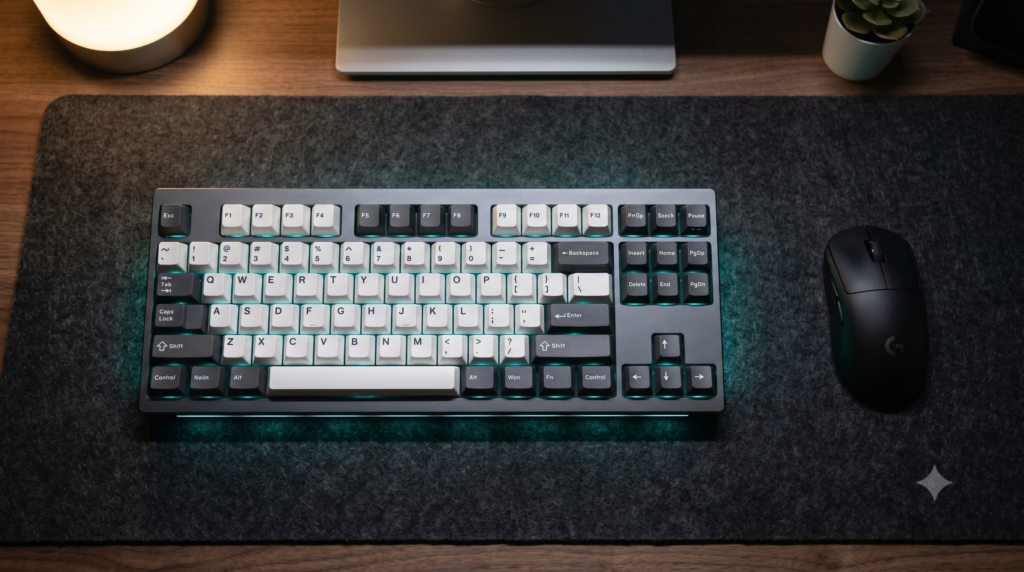
The Best TKL Keyboards for Extra Desk Space
Examine your current desktop layout. If you are operating a standard 104-key full-size mechanical keyboard, observe the right-hand quadrant. For the majority of gamers, software developers, and remote professionals, the integrated numeric keypad remains largely untouched during daily tasks.
Yet that redundant block of plastic and switches consumes roughly 3.5 inches (85mm) of critical horizontal desk surface. By extending the right perimeter of your keyboard, a full-size deck forces your mouse arm into an exaggerated outward angle, straining your rotator cuff and constraining your mousepad tracking corridor.
Maximizing desk surface area is especially crucial in smaller workstations, as explored in our guide to the best gaming desks for small rooms[cite: 1]. Freeing up horizontal mouse space allows competitive players to comfortably pair their setup with ultra-responsive hardware like that reviewed in our Finalmouse vs Razer Viper Mini magnesium showdown[cite: 1]. Below is the biomechanical and technical breakdown of the top TKL keyboards on the market.
Biomechanical Analysis: Why 80% Form Factors Prevent Shoulder Strain
1. Neutral Shoulder Alignment
Centering your typing posture on the home row (F and J keys) of a full-size board shifts your mouse pad 18 inches away from your torso. A TKL keyboard narrows that distance to 14 inches, reducing outward shoulder abduction and relieving tension on the upper trapezius.
2. Expanded Low-DPI Tracking Corridor
Competitive shooter settings require low sensitivity for precision aiming. Removing the numpad opens up 3.5 inches of unobstructed horizontal clearance, eliminating accidental mouse-to-keyboard collisions during wide tactical flicks.
3. Retention of Navigation Essentials
Unlike ultra-compact 60% layouts that bury arrow keys inside secondary function layers, an 80% TKL retains standalone arrow and navigation clusters, preserving full productivity for video editing, spreadsheets, and programming.
TKL Mechanical Keyboard Technical Comparison Matrix
| Keyboard Model | Switch Architecture | Polling Rate | Connectivity | Keycap Material | Best Scenario |
|---|---|---|---|---|---|
| SteelSeries Apex Pro TKL | OmniPoint 2.0 Magnetic (Hall Effect) | 1000Hz (Rapid Trigger) | 2.4GHz + BT + USB-C | Doubleshot PBT | High-stakes FPS competitive esports |
| Logitech G915 TKL | GL Low-Profile Mechanical | 1000Hz Lightspeed | 2.4GHz + BT + Micro-USB | Low-Profile Oleophobic ABS | Minimalist clean desks needing low wrist elevation |
| Keychron K8 Pro | Hot-Swap Mechanical (Gateron G Pro) | 1000Hz Wired / Bluetooth | Bluetooth 5.1 + USB-C | Double-Shot OSA PBT | Enthusiast typists and custom switch modders |
| Razer Huntsman V2 TKL | Razer Linear Optical (Gen 2) | 8000Hz HyperPolling | Detachable USB-C Wired | Doubleshot PBT | Lowest measurable switch latency and input response |
| HyperX Alloy Origins Core | HyperX Red Linear Mechanical | 1000Hz Native | Detachable USB-C Wired | Laser-Etched ABS | Heavy aircraft-grade aluminum budget durability |
1. SteelSeries Apex Pro TKL Wireless
The SteelSeries Apex Pro TKL Wireless represents the benchmark in magnetic switch engineering. Rather than relying on traditional physical metal leaves that bounce and degrade over time, OmniPoint 2.0 switches measure positional depth via magnetic Hall Effect sensors.
This architecture enables Rapid Trigger: the key resets the instant your finger begins upward travel rather than waiting to pass a fixed mechanical reset point. This provides near-instantaneous counter-strafing in tactical shooters like Counter-Strike 2 and Valorant. A customizable OLED smart display provides on-the-fly actuation tuning, while the compact 80% deck frees significant horizontal real estate for wider mouse sweeps.
Strengths
- Hall Effect magnetic sensors allow customized 0.1mm to 4.0mm actuation points
- Rapid Trigger feature eliminates physical switch reset lag during strafing
- Series 5000 aluminum top plate eliminates deck flex during heavy keystrokes
- Includes a detachable soft-touch magnetic wrist rest for wrist support
Trade-Offs
- Flagship price point compared to standard mechanical boards
- SteelSeries GG companion software requires system background resources
2. Logitech G915 TKL Lightspeed Wireless
For builders prioritizing visual minimalism and low-profile ergonomics, the Logitech G915 TKL Lightspeed is an engineering showcase. Measuring just 22mm tall, its slim brushed aluminum chassis keeps wrist extension flat against the desk mat, completely eliminating the need for a bulky wrist rest.
Logitech’s Lightspeed wireless protocol delivers a 1ms report rate that matches high-end wired peripherals. The low-profile GL switches cut total key travel in half, reducing physical finger fatigue during extended writing or gaming marathons. Its tactile machined volume roller and dedicated wireless toggle keys provide immediate hardware control without opening background utility menus.
Strengths
- 22mm ultra-slim profile keeps wrists in a neutral position without a rest
- Lightspeed 2.4GHz connection delivers imperceptible 1ms wireless latency
- Machined aluminum volume roller provides smooth, tactile audio adjustments
- Dual-connectivity toggle enables instant switching between PC and tablet
Trade-Offs
- Uses a Micro-USB charging port rather than modern USB-C
- Proprietary stem design limits aftermarket custom keycap replacement options
3. Keychron K8 Pro QMK/VIA Wireless
Mass-market gaming keyboards frequently suffer from hollow case resonance and rattly metallic stabilizers. The Keychron K8 Pro bridges the gap between commercial availability and custom mechanical keyboard enthusiast design.
Engineered with internal sound-dampening foam and pre-lubricated screw-in PCB stabilizers, the K8 Pro produces a deep, solid acoustic profile right out of the box. Its fully hot-swappable PCB allows you to pull switches out with an included tool and swap them for any 3-pin or 5-pin mechanical switch without soldering. If you want to further tune your switch sound profile, check out our guide to budget mechanical keyboard upgrades under $40 for custom sound and feel[cite: 1].
Strengths
- Hot-swappable PCB supports effortless switch experimentation without soldering
- Dual-layer acoustic dampening eliminates hollow metallic pinging
- Full QMK and VIA compatibility allows driverless key remapping via browser
- Native hardware toggle switch for seamless macOS and Windows compatibility
Trade-Offs
- Bluetooth polling rate is capped at 125Hz (wired mode recommended for gaming)
- Taller chassis profile benefits from pairing with a dedicated wrist rest
4. Razer Huntsman V2 TKL
Standard mechanical switches rely on two metal contacts closing an electric circuit, introducing a mandatory “debounce delay” (typically 2ms to 5ms) to prevent false double-clicks. The Razer Huntsman V2 TKL completely eliminates debounce latency by using optical beam actuation.
When a key is pressed, an internal infrared light beam is interrupted, registering the stroke at the speed of light. Paired with Razer’s 8000Hz HyperPolling controller, input packets are sent to your PC every 0.125 milliseconds. If you prefer keyboards that operate purely on hardware memory without heavy background software suites, read our analysis on alternatives to Razer Synapse compatible keyboards[cite: 4].
Strengths
- Optical light-beam switches eliminate physical switch debounce delay
- 8000Hz polling rate delivers near-zero input transmission latency
- Thick doubleshot PBT keycaps resist shine and oil accumulation
- Internal acoustic foam dampens key bottom-out vibrations
Trade-Offs
- Strictly wired operation (detachable braided Type-C cable included)
- Optical switches are proprietary and cannot be swapped with standard mechanical switches
5. HyperX Alloy Origins Core
Most mechanical keyboards under $100 rely heavily on hollow plastic shells that flex under pressure. The HyperX Alloy Origins Core stands out by utilizing a solid aircraft-grade aluminum chassis for both the top plate and the bottom casing.
Weighing over two pounds, this dense metal deck remains firmly anchored to your desk mat during aggressive gaming sessions. The proprietary HyperX Red linear switches feature smooth factory lubrication and exposed LED diodes that bounce brightly off the dark matte aluminum frame. For gamers exploring high-value competitive options, compare this board with our evaluated shortlist of the top 5 mechanical keyboards under $100 for esports[cite: 1].
Strengths
- Full aircraft-grade aluminum top and bottom chassis provides rigid stability
- Factory-lubricated linear switches deliver exceptionally smooth actuation
- Sub-$80 price point delivers commercial build quality without premium markups
- Compact TKL footprint frees critical desk space on a budget
Trade-Offs
- Ships with laser-etched ABS keycaps that will develop shine over time
- Non-hot-swappable switch design prevents modular customization
Mechanical Keyboards & Peripheral Hub
Downsizing to a Tenkeyless keyboard is the first step toward optimizing your peripheral layout. Explore our companion technical blueprints for custom sound modifications, driverless firmware hardware, and competitive esports gear:
Frequently Asked Questions
What does TKL mean on a keyboard?
TKL stands for Tenkeyless, which is an 80% form factor keyboard. It includes the alphanumeric cluster, top function row (F1-F12), and dedicated arrow/navigation cluster, while completely eliminating the 10-key numeric keypad on the right side. This reduces keyboard width by roughly 3.5 inches (85mm).
Why is a TKL keyboard ergonomically superior to a full-size keyboard?
Full-size keyboards push your mouse hand outward at an exaggerated shoulder abduction angle when centering your hands on the home row (F and J keys). A TKL keyboard allows you to position your mouse closer to your body’s centerline, keeping your shoulders neutral and relieving strain on the rotator cuff and upper trapezius.
Is a 60% keyboard better for gaming than a TKL?
A 60% board offers the smallest desk footprint, but it eliminates dedicated arrow keys, navigation keys, and the function row. While popular for pure FPS gaming, it requires complex Fn-layer shortcuts for basic productivity. A TKL is widely considered the optimal sweet spot, providing ample mouse tracking clearance while retaining standalone arrow and function keys.
What is the advantage of magnetic Hall Effect switches in TKL keyboards?
Magnetic Hall Effect switches (such as SteelSeries OmniPoint) use permanent magnets and Hall sensors to register keypresses without physical contact points. This allows customizable actuation points from 0.1mm to 4.0mm and enables Rapid Trigger, which resets the key the millisecond it begins an upward travel, providing instantaneous counter-strafing in competitive games.