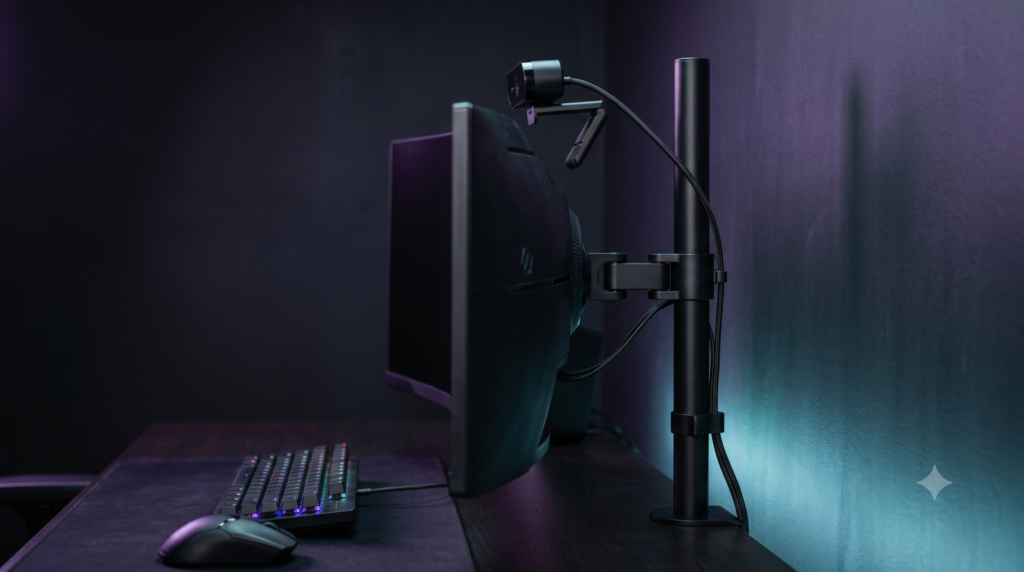
Webcam clips are designed around flat monitors with a straight top edge. A large ultrawide changes two things: the top edge sits higher above your eyes, and on a curved model it isn’t straight. This guide explains where a camera works best on a big curved screen and compares five mounting options using their published specifications.
Why the top edge is awkward on an ultrawide
- The clip may not seat properly. A webcam clip expects a flat top edge. On a curved or very thin bezel, it can sit unevenly or press on the panel edge. Monitor makers such as Philips and ViewSonic warn against applying pressure to the screen. Our thin-bezel webcam mount guide covers this in detail.
- The camera sits above your eye line. On a tall screen, a top-mounted camera looks down at you, and when you read the middle of the screen you appear to be looking away.
- The monitor moves. A camera on the monitor moves with it when you bump the desk or adjust the arm.
Where to put the camera: four positions compared
| Position | Eye contact | Touches the monitor? | Best for |
|---|---|---|---|
| Top edge of the monitor | Looks down at you | Yes | Light webcams on monitors with a flat, sturdy top edge |
| Over the screen (eye-contact webcam) | Strongest on calls | Clips to the top, hangs in front | Video calls where eye contact matters most |
| Desk pole behind the monitor | Adjustable height | No | Streaming setups and heavier cameras |
| Low arm under the monitor | Looks up slightly | No | Setups where you want the space above the screen clear |
How to choose
- Weigh the camera, light and cables, and compare the total with the mount’s listed load.
- Check your desk: clamp mounts need room behind the monitor and a desk edge they can grip.
- Decide what matters most: eye contact on calls (an eye-contact webcam), a stable broadcast angle (desk pole), or a clear view above the screen (low arm).
- Plan the cable route. Our guide to hiding webcam and mic cables on monitor arms covers this, and our 4K webcam USB guide explains which port to use.
How we checked
Sources and limits (checked 3 November 2026)
- Eye-contact webcam details come from reviews of the category by Tom’s Hardware, TidBITS and The Gadgeteer, plus the iContact listing behind our link.
- Elgato Wave Mic Arm LP specs come from retailer listings that repeat Elgato’s specifications. Master Mount L guidance comes from Elgato’s own help page.
- Master Mount L specs come from retailer listings that repeat Elgato’s specifications. The lighting button opens an Amazon search, and we could not confirm the exact TARION model’s specs, so those cards list what to check.
- We have not tested these mounts ourselves. Claims in older versions of this article, such as clamps cracking panels and exact eye-line distances, could not be sourced and have been removed.
1. iContact Pro 4K Eye Contact Webcam
Strengths: place it over the other person’s video window and you look at the lens while watching them. The Gadgeteer’s review of the earlier iContact model describes the same hanging-arm design.
Trade-offs: it sits in front of part of your screen, and small eye-contact cameras can struggle in poor lighting, so pair it with a light.
2. Elgato Master Mount L
A tall pole that clamps to the back of the desk, so the camera sits above or beside the monitor without touching it.
Strengths: the camera is separate from the monitor, and you can set its height and angle freely.
Trade-offs: Elgato notes the pole can wobble at full extension and suggests about 90 cm as a working height. It needs space and a clampable desk edge behind the monitor.
3. Elgato Wave Mic Arm LP
Strengths: built as a low-profile mic arm that sits below shoulder level, so it can hold a webcam under the monitor and keep the space above the screen clear.
Trade-offs: it’s designed for microphones, so a camera from below looks up slightly. You may need a small ball head to angle the camera.
4. TARION Titanrig Lite Z Camera Desk Mount
A clamp-on overhead arm stand, sold for cameras including DSLRs, that can hold a camera above or in front of the monitor. Check these on the listing before you buy:
- The weight limit covers your camera.
- The clamp range fits your desk thickness.
- It has a 1/4-inch thread or a webcam adapter.
5. Lume Cube Edge Light
A light helps any camera position, and especially small eye-contact webcams, which reviewers found sensitive to lighting. The button opens an Amazon search for the Edge Light 2.0, so pick the listing sold new. Check these on the listing:
- How it mounts: a desk clamp keeps weight off the monitor.
- That brightness and colour temperature are adjustable.
- How it’s powered.
Frequently asked questions
Can I clip a webcam onto a curved ultrawide monitor?
Sometimes. A webcam clip is made for a flat top edge, so it may not sit securely on a curved or very thin bezel. Monitor makers such as Philips and ViewSonic warn against pressure on the screen, so if the clip doesn’t seat cleanly, use a desk pole or arm instead.
Where should a webcam go on a 34-inch ultrawide?
Ideally close to your eye line and near the centre of the screen. On a tall ultrawide, a camera on the top edge looks down at you. A camera on a desk pole or low arm can be set closer to eye height.
What is an eye-contact webcam?
A small webcam on a thin stalk that hangs down over the front of your screen, so you can place it over the other person’s video window and look at the lens while watching them. Reviews of this type, such as the Center Cam and iContact, found it helps eye contact, though small sensors can be sensitive to lighting.
Can a mic arm hold a webcam?
Many can, because webcams and mic arms commonly use the same 1/4-inch thread. The Elgato Wave Mic Arm LP lists 1/4-inch mounting and a 2 kg load, and it sits low, below the monitor.
Does a desk pole stop the camera shaking when I type?
It separates the camera from the monitor, so monitor wobble doesn’t move it. A long pole can still sway when fully extended, and Elgato suggests about 90 cm as a working height for its Master Mount L.
More webcam and monitor guides
Sources
- Tom’s Hardware: Center Cam review (eye-contact webcam category)
- The Gadgeteer: iContact camera review
- Videoguys: Elgato Master Mount L specifications
- TidBITS: Center Cam hands-on (eye contact and lighting)
- Elgato: Master Mount L general info and quick start guide
- AVL Gear: Elgato Wave Mic Arm LP specifications
- Sound House: Wave Mic Arm LP (reach, clamp, load)
- TARION mount: no spec page confirmed; Lume Cube light: the button opens an Amazon search.