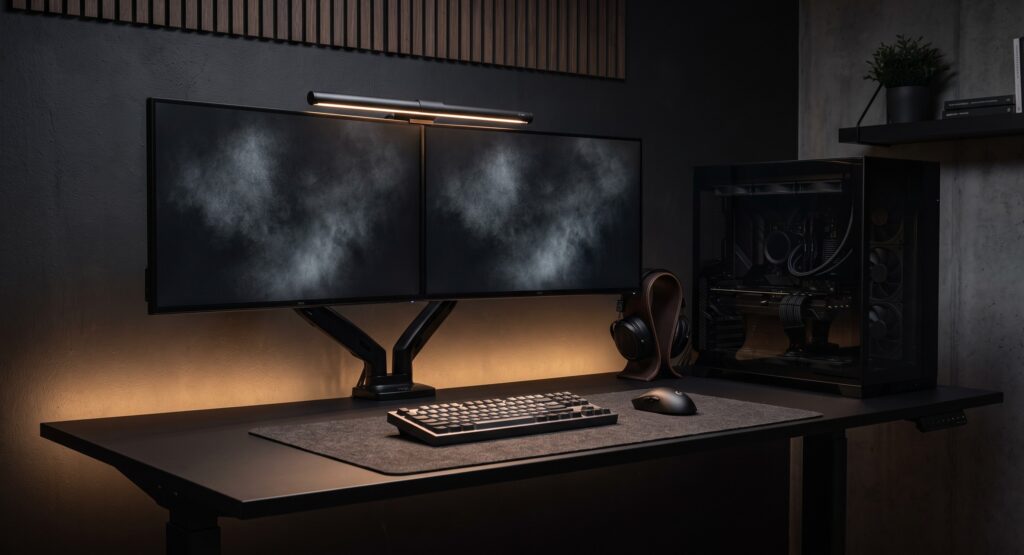
A stealth black gaming setup swaps colorful lighting for matte black surfaces, hidden cables and one task light. This guide covers five parts for that look. For each one it says what the product listing confirms, what it does not list, and what to check before you buy.
How we checked
This is a research-based guide, not a hands-on test. We checked manufacturer pages and retailer listings for the parts named here, in October 2026. Where a spec was not listed on the source we checked, we say so and leave it out. We have not built or used this setup. Check the current listing for dimensions, lighting options and price before you buy.
Parts at a glance
| Part | Role | Confirmed on the source we checked | Not listed on the source we checked |
|---|---|---|---|
| Corsair 4000D Airflow | PC case | Tempered glass side panel; GPU clearance up to 360 mm; CPU cooler up to 170 mm (white version) | Black version specs; front panel finish |
| FlexiSpot electric standing desk | Desk | Electric height adjustment | Height range, lift capacity, exact model specs |
| Logitech G915 TKL | Keyboard | Wireless LIGHTSPEED connection; customizable RGB lighting | Weight, dimensions, whether the lighting can be fully turned off |
| Logitech G PRO X Superlight | Mouse | Weight 63 g (2.22 oz); 125 × 63.5 × 40 mm | Lighting |
| BenQ ScreenBar | Monitor light | USB power at 5 V / 1 A; fits monitors 1 to 3 cm thick; 45 × 9 × 9.2 cm; 0.53 kg | Lighting control; glare performance |
The five parts
Corsair 4000D Airflow
A mid-tower case with a tempered glass side panel. The Corsair listing we checked is for the white version, so confirm the black version’s specs on its own listing. That listing describes a solid steel front panel, which is not the same as a mesh front, so check the front finish in the product photos. The listed clearances are a GPU up to 360 mm and a CPU cooler up to 170 mm. Measure your parts against these figures before you buy.
Why it makes the list
- Tempered glass side panel shows a clean interior
- Listed clearances: GPU up to 360 mm, cooler up to 170 mm
- Two 120 mm fans are included on the listing
Limitations
- The glass shows the interior, so tidy cabling matters
- The listing we checked is the white version
- Fans or parts with lighting will undermine the look
FlexiSpot Electric Standing Desk
FlexiSpot sells several standing desks, and they differ in size, frame, height range and lift capacity. We could not confirm specs for the model behind this link, so this card gives the checks to make rather than model figures. Choose a matte black frame and top if you want the look, then compare the height range and lift capacity with your PC tower and monitors.
Why it makes the list
- Electric height adjustment for sitting and standing
- Black frame options appear on several retailer listings
Limitations
- Specs vary by model, so verify size and lift capacity
- Dark matte tops show dust and fingerprints
Logitech G915 TKL
Logitech’s product page describes a wireless keyboard with LIGHTSPEED connection, and it can also be used wired over USB. The page lists customizable LIGHTSYNC RGB lighting. It does not list the weight, the dimensions, or whether the lighting can be turned off completely, so check those before you buy. Unless the lighting can be fully turned off, this keyboard will not give you a no-RGB setup.
Why it makes the list
- Wireless LIGHTSPEED connection, which the page says has a 1 ms rate
- Can be used wired over USB, which also charges it
Limitations
- RGB lighting is built in
- Weight and dimensions are not listed on the source we checked
- Whether the lighting can be fully turned off is not listed
Logitech G PRO X Superlight
Logitech lists this mouse at 63 g (2.22 oz) and 125 × 63.5 × 40 mm, with a HERO sensor. The page we checked does not list lighting, so confirm it on the product page if a plain shell is a must. Check the model on your link against these figures, because the specs above come from the product page for the model we checked.
Why it makes the list
- Light listed weight of 63 g (2.22 oz)
- Compact listed size: 125 × 63.5 × 40 mm
Limitations
- Lighting is not listed on the source we checked
- Shape suits some grips better than others
BenQ ScreenBar
The ScreenBar clips to the top of the monitor and lights the desk, so a desk lamp base is not needed. BenQ’s spec page lists USB power at 5 V / 1 A, a monitor thickness range of 1 to 3 cm, and a lighting area of 60 × 30 cm at 500 lux. The page does not list lighting control or glare performance, so test it in your room before you rely on it. BenQ also sells other ScreenBar models, so confirm that your link is the version you want.
Why it makes the list
- USB power at 5 V / 1 A, per BenQ’s spec page
- Lights the desk at 60 × 30 cm (BenQ’s figure at 500 lux)
- Frees desk space compared with a lamp base
Limitations
- Monitors outside 1 to 3 cm thick may not fit
- Lighting control and glare are not listed on the source we checked
- A top-mounted webcam may get in the way
Making it look stealth
- Match finishes. Mix matte black parts, and avoid glossy plastic and bright logos where you can.
- Hide the cables. Use black cable trays and ties under the desk so wires fall into shadow.
- Control the lighting. Turn off or set a single color for anything with RGB, including case fans and the keyboard, and keep one task light.
- Plan for dust. Dark matte surfaces show dust and fingerprints, so keep a microfiber cloth nearby.
Related guides
- Minimalist desk setup ideas for gamers who work from home: read next for the layout side of a clean desk.
- How to Hide Massive Gaming Laptop Power Bricks Under Your Desk : read next for more on hiding cables.
- Desk organization upgrades for a cleaner setup: read next for storage and cable-holding gear.
Frequently asked questions
Is a stealth black build really RGB-free?
Not with these parts. The Logitech G915 TKL has built-in RGB, and other components may have status lights. Check each part’s lighting settings and turn off what you can.
Are matte black surfaces hard to keep clean?
They can show dust and fingerprints more than some other finishes. A microfiber cloth and a desk mat in the high-contact area help.
How do I hide cables in an all-black setup?
Run cables under the desk through a black tray or sleeve, fasten them with black hook-and-loop straps, and keep power strips off the floor. Dark cables against a dark desk are less visible, though they won’t disappear.
Sources
- Corsair 4000D Airflow (white version) listing: pbtech.com
- BenQ ScreenBar specifications: benq.com
- Logitech G915 TKL product page: logitechg.com
- Logitech G PRO X Superlight product launch coverage: levelup.com
- FlexiSpot: no manufacturer or retailer spec page was confirmed in this check, so no model specs are given.