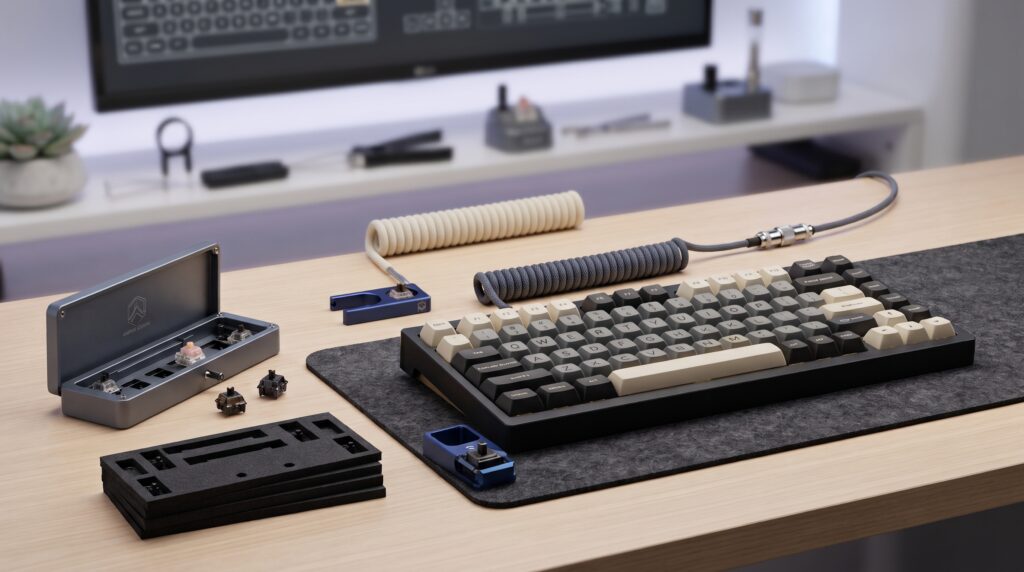
You can change how a mechanical keyboard sounds and feels without buying a new one. The cheapest upgrades work on three different things: the case, the switches and the cable. Each fixes a different problem, so the right first step depends on what bothers you about your keyboard now.
This guide explains what each upgrade changes, what your keyboard needs before you start, and the mistakes to avoid.
Step 1: Name the problem
| What you hear or feel | Upgrade to try | Effort | What your keyboard needs |
|---|---|---|---|
| Hollow, echoing sound | Case foam | Open the case once | A case you can open, and foam that fits your layout |
| Scratchy or uneven keys | Lube the switches (needs a switch opener) | Every switch opened and lubed by hand | Hot-swappable sockets, or desoldering skills |
| Messy cable or a plain look | Coiled aviator cable | Plug in | A detachable cable and the right connector |
Step 2: Check whether your keyboard is hot-swappable
Before you change or lube switches, find out how they are attached. On a hot-swappable keyboard, switches sit in sockets and pull out with a switch puller. On a soldered keyboard, each switch is soldered to the circuit board and has to be desoldered first. Check the product page for “hot-swap” or “hot-swappable”. If you are unsure, practise on a hot-swappable board first.
Upgrade 1: Case foam for a hollow sound
Foam inside the case absorbs the echo that makes some keyboards sound hollow. Kits use different materials: Poron foam is a dense, resilient material for dampening, and thin PE foam between the circuit board and the switches changes the character of the sound rather than just muting it. Keychron’s own acoustic upgrade kits combine Poron and XPE foam layers, and Keychron notes that installing them means taking the whole keyboard apart.
- Buy foam cut for your layout, or a sheet you can trim to fit.
- Keep foam clear of screw holes, stabilisers and the USB port.
- Check the warranty before opening the case.
Upgrade 2: A switch opener for lubing switches
Lubing reduces scratchiness and changes the sound of each key. To do it, each switch is removed, opened, lightly lubed and closed again. A switch opener holds the switch and separates the top and bottom housing evenly. A screwdriver can work, but it can damage the housing clips over time.
- Choose an opener that matches your switch type. Many fit Cherry MX-style switches.
- Use a thin layer of lube. Too much can make switches feel sluggish or mushy.
- Lube one switch, test it, then do the rest the same way.
Upgrade 3: A coiled aviator cable for the desk
A coiled aviator cable is about looks and cable routing. Its detachable aviator connector lets you unplug the keyboard at the connector rather than at the computer. It does not change typing sound or feel. Check that its keyboard end matches your keyboard’s port (most current boards use USB-C), and whether you need a straight or angled connector to fit your keyboard’s cable channel.
How we checked
Sources and limits (checked 28 October 2026)
- The switch-lubing steps and switch-opener advice come from guides by Tom’s Hardware, KeebsForAll and ASUS ROG.
- The foam information comes from Keychron’s acoustic upgrade kit pages and a keyboard foam guide. The cable details come from Keychron’s coiled aviator cable listings.
- We could not confirm the exact products behind our Amazon links, so the product cards list what to check rather than specs.
- We have not tested these products ourselves, and we have not recorded or measured any sound changes.
1. Poron case foam kit
Check these on the listing before you order:
- The size or layout fits your keyboard, such as 60%, 75%, TKL or full size, or the sheet can be trimmed to fit.
- The material is named, for example Poron or PE.
- The thickness leaves room inside your case.
Trade-offs: you have to open the case, which can affect the warranty.
2. Metal switch opener
Check these on the listing before you order:
- It is compatible with your switch type, for example Cherry MX-style or Kailh.
- It is metal, which Tom’s Hardware found more stable than plastic or 3D-printed openers.
- What’s in the kit. A brush and a switch puller are also needed for lubing.
Trade-offs: it’s only useful if you plan to lube or modify switches. Lube is sold separately.
3. Coiled aviator keyboard cable
Check these on the listing before you order:
- The keyboard-end connector matches your keyboard’s port, usually USB-C.
- The connector is straight or angled to fit your keyboard’s cable channel.
- The computer-end connector, USB-A or USB-C, matches your computer.
- The cable length reaches your computer.
Trade-offs: it changes the look, not the sound or feel.
Frequently asked questions
Which keyboard upgrade changes the sound most for the least effort?
If the keyboard sounds hollow, case foam targets that directly and needs no new switches. Lubing switches changes both sound and feel, but it takes much longer because every switch is opened and lubed by hand.
Do I need a hot-swappable keyboard to lube switches?
It makes it far easier. On a hot-swappable board you pull the switches out with a switch puller. On a soldered board each switch has to be desoldered first, then soldered back in afterwards.
Can I open a switch with a screwdriver instead of a switch opener?
You can, but a switch opener separates the housing evenly. Tom’s Hardware recommends a metal opener, finding plastic and 3D-printed ones less stable.
Will a coiled cable change how my keyboard sounds or feels?
No. A coiled or aviator cable changes how the desk looks and how the cable is routed. It does not change typing sound or feel.
Can adding foam void my keyboard warranty?
Opening the case can affect the warranty, depending on the maker’s policy. Check the warranty terms before you open it.
More keyboard guides
Sources
- Tom’s Hardware: How to lube switches on your mechanical keyboard
- KeebsForAll: How to lube mechanical keyboard switches
- ASUS ROG: How to lube your keyboard switches
- Keychron: Q1 and Q1 Pro acoustic upgrade kit
- MKB Guide: Keyboard foam types and sound impact
- Keychron: coiled aviator cable listings (USB-C, straight and angled connectors)
- Foam kit, switch opener and coiled cable on Amazon: no spec page confirmed for the linked products.