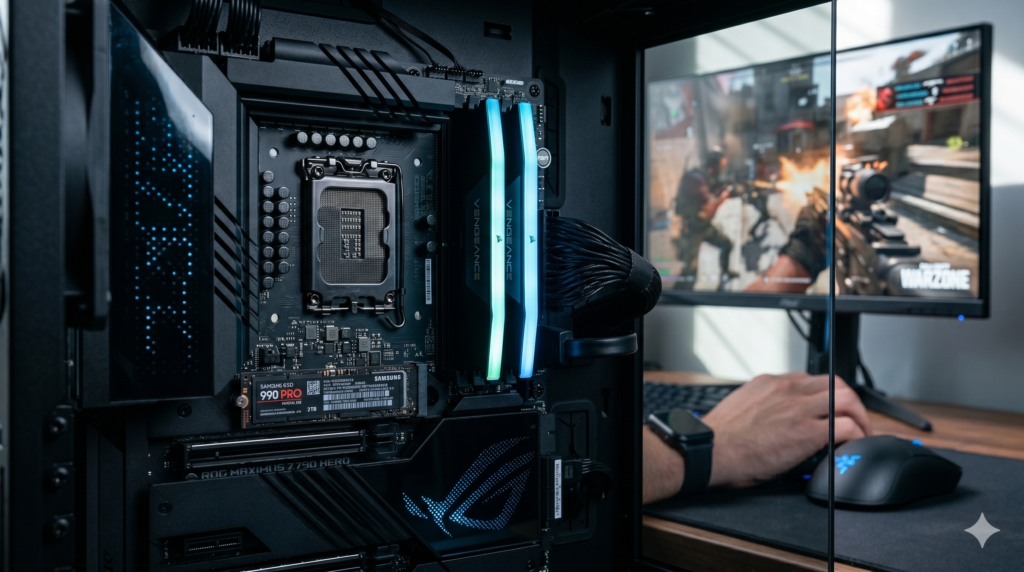
Stutter usually shows up as sudden hitches during gunfights or while moving into new areas, even when the average frame rate looks high. Upgrades are sometimes the answer, but they are an expensive guess if you have not found the cause. This guide covers how to diagnose stutter, what Activision actually lists for PC, and which components help in which situation.
Why average FPS can hide stutter
Averages hide spikes
The 1% low is the average frame rate of your slowest 1% of frames. Guides based on CapFrameX data note that a large gap between average FPS and 1% lows is what you feel as stutter.
Paging when RAM runs out
Microsoft explains that when the memory used by all processes exceeds available RAM, Windows moves pages to disk. It names Pages Output/sec as the best counter to watch if you suspect paging is your bottleneck.
Common Call of Duty causes
Activision’s Warzone guidance, as summarized by Prism News, starts with letting shader preloading finish, fully updating Windows, ruling out background tools and repairing the install.
What Activision lists for Warzone on PC
| Tier | RAM | Storage | Graphics card (examples) |
|---|---|---|---|
| Minimum | 8 GB | SSD, 116 GB free at launch | GTX 970 / RX 470 |
| Recommended | 12 GB | SSD, 116 GB free at launch | RTX 3060 / RX 6600 XT |
| Competitive / Ultra 4K | 16 GB | SSD, 116 GB free at launch | RTX 4080 or 5070 / RX 9070 XT |
Two points follow from Activision’s own page. First, 16 GB meets the top tier, so a 16 GB system is not underpowered by the publisher’s standard. Second, an SSD is listed even at minimum, so a hard drive is a likely cause of trouble. Requirements change with each season, so check Activision’s current page for your game.
Diagnose before you upgrade
General checklist
- Let shader preloading finish after each game, driver or settings update, and fully update Windows and your graphics driver.
- Close background tools and overlays. Activision’s older Modern Warfare troubleshooting page lists NZXT CAM, MSI Afterburner and Razer Cortex as software that can conflict with the game, so test with overlays off.
- Repair or verify the game files in Battle.net or Steam.
- Measure 1% and 0.1% lows with CapFrameX or PresentMon, which record frame times directly.
- Check memory use. In Task Manager, watch memory during a match. In Performance Monitor, watch Pages Output/sec.
- Check where the game is installed. Use an SSD with enough free space for the install and updates.
- Check temperatures. If stutter gets worse the longer you play, your CPU or GPU may be throttling. See our guide to fixing high PC temperatures in Call of Duty.
Which upgrade fits your situation?
- Game on a hard drive or a nearly full drive: move it to an SSD, such as the Samsung 990 PRO.
- Memory use stays near your total RAM and Pages Output/sec is high: more RAM, such as a 32 GB kit.
- Frame-time graph looks smooth but aim feels uneven: look at the input chain rather than the PC, such as your mousepad surface. A mouse upgrade is optional.
- Stutter appears after every update: shader preloading and drivers come first, not hardware.
Upgrade options at a glance
| Component | Option | Key specs (manufacturer) | Helps most when |
|---|---|---|---|
| Memory | Corsair Vengeance 32 GB DDR5 | 2 x 16 GB; EXPO and XMP profiles on many kits | Memory use and paging show pressure |
| Storage | Samsung 990 PRO 2 TB | 7,450 / 6,900 MB/s; 1.4M / 1.55M IOPS | Game is on an HDD or slow, full drive |
| Input | Razer DeathAdder V3 Pro | 63 g (black), 64 g (white); 1000 Hz; 4000 Hz with extra dongle | Frame times are smooth but aim feels uneven |
The 3 upgrades
1. Corsair Vengeance 32 GB DDR5 kit
Suits systems where monitoring shows memory running out, or where you game with browsers, streaming software and voice chat open. Corsair says its dual-profile kits work on AMD 600 and 800 series and Intel 700 and 800 series boards.
Limits: Corsair sells many Vengeance SKUs with different speeds and timings, and some are Intel XMP only, so match the kit to your platform. Memory profiles must be enabled in the BIOS. Because Activision lists 16 GB for its competitive tier, this upgrade is not a given for every system.
2. Samsung 990 PRO 2 TB NVMe SSD
Suits players whose game is on a hard drive, a slow SSD, or a drive with little free space. Activision lists an SSD with about 116 GB free at launch, and a 2 TB drive leaves room for updates and other games. Samsung sells it with and without a heatsink; our link is the version without one (MZ-V9P2T0B/AM).
Limits: TweakTown notes, in its review of a similar Gen 4 drive, that sequential speed has little bearing on real-world tasks, so moving from a decent SATA SSD to this drive may not change stutter. The rated speeds need a PCIe 4.0 x4 slot.
3. Razer DeathAdder V3 Pro wireless mouse
A mouse does not change your frame times, so this is not a stutter fix. It suits players whose frame-time graph is smooth but whose aim still feels uneven and who want a lightweight wireless mouse. Razer says 4000 Hz polling needs its separate HyperPolling dongle, and battery life drops to about 24 hours at that rate.
Limits: we found no source showing mouse polling rate causes in-game stutter, so check frame times before blaming input. The 4000 Hz option adds cost.
Frequently asked questions
Why does Call of Duty stutter even with high average FPS?
Average FPS hides short slow frames. Your 1% and 0.1% lows show them. Common causes include shader compilation, drivers, background software, and sometimes RAM or storage limits.
Is 16 GB of RAM enough for Warzone?
Activision lists 16 GB for its competitive and 4K tier, so it meets the publisher’s top requirement. Heavy multitasking can still use more, which is why monitoring memory is the better test.
Will an NVMe SSD fix Call of Duty stutter?
It may help if the game is on a hard drive or a slow, full drive. Activision lists an SSD even at minimum. An upgrade from an existing good SSD is less likely to change stutter.
Should I use MSI Afterburner to measure frame times?
It is widely used, but Activision’s older troubleshooting page lists it as software that can conflict with the game. CapFrameX and PresentMon are alternatives that record frame times.
More PC gaming guides
Sources
- Activision: PC system requirements for Warzone
- Activision: Modern Warfare PC troubleshooting and Prism News summary of the Warzone guide
- Microsoft Learn: RAM, virtual memory, pagefile and memory management
- Wccftech: benchmarking with CapFrameX and Tier1Settings: 1% lows
- Corsair: Vengeance 32 GB DDR5 kits
- Samsung: 990 PRO data sheet, Samsung: 990 PRO 2 TB product page and TweakTown review (sequential vs real-world speed)
- Razer: DeathAdder V3 Pro announcement, Tom’s Hardware review and LanOC review