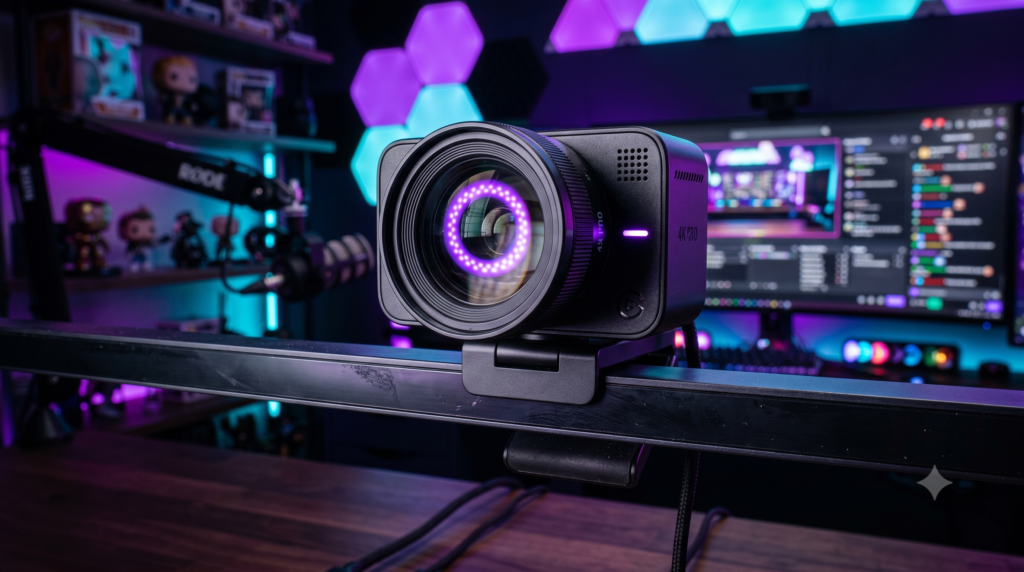
Top 5 Webcams for Twitch Streaming in 4K
Let’s address the elephant in the room: Twitch currently caps its broadcast output at 1080p for most creators. So, why are all the top streamers suddenly upgrading their desk setups to massive 4K webcams?
The answer is Content Repurposing and Lossless Digital Zoom. In modern streaming, growing your channel means taking your Twitch VODs and editing them into YouTube videos and vertical TikTok Shorts. If you capture your face at 1080p and then try to crop it for a vertical short, your face will become incredibly pixelated and blurry.
A 4K webcam allows you to record your local video in stunning Ultra-HD. Inside OBS Studio, you can digitally zoom in, pan around, and crop your camera frame without losing a single drop of image quality. Plus, modern 4K webcams feature massively upgraded light sensors, allowing them to rival traditional DSLR mirrorless cameras for a fraction of the price. Here are the 5 absolute best 4K webcams you can mount to your monitor right now.
To get a true Mirrorless Camera (like a Sony A6700) onto your stream, you need a $1,000+ camera body, a $400 lens, a dummy battery, an Elgato Cam Link, and an expensive desk mount. The premium 4K webcams on this list plug in via a single USB-C cable and deliver 90% of that quality for under $300.
Elgato Facecam Pro
The Elgato Facecam Pro is arguably the most powerful webcam ever created. Unlike standard 4K webcams that cap out at 30 frames per second (resulting in slightly choppy hand movements), the Facecam Pro captures True 4K at 60 FPS. This means your facecam will perfectly match the buttery-smooth 60FPS framerate of your PC gameplay.
It utilizes a massive Sony STARVIS sensor with an autofocus lens that allows you to manually dial in your focal length via the Elgato Camera Hub software. You can even save all of your exposure and zoom settings directly to the camera’s onboard memory, so you never have to re-configure OBS after a PC restart.
✓ What We Love
- The first and best webcam to deliver true uncompressed 4K at 60 Frames Per Second
- Variable focal length lens captures incredible, sharp detail
- Elgato Camera Hub is the best webcam software in the industry
- Seamlessly integrates with the Elgato Stream Deck
✕ Keep in Mind
- It is physically massive and heavy (requires a sturdy monitor mount)
- No built-in microphone (though streamers use dedicated mics anyway)
Razer Kiyo Pro Ultra
In the camera world, the size of the physical sensor dictates how much light and detail you can capture. The Razer Kiyo Pro Ultra boasts a gargantuan 1/1.2-inch sensor—the largest sensor ever put into a consumer webcam. It is essentially a professional point-and-shoot camera shoved into a circular housing.
Because the sensor is so large, the Kiyo Pro Ultra achieves something no other webcam can do: True Optical Bokeh. It creates a natural, optical background blur behind you without relying on fake, glitchy software blurring. If you stream in a dimly lit room with heavy RGB lighting, this camera will easily capture your face with crystal clarity while keeping the dark areas completely free of grainy digital noise.
✓ What We Love
- The largest image sensor on the market for incredible low-light performance
- Creates natural, hardware-based background blur (Bokeh)
- Uncompressed 4K video captures immaculate skin tones
- Built-in, twisting physical privacy shutter
✕ Keep in Mind
- Capped at 30 FPS in 4K (Can do 60 FPS in 1080p)
- Razer Synapse software can sometimes feel bloated
Insta360 Link 4K Gimbal Webcam
If you are a keyboard builder, an artist, or a trading card unboxer, you usually need a complicated overhead camera rig. The Insta360 Link changes the game. Featuring a 3-axis gimbal (similar to high-end drone cameras), it stabilizes footage perfectly while using AI to track your movements around the room.
Its killer feature is “DeskView Mode.” With a single click, the motorized camera aims straight down at your desk and automatically applies software distortion correction, creating a perfectly square, flat overhead shot. It also features a dedicated “Whiteboard Mode” that automatically finds whiteboards in the room, zooms in, and enhances the marker text so viewers can read it clearly.
Buy Insta360 LinkOBSBOT Tiny 2 AI-Powered PTZ 4K
If you are a “Just Chatting” streamer, a fitness creator, or someone who frequently moves around their room on stream, static webcams are annoying. The OBSBOT Tiny 2 is a PTZ (Pan-Tilt-Zoom) camera mounted on an incredibly fast motorized gimbal.
It utilizes an advanced deep learning AI neural network to lock onto your face or body. If you stand up and walk across your room, the physical camera silently rotates and follows you, keeping you perfectly dead-center in the frame. You can also use simple voice commands (like “Zoom In Close”) to create highly engaging, comedic moments on stream without touching your keyboard.
Buy OBSBOT Tiny 2Logitech MX Brio Ultra HD 4K
For nearly a decade, the original Logitech Brio 4K was the undisputed standard for streamers. In 2024, Logitech completely overhauled it with the MX Brio 4K, fixing its washed-out colors and upgrading the housing to a stunning, premium milled aluminum.
The MX Brio uses Logitech’s massive G-Hub software, which offers fine-tuned manual controls over exposure, tint, and field of view. It also features a genius magnetic mount that allows you to tilt the camera downward with one hand to show off your desk. If you use the same setup for professional video calls and streaming, it is the ultimate jack-of-all-trades.
Buy Logitech MX BrioIf you sit primarily in your gaming chair playing PC or Console games, the Elgato Facecam Pro is the undisputed king. Its uncompressed 4K60FPS video will perfectly match your gameplay framerate, providing the most professional look on Twitch.
However, if you want that beautiful blurry background and true DSLR look without buying a mirrorless camera, the massive sensor on the Razer Kiyo Pro Ultra makes it an incredible cinematic alternative.
Frequently Asked Questions (FAQ)
Are 4K webcams better than a DSLR camera for streaming?
DSLRs and mirrorless cameras still offer the absolute best raw image quality and natural background blur (bokeh) due to interchangeable lenses. However, they require expensive lenses, dummy batteries, heavy desk poles, and a $150 capture card (like an Elgato Cam Link) to work. Modern flagship 4K webcams deliver 90% of that visual quality, but plug into your PC using a single USB-C cable for a fraction of the cost.
Why does my 4K webcam look grainy?
Grain (digital noise) is a lighting problem, not a camera problem. If you sit in a dark room illuminated only by your monitor, your webcam is forced to artificially boost its ISO setting to “see” your face. This artificial brightness creates grain. To get the “DSLR look,” you must pair your 4K camera with a proper LED Key Light aimed at your face.
Can I use a 4K webcam for YouTube videos and TikToks?
Yes! This is the hidden superpower of 4K webcams. If you use the “Record” button in OBS Studio while you stream, you can record yourself in native 4K. You can then take that hyper-crisp footage into Premiere Pro and easily chop it up into vertical TikToks or high-quality YouTube Shorts without it looking pixelated.