Best Low-Profile Mic Arms for Minimalist Desk Setups
You have meticulously curated the ultimate minimalist battlestation. You spent over $800 on a stunning OLED gaming monitor, mounted it on a sleek gas-spring arm to reclaim your desk space, and routed every single cable out of sight. The setup looks architectural, pristine, and clean.
And then, to record high-quality audio, you bolt a massive, ugly, spring-loaded “scissor” mic arm to the back of your desk. It towers two feet into the air, blocks the top-left corner of your beautiful monitor, and casts a shadow over your keyboard. Every time you pull it toward you, the exposed springs squeak, completely ruining the aesthetic and acoustic vibe of your workspace.
At Desk & Console, we believe professional audio should not require a sacrifice in spatial design. A minimalist streaming microphone setup requires an under-monitor boom arm gaming setup. By shifting the entire mechanical apparatus flush with your desk surface, you reclaim your visual field and maintain a razor-clean aesthetic. Here is the definitive guide to stealth acoustic mounting.
The Mechanics of the “Under-Monitor” Setup
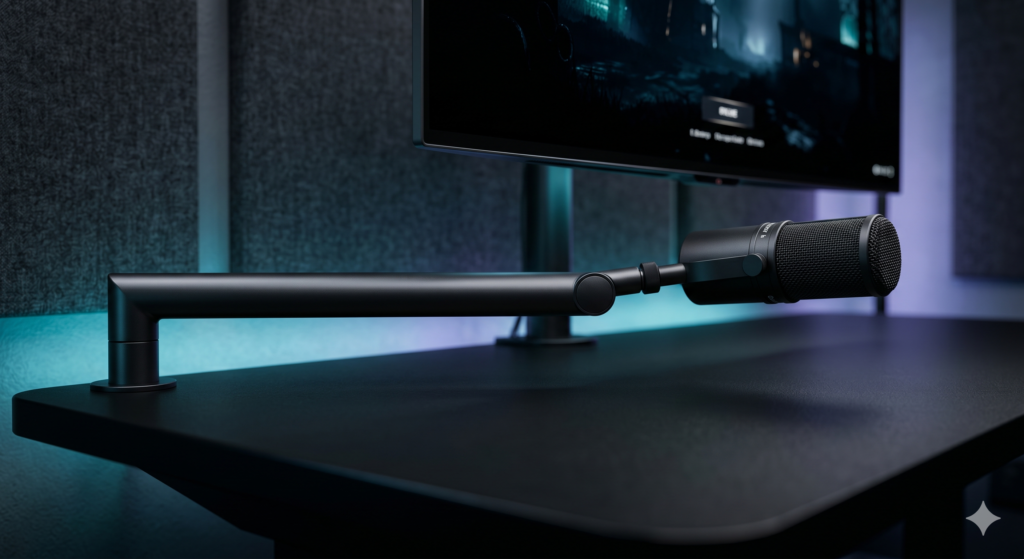
The mechanics of a low-profile (LP) arm are entirely different from traditional scissor arms. Instead of extending vertically into the air and dropping down, an LP arm hugs the desk surface, extending horizontally via interlocking elbow joints.
📐 Sightlines & Spatial Clearance
A true low-profile setup requires a “Floating Desk” methodology. You cannot successfully run a low-profile arm if your gaming monitor is sitting on a bulky factory stand. You must mount your monitor on a VESA arm, elevating the bottom edge of the display 3.5 to 5 inches off the desk surface.
This creates a critical spatial void. The low-profile mic arm is clamped to the far edge of your desk, extending horizontally through this void. Because it sweeps underneath the monitor, it completely preserves your unhindered sightline to your screen and keeps your face completely unobstructed during a video call or livestream.
| Design Metric | Standard Overhead Arm | Premium Low-Profile Arm |
|---|---|---|
| Visual Footprint | Highly intrusive (Blocks screens) | Virtually invisible on camera |
| Cable Routing | Cables hang in the air | Hidden inside flush desk channels |
| Microphone Position | Hangs down from above | Pushed up from the chest/chin |
| Aesthetic Vibe | “1990s Radio Station” | “Modern Minimalist Studio” |
The Best Low-Profile Mic Arms
Low-profile arms endure immense torque because gravity is constantly trying to pull the horizontal beam straight down. To support a heavy broadcast microphone, you must abandon cheap springs and invest in premium aluminum tubes with high-tension friction joints.
1. Elgato Wave Mic Arm LP 🏆 The Undisputed King
If you search for the best low profile mic arm, the Elgato Wave Mic Arm LP is the benchmark. Elgato essentially invented this specific sub-category for modern content creators, and their execution remains aesthetically perfect.
Crafted entirely from premium, matte-black tubular metal, the arm looks like a piece of high-end industrial robotics. It provides a massive 29.1 inches of horizontal reach, easily sweeping across a large 72-inch desk. The friction hinges are adjusted via an included Allen wrench, allowing you to lock the tension perfectly so that even heavy, 2-pound dynamic microphones float effortlessly above your keyboard without sagging.
Check Price on Amazon2. Gator Frameworks Deluxe Low Profile Mic Boom
If you want a highly professional alternative to Elgato, the Gator Frameworks Deluxe Low Profile Arm is an absolute powerhouse. Designed for serious audio engineers, it ditches the gamer branding for a pure, utilitarian studio aesthetic.
The Gator arm features a slightly more aggressive aesthetic with exposed joint tension knobs, allowing you to perfectly dial in the mechanical resistance. It features an excellent hidden cable channel system and provides phenomenal horizontal reach (28.25 inches). If you have a massive desk and need the arm to clamp in the far back corner and still reach your mouth, this arm provides exceptional sweeping distance.
Check Price on Amazon3. Neewer Low-Profile Mic Arm Pro
If you spent your entire budget on your microphone and audio interface, the Neewer Low-Profile Mic Arm Pro is the ultimate budget-friendly savior.
While it utilizes slightly more plastic in its joint covers than the Elgato, the core structural arms are still solid aluminum. It effortlessly slides underneath a 27-inch gaming monitor and holds mid-weight dynamic USB microphones (like the Elgato Wave:3 or Rode PodMic) perfectly level. It includes internal cable channels to preserve the clean aesthetic, making it the most cost-effective way to banish the ugly “overhead scissor arm” from your desk forever.
Check Price on Amazon🔌 Complete the Stealth Look
Buying a low-profile arm is only half the battle. If your cables and microphone don’t match the geometry of the arm, the minimalist illusion is ruined. These three accessories are mandatory for a flawless setup.
1. Right-Angle XLR / USB-C Adapters
The Fatal Flaw: If you use a premium low-profile arm, your microphone hovers horizontally, just inches above your desk. If you plug a standard, stiff, straight XLR cable into the back of the microphone, the cable will physically smash into the surface of your desk, restricting your movement and looking messy. You must buy a Cable Matters Right-Angle XLR Adapter. This forces the cable to immediately drop at a sharp 90-degree angle, preserving maximum desk clearance and seamlessly routing the wire into the arm’s hidden channel.
Check Right-Angle Adapters on Amazon →2. Low-Profile Mic Capsules
A massive, side-address condenser mic stands completely vertically, defeating the purpose of a horizontal arm. You need a sleek, “end-address” broadcast dynamic microphone. Pair your new arm with the Shure MV7+ or the Rode PodMic. Their cylindrical designs look incredibly aggressive and stealthy, pointing perfectly straight at your mouth while hovering just above your mechanical keyboard.
Check the Shure MV7+ on Amazon →3. Magnetic Desk Cable Tracks
When the cable exits the base of the Elgato or Gator arm, do not let it dangle onto your floor. Apply an Anker Magnetic Cable Holder directly beneath the lip of your desk right where the C-clamp mounts. Route the XLR cable cleanly through this hidden raceway all the way to your audio interface, keeping the wire run completely invisible.
Your premium gaming monitors and beautiful desk surface deserve to be seen. By abandoning archaic overhead scissor arms and investing in the perfectly calibrated, horizontal sweep of the Elgato Wave Mic Arm LP (paired cleanly with a Right-Angle Cable Adapter), you achieve the ultimate streaming goal: studio-grade vocal proximity with absolutely zero visual clutter.
Frequently Asked Questions (FAQ)
What is an under monitor boom arm for gaming?
An under-monitor boom arm (often called a Low Profile or ‘LP’ arm) clamps to the side or back of your desk and sweeps horizontally across the surface, rather than towering upward like a traditional radio arm. It hovers just a few inches above your desk, sliding perfectly underneath your gaming monitors so your line-of-sight remains entirely unobstructed.
What is the best Elgato Wave Mic Arm LP alternative?
While the Elgato is the gold standard, the Gator Frameworks Deluxe Desktop Mic Boom and the Neewer Low-Profile Pro are phenomenal alternatives. They feature fully enclosed tubular designs, support heavy broadcast microphones like the Shure SM7B, and offer massive horizontal reach without the premium Elgato brand tax.
Can a low-profile mic arm hold a heavy broadcast mic?
Yes, but you must buy a premium model. Cheap low-profile arms lack the internal friction joints required to counteract gravity when fully extended. Premium arms like the Elgato LP or Gator Frameworks feature adjustable tension hinges that can comfortably suspend a 4.4 lb (2 kg) payload, easily holding an SM7B or Rode Procaster without drooping.