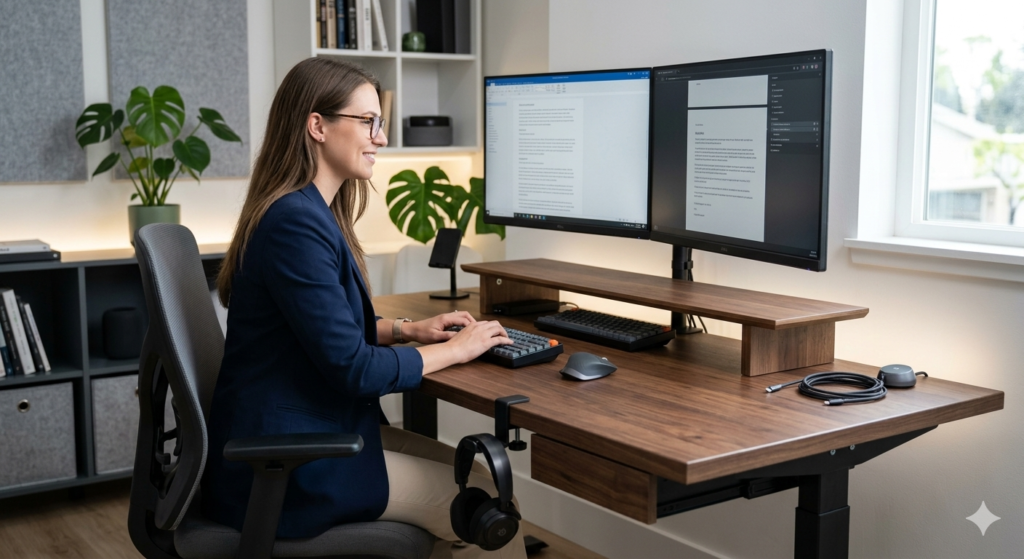
Desk organization mostly comes down to giving every item a fixed place: screens up off the surface, small items in a drawer, cables anchored, and power gear out of the way. This guide covers five low-cost upgrades that each handle one of those jobs. For each one it explains what it does and what to check on your desk before you buy.
How we checked
This is a research-based guide, not a hands-on test. We checked the product listings for the items named here. Where a listing did not state a figure, such as a weight limit, clamp range, or dimension, we left it out and say so. We have not measured or used these products ourselves. Check the current listing for dimensions, ratings, and price before you buy.
Quick comparison
| Upgrade | Job it does | How it attaches | Check first |
|---|---|---|---|
| Aothia dual monitor stand riser | Raises screens and frees space underneath | Freestanding (confirm on the listing) | Combined monitor width; desk depth; listing dimensions and weight rating |
| VIVO clamp-on under-desk drawer | Hidden storage for small items | Clamps to the desktop | Load limit and desk thickness on the listing |
| Anker magnetic cable holder | Keeps charging cables from falling behind the desk | Check the listing for the attachment type | Surface type; cable thickness |
| Eurpmask headset hook | Hangs a headset off the desk surface | Clamps to the desk edge | Maximum clamp thickness and weight limit on the listing |
| Scandinavian Hub cable tray | Holds a power strip and chargers under the desk | Mounts under the desk (confirm on the listing) | Tray size and weight rating on the listing; space under the desk |
The five upgrades
Aothia Dual Monitor Stand Riser
A riser that lifts two monitors above the desk, which can free space underneath for a keyboard, notebook, or small gear. It suits a desk where the monitors sit low and take up depth. The listing dimensions and weight rating were not confirmed in the sources we checked, so measure your monitors’ combined width and the shelf’s footprint before you order.
Why it makes the list
- Frees space under the screens
- Lifts screens off the desk surface
Limitations
- Less flexible than an adjustable stand
- Needs enough desk depth for the shelf
VIVO Clamp-On Under-Desk Drawer
A slide-out drawer that clamps beneath the desktop, so you can store pens, cables, and small items without drilling. The load limit and the range of desk thicknesses it fits were not confirmed in the sources we checked, so check both on the listing. Clamps press on the desktop, so thin, hollow, or glass tops may not suit them, and clamp pads can mark soft finishes.
Why it makes the list
- No drilling needed
- Adds storage to a desk without drawers
Limitations
- Shallow, so it holds small items only
- Clamps can mark or stress some desktops
Anker Magnetic Cable Holder
A small desktop holder with magnetic clips that keeps charging cables in reach, so they don’t slip behind the desk when unplugged. Anker’s product listing for the A8891 describes a magnetic cable holder with several clips. The attachment method and the cable thicknesses it fits were not confirmed in the sources we checked, so check them on the listing. Thick braided cables may not stay in the clips.
Why it makes the list
- Low-cost way to stop cables from falling
- Small enough to sit near a monitor or dock
Limitations
- Fit depends on cable thickness
- Solves cable drop only, not overall cable management
Eurpmask Headset Hook
An edge-clamp hook that holds a headset off the desk surface and swings it out of the way. The maximum clamp thickness and the weight limit were not confirmed in the sources we checked, so compare them with your desk and your headset before you buy. Gaming headsets vary in weight, and edges with a bevel or lip can make clamps hold less securely.
Why it makes the list
- Frees desk space and keeps the headset within reach
- Clamps to the edge without tools, according to the listing
Limitations
- Weight limit not confirmed in our sources
- Needs a flat edge with room for the clamp
Scandinavian Hub Under-Desk Cable Tray
An open wire tray that mounts under the desk to hold a power strip and chargers, keeping them off the floor and out of sight. The tray’s size and weight rating were not confirmed in the sources we checked, so confirm them on the listing, along with whether your power strip fits. An open design leaves air around equipment, but don’t cover or bundle power supplies.
Why it makes the list
- Gets power strips and chargers off the floor
- Open wire design leaves airflow around equipment
Limitations
- Needs clearance under and behind the desk
- Check the weight rating if you load it with heavy adapters
Before you buy: a short checklist
- Measure your desk. Note the thickness, depth, material, and edge shape. Clamp-on gear depends on all four.
- Check the ratings. Compare each listing’s stated weight limit with what you will put on it.
- Protect the finish. Put felt or foam between metal clamps and a wooden or veneer desk.
- Keep power gear ventilated. Don’t cover chargers or power strips, and don’t overload an outlet.
Related guides
- How to Hide Massive Gaming Laptop Power Bricks Under Your Desk : read next for more on cable runs.
- How to mount a heavy gaming laptop to a monitor arm without sagging: read next if you are weighing a monitor arm against a riser.
- The best ergonomic desk upgrades to fix posture and reduce fatigue: read next for posture-related desk changes.
Frequently asked questions
Can I install these without drilling?
Mounting differs by product, so confirm each listing’s method before you buy. Clamp-on items press on the desktop, so check that the desk is thick and solid enough for them.
Will clamps damage my desk?
They can, especially on soft finishes, veneer, or thin and hollow tops. Look for padded jaws, add a layer of felt, and don’t over-tighten.
Is it safe to put a power strip in a cable tray?
Open trays leave air around equipment, but they don’t make an overloaded strip safe. Stay within the strip’s rated load, keep it uncovered, and follow the manufacturer’s instructions.
Sources
- Anker, A8891 magnetic cable holder product page: eu.anker.com