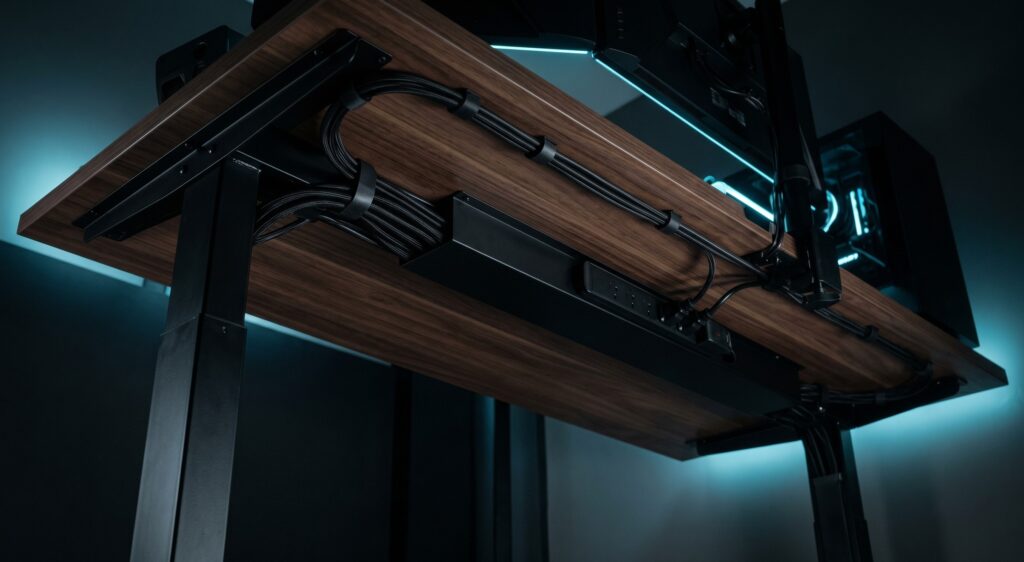
Zero-Visibility Cable Management: The Ultimate Guide
You can buy the most expensive monitor, the sleekest mechanical keyboard, and the most powerful PC on the market—but if your desk looks like a nest of black spaghetti, your setup will always look cheap. Visible cables don’t just look bad; they collect dust, get caught on your feet, and create visual clutter that translates directly to mental clutter.
Achieving “Zero-Visibility” means when you sit in your chair, you cannot see a single wire. This requires a systematic approach and specific, affordable tools. Here is our gear list to make your cables disappear.
The Golden Rule: Mount Under the Desk
The biggest mistake is plugging everything into a power strip resting on the floor. To achieve zero visibility, only one cable should ever touch your floor: the main power strip cable plugging into the wall. Everything else gets plugged into a power strip mounted directly to the underside of your desk.
1. VIVO Under Desk Cable Management Tray
You need a highway to run cables across your desk and a basket for heavy power bricks. The VIVO tray is the undisputed champion. Unlike plastic J-channels that use weak adhesives, this is made of solid steel and screws directly into your wooden desktop.
- Excellent airflow for bricks.
- Easy to route cables.
- Massive weight capacity.
- Requires drilling.
2. Belkin 12-Outlet Pivot-Plug Surge Protector
Since you are mounting your power strip under the desk, you need one that can accommodate weirdly shaped plugs. Massive power adapters usually block adjacent outlets, but the rotating outlets on this Belkin model ensure you can actually use all 12 plugs.
- Rotating outlets solve blocks.
- High surge protection.
- Long 8ft cord.
- Relatively heavy unit.
3. VELCRO Brand ONE-WRAP Cable Ties
Put the zip ties down immediately. Plastic zip ties are a nightmare for desk setups. VELCRO Brand ONE-WRAP Cable Ties are the industry standard for tech—they are cheap, 100% reusable, and gentle on delicate braided cables.
- Reusable forever.
- Won’t crimp wires.
- Extremely affordable.
- Dust sticks to velcro.
4. Alex Tech Expandable Braided Cable Sleeve
For the inevitable cluster of cables traveling from the desk to the PC or wall, use an Alex Tech Sleeve. Instead of seeing messy wires, you group them together into one sleek, professional-looking black tube.
- No unplugging required.
- Self-curling design.
- Anti-fray material.
- Can bulge if overfilled.
Frequently Asked Questions
Use adhesive cable routing clips or “J-Channel Raceways” (backed with heavy-duty tape) to run wires along the back edge of the metal frame. If the desk is entirely glass, route cables to the wall behind the desk instead.
You must allow for “slack.” Bundle all cables traveling from desk to floor into one braided sleeve, and leave enough length for the maximum desk height. When lowered, the sleeve will naturally curve into a clean “J” shape.