Rating Subscriber Setups: How to Improve Your RGB Lighting
At Desk & Console, we review thousands of subscriber desk setups submitted to our community every year. Whether you have a budget $800 PC or a massive $5,000 custom water-cooled rig, there is one universal truth: Lighting dictates 90% of your setup’s aesthetic.
Unfortunately, we see the exact same mistakes over and over again. People spend a fortune on high-end monitors, only to completely ruin the aesthetic of their room by slapping a cheap $10 strip of exposed LEDs to the back of their desk. Bad lighting creates harsh hotspots, gives you massive eye strain in dark rooms, and makes you look like a washed-out ghost on your webcam.
Today, we aren’t just roasting bad setups. We are giving you the exact blueprint to fix them. Here are the 4 most common RGB lighting mistakes we see, and the absolute best hardware on Amazon to solve them instantly.
Govee RGBIC Neon Rope Light for Desks
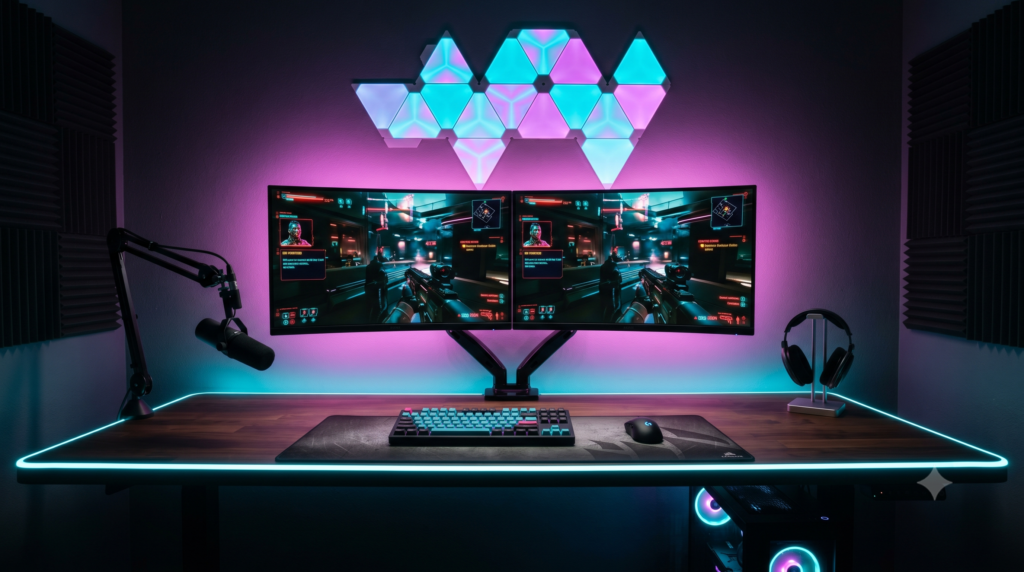
If you want to line the back edge of your desk, do not use a standard flat LED strip. Instead, use the Govee RGBIC Neon Rope Light. Govee took their high-end LED strips and encased them entirely inside a thick, frosted silicone tube.
This completely hides the internal diodes, creating a smooth, flawless, solid line of neon light that looks exactly like a real glass neon sign. Because it uses RGBIC technology, you can make different segments of the rope display different colors simultaneously, blending a gorgeous cyber-cyan into neon pink along your desk’s edge. It bends easily around the corners of your desk and completely elevates the look of your setup’s backlighting.
✓ What We Love
- Flawless silicone diffusion hides all individual LED hotspots
- RGBIC tech allows for stunning, multi-color gradients
- Easily syncs with Razer Chroma and the Govee Desktop App
- Flexible enough to wrap around the curved edges of gaming desks
✕ Keep in Mind
- You cannot cut this strip to size without breaking the diffusion seal
Philips Hue Play White & Color Light Bars
If you have a dual-monitor setup but the wall behind the screens is completely dark, your setup lacks depth. It creates massive eye strain and makes the room look like a dark cave. To create “Bias Lighting” (illuminating the wall behind your screens to save your eyes), the absolute gold standard is the Philips Hue Play Light Bars.
You attach these two sleek bars to the back of your monitor facing the wall. They splash a massive, highly vibrant wash of diffused color onto the wall, separating your monitor from the background. If you download the free Hue Sync app on your PC, these lights will actively read the edges of your screen and dynamically change color to match whatever game or movie you are playing in real-time, pulling the action off the screen and onto your walls.
✓ What We Love
- Zero-latency PC screen syncing creates mind-blowing game immersion
- Drastically reduces eye strain during late-night gaming sessions
- The color accuracy of Philips Hue is unmatched in the industry
✕ Keep in Mind
- Requires the Philips Hue Bridge to function properly (sold separately)
- Premium “Philips Tax” pricing
Nanoleaf Shapes Hexagons
You have a beautiful desk, but the wall directly to the left or right of your setup is completely blank and boring. You need to add structural, geometric interest to balance the room. Nanoleaf Shapes are the absolute staple of the streaming community for a reason: they act as highly functional, modular wall art.
You can snap these ultra-thin, edge-to-edge illuminated hexagons together into any geometric shape you want. They mount to the wall using damage-free adhesive strips (perfect for renters). They can pulse to the beat of your Spotify music, sync with Razer Synapse on your PC, or simply provide a gorgeous, static wash of neon color to fill out your camera background.
Buy Nanoleaf ShapesLogitech Litra Glow Premium LED
Your RGB background looks amazing, but because your room is dark, your $150 webcam is struggling to see your face. You look grainy, red, and washed out on Discord or Twitch. A $50 webcam with great lighting looks 10x better than a $500 DSLR camera in the dark. The Logitech Litra Glow mounts behind your monitor and aims forward to fix this.
Unlike cheap Amazon ring lights that cast harsh shadows and reflect circles in your glasses, the Litra Glow uses “TrueSoft” frameless diffusion. It wraps your face in a soft, flattering, cinematic white glow. It clears up webcam grain instantly, making your face pop perfectly against your newly upgraded RGB background.
Buy Logitech Litra GlowIf you only make one change to your setup today, buy the Govee RGBIC Neon Rope. Taping it to the edge of your desk to create a perfectly smooth, diffused neon glow is the highest-impact visual change you can make.
However, if you suffer from eye fatigue and want to make your gameplay feel infinitely more immersive, mounting the Philips Hue Play Bars to the back of your monitor to create bias lighting is the ultimate luxury upgrade.
Frequently Asked Questions (FAQ)
Why do my LED strips look dotted and cheap?
This is known as “hotspotting.” Bare LED strips should never be visible to the human eye. To fix this, you must either hide the strips behind your desk facing a wall (creating a bias lighting wash) or buy silicone-diffused neon rope lights or aluminum channels that blend the individual LEDs into one solid, smooth beam of light.
What is Bias Lighting for a monitor?
Bias lighting is the placement of an RGB light source directly behind your monitor, illuminating the wall behind it. This creates a soft halo effect that drastically reduces eye strain in a dark room and artificially deepens the black levels on your gaming monitor, making your games look better.
Should I use the ‘Rainbow’ effect on my RGB lights?
In the setup community, this is referred to as “Unicorn Vomit” and is generally considered a rookie mistake. To make a setup look professional, pick a strict 2-color or 3-color palette (like Cyan and Magenta for a Cyberpunk theme, or Orange and Teal for a cinematic look) and stick to it across all your lights.