Desk Depth Guide for Low-DPI Arm Aimers in Call of Duty
To physically unlock your aim, you must upgrade to a desk with a minimum depth of 30 to 32 inches, mount your display on a gas-spring arm to reclaim the space beneath it, and switch to a compact 60% keyboard.
Quick Fix: Clamp-On Desk Space Extender
If you are stuck on a shallow 24-inch desk and your arm is hanging painfully off the edge, you don’t have to buy a $400+ new desk today. A Clamp-On Desk Space Extender costs under $40. It clamps seamlessly to the front of your desk, instantly adding 10 inches of padded depth so you can rest your entire forearm flat for perfect low-DPI pivoting.
Grab a Desk Extender on AmazonYou drop into the Gulag in Warzone. An enemy slide-cancels past your camera. You violently flick your mouse to the left to track them, but before your crosshair reaches their body, your mouse slams into the heavy metal base of your monitor stand. You physically run out of space, your crosshair stops moving, and you lose the gunfight.
You didn’t lose because of a skill issue. You lost because of poor spatial desk geometry.
At Desk & Console, we approach battlestation design like architects. If you are struggling with inconsistent aim, your first step isn’t aim-training—it is auditing your physical footprint. Here is the mathematical blueprint to optimizing your desk depth low dpi gaming setup so you never run out of swipe area again.
The Physics of Arm Aiming: The Clearance Plane
To achieve surgical tracking accuracy in modern FPS games, competitive players lower their mouse sensitivity dramatically (usually 400 to 800 DPI, with low in-game multipliers). At these sensitivities, you can no longer aim by just flicking your wrist.
You become an “Arm Aimer.” Your elbow becomes the pivot point. To do a 180-degree turn in-game, you must physically drag the mouse 15 to 20 inches across the desk. This biomechanical motion requires a massive physical canvas—which is why pro players use XL or XXL square mousepads (500x500mm / roughly 19.6 inches square).
📏 The Geometric Impossibility
If you put a 19.6-inch square mousepad on a 24-inch deep desk, you have exactly 4 inches of clearance left. That remaining space is completely devoured by your monitor stand, your keyboard cable, and your own torso. You are forced to either push your mousepad off the front edge of the desk (ruining your arm support) or tuck it underneath your monitor (limiting your upward vertical swipe).
Desktop Footprint Optimization: Reclaiming the Swipe Zone
To fix this, you must radically audit your desk real estate. You need a setup that completely clears the “Swipe Zone”—the physical arc your right arm travels during a panic flick.
1. How to Stop Hitting Monitor Stand With Mousepad
If you push your mouse forward to control an aggressive vertical recoil pattern and the cable smashes into the massive V-shaped plastic feet of your factory monitor stand, you have a severe hardware bottleneck.
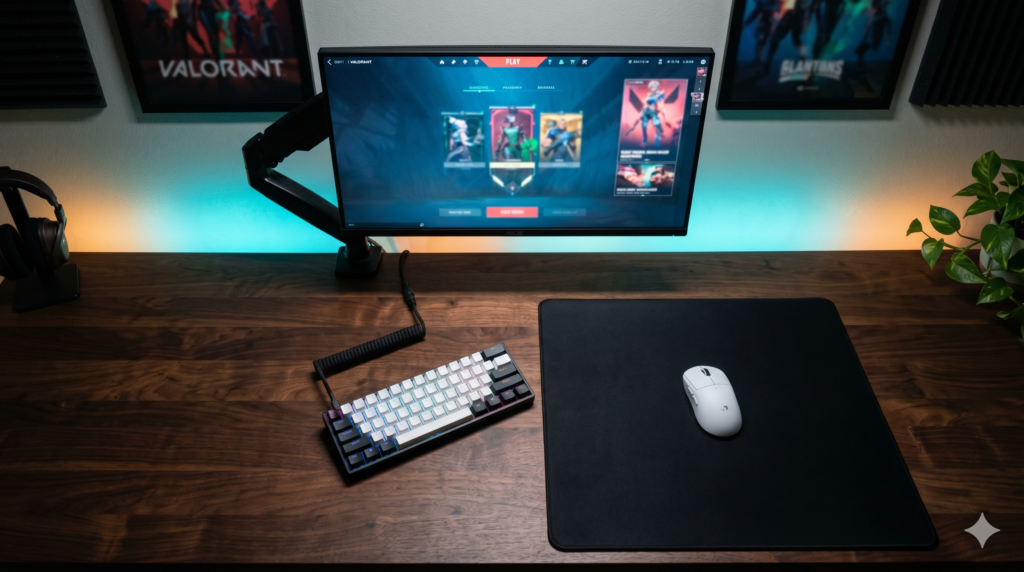
The Fix: You must completely remove the factory stand and use a C-Clamp Gas-Spring Monitor Arm. By clamping the arm to the very back edge of the desk, the monitor effectively “floats” in the air. This reclaims 100% of the surface area beneath the screen, allowing you to push your massive 500mm mousepad all the way to the back wall without any collision.
2. The 60 Percent Keyboard Desk Space Hack
If depth is your vertical enemy, your full-sized keyboard is your horizontal enemy. A standard 104-key mechanical keyboard is over 17 inches wide. If you center it in front of your monitor, it physically invades your mousepad’s territory.
To compensate, players push their mousepad far to the right side of the desk. This forces your right shoulder to externally rotate at a harsh angle, causing terrible shoulder pain and inconsistent tracking during long sessions.
The Fix: The 60 percent keyboard desk space hack. By cutting off the number pad and arrow keys, a 60% keyboard is only 11.5 inches wide. This allows you to pull your mousepad 6 inches closer to the center of your body, perfectly aligning your shoulder and elbow in a relaxed, ergonomic 90-degree angle for flawless tracking.
The Elite Spatial Arsenal: Hardware Built for Aiming
To execute the perfect spatial layout, you need hardware that respects the physical demands of arm aiming. Here is the gear required to build an unhindered tracking environment.
1. 30 to 32-Inch Deep Gaming Desks 🏆 Mandatory Foundation
If you want to know the best desk width for arm aiming, width is great, but depth is king. A 30-inch (76 cm) depth is the golden standard.
A 30-inch deep desk is transformative. It allows you to push your heavy VESA monitor arm far to the back, unroll a massive 500x500mm mousepad, and still have 10 inches of clean wood left over for your forearm to comfortably anchor onto the table edge. It completely eliminates the feeling of your arm “hanging” off the back of the desk, stabilizing your crosshair during stressful 1v1 gunfights.
Search 30″ Deep Desks on Amazon2. SteelSeries Apex Pro Mini / Wooting 60HE ⚡ The Space Saver
If you are purely focused on competitive FPS performance, you do not need a numpad. You need horizontal clearance. A 60% keyboard like the Wooting 60HE or SteelSeries Apex Pro Mini shrinks your keyboard footprint down to just 11.5 inches.
More importantly, these elite boards feature Hall Effect magnetic switches. Instead of bottoming out a mechanical switch, you can program the keys to actuate the exact millimeter you touch them (Rapid Trigger). This gives you instantaneous strafing in-game while simultaneously freeing up 6 inches of desk space for your mouse hand.
Search Apex Pro Mini3. Under-Desk Keyboard Mounted Tracks 🛠️ The Life Hack
If you absolutely cannot buy a 30-inch deep desk due to room size constraints, your final option is to artificially extend the desk downward. An Extra-Wide Under-Desk Keyboard Track bolts beneath your desktop and is wide enough to hold both your keyboard and your mousepad.
This completely removes your inputs from the top of the desk, leaving the entire 24-inch top surface strictly for your monitor and PC case. By pulling the sliding track out toward your lap, you simulate the feeling of a 30-inch deep desk, giving your forearm the space it needs to pivot smoothly.
Search Under-Desk TracksFrequently Asked Questions (FAQ)
What is the desk depth low dpi gaming requires?
A standard 24-inch deep office desk is fundamentally too shallow for low-DPI arm aiming. To fit an XL 500x500mm mousepad, support your entire forearm up to the elbow, and push your monitor back to a healthy visual distance, you need a desk with a minimum depth of 30 inches (ideally 32 inches).
What is the best desk width for arm aiming?
While depth is the actual bottleneck for arm aiming, the best desk width is a minimum of 60 inches. This allows you to comfortably place your heavy PC tower on the desk, center your XXL mousepad, and still have enough horizontal clearance that your mouse hand won’t feel claustrophobic or hit the edge of the PC case.
How to stop hitting monitor stand with mousepad?
You must completely eliminate the factory monitor stand. Factory stands are designed to balance heavy monitors using massive, intrusive plastic feet. By buying a C-clamp monitor arm and attaching it to the back edge of your desk, your monitor will float, granting your mousepad 100% of the surface area beneath the screen.