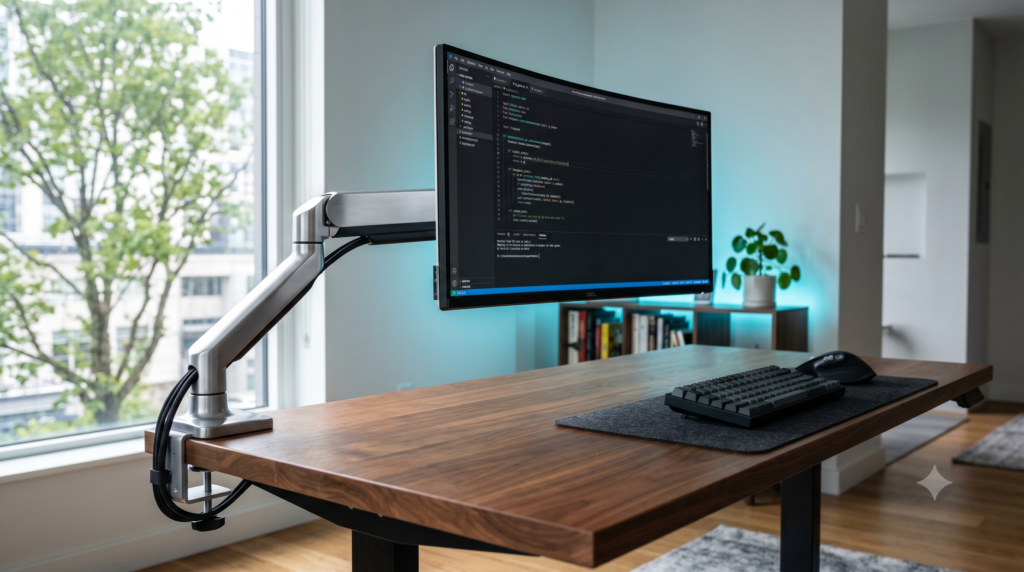
How to Mount Your Monitors for Perfect Posture
Maximize your competitive performance by exploring our fresh optimization reviews:
- The Minimalist Streamer Layout: Hiding Dual PCs & Capture Cards
- Best Powered USB Hubs That Won’t Disconnect Your Mouse Mid-Match
- Desk Depth Guide for Low-DPI Arm Aimers in Call of Duty
- The Optimal Monitor Height, Distance, & Tilt for Competitive FPS Gaming
- How to Perfectly Align Your Gaming Laptop Screen with a 27-Inch Monitor
If you spend more than 6 hours a day sitting at a desk—whether you are a remote worker, a software engineer, or a passionate PC gamer—you have probably experienced the dreaded “tech neck.” That deep, burning ache at the base of your skull and across your shoulders isn’t just a symptom of getting older. It is a symptom of terrible hardware.
Almost every factory monitor stand is designed with a massive flaw: they are too short. When your monitor sits on its factory plastic legs, your screen is situated near your chest. This forces you to roll your shoulders forward, tilt your head down, and hunch over your desk to read your screen. Over thousands of hours of gaming or spreadsheets, this unnatural tilt places roughly 30 pounds of artificial pressure on your cervical spine.
To achieve perfect, pain-free posture, you must follow the ergonomic “Rule of Thirds.” When sitting upright, looking straight ahead, the top 1/3rd of your monitor screen must be exactly at your eye level. Your eyes should look naturally downward (about 15 to 30 degrees) to view the center of the screen, keeping your cervical spine completely straight and neutral.
The only permanent way to fix this is by throwing away your factory plastic stand and upgrading to a VESA Monitor Mount. Clamping a steel arm to the back of your desk not only saves your neck by allowing infinite height adjustability, but it also creates the illusion that your screens are “floating,” instantly freeing up massive amounts of usable space on your desk.
Factory Stands vs. VESA Monitor Arms
| Ergonomic Factor | Factory Monitor Stand | Pneumatic Monitor Arm |
|---|---|---|
| Height Range | Usually maxes out 3 to 5 inches too low | 10 to 18+ inches (Perfect Eye Level) |
| Desk Space Used | Massive footprint (Takes up 30% of desk) | Zero (Clamps to the back edge) |
| Adjustability | Rigid and stiff | Floats fluidly with a fingertip touch |
| Cable Management | Cables hang visibly | Hidden inside the arm raceways |
At Desk & Console, we know that trusting a $600 monitor to a flimsy $20 clamp is terrifying. You need arms with premium gas-spring or pneumatic tension that won’t sag over time. Here are the top 5 highly-rated VESA monitor mounts available right now.
Ergotron LX Premium Single Monitor Arm
If you walk into the headquarters of Apple, Google, or any high-end tech firm, you will see Ergotron mounts on every desk. The Ergotron LX is the absolute gold standard for pneumatic monitor arms. While cheaper arms use basic gas cylinders that leak over time, Ergotron uses patented Constant Force mechanical spring technology.
This allows you to lift, tilt, and pan a massive 34-inch monitor using literally one finger. Once you let go, it stays frozen in place without sagging a single millimeter. It is built entirely from polished aluminum and steel, and it comes with an astonishing 10-year warranty. If you value your posture and your expensive display, this is the endgame.
✓ Workspace Wins
- Patented Constant Force tech provides effortless, buttery-smooth adjustment
- Incredible 13-inch vertical height lift (perfect for tall users)
- Built like a tank from premium polished aluminum
- Backed by a legendary 10-year warranty
✕ Keep in Mind
- It carries a premium price tag compared to generic brands
HUANUO Dual Monitor Gas Spring Mount
If you have a dual-monitor setup (like a primary gaming screen and a secondary Discord/Spotify screen), keeping two factory stands on your desk will consume your entire workspace. The HUANUO Dual Monitor Mount is an absolute viral staple in the WFH and gaming communities for fixing this instantly.
It uses a single heavy-duty C-clamp at the back of your desk, splitting off into two independent gas-spring arms. This allows you to position one monitor in horizontal landscape mode directly in front of you for gaming, while rotating the second monitor into a vertical portrait mode for reading chat or writing code. It clears up massive amounts of desk space and hides all cables down the central spine.
✓ What We Love
- Incredible value; perfectly mounts two screens for under $60
- Independent gas springs allow different heights for mismatched monitors
- Allows for instant 360-degree rotation (Horizontal to Vertical layouts)
- Consolidates two massive monitors down to a single 4-inch desk clamp
✕ Keep in Mind
- Requires significant desk clearance behind the desk to fold the arms back flush
AVLT Single 13-43 inch Heavy Duty Arm
The biggest mistake PC gamers make is buying a standard $30 monitor arm and trying to attach a massive, heavy 34″ or 49″ curved Ultrawide monitor to it. The weight of the monitor instantly overwhelms the “tilt pivot” on cheap arms, causing the screen to sag and face the desk permanently.
If you own an Ultrawide monitor (like the Samsung Odyssey or Alienware 34), you must buy a heavy-duty arm. The AVLT Heavy Duty Mount is engineered with a reinforced steel tilt-mechanism and a high-tension gas spring capable of holding an absurd 33 pounds. It allows you to safely float massive cinematic screens above your desk without any fear of drooping or desk damage.
Buy AVLT Heavy Duty ArmWALI Premium Dual Vertical Stacked Mount
In the ergonomic and productivity community, a massive trend has emerged: Vertical Stacking. Having two monitors side-by-side forces you to constantly turn your neck left and right to view data, which creates asymmetrical neck strain over an 8-hour workday. The WALI Vertical Mount solves this.
It utilizes an extra-tall 31.5-inch steel pole. You mount your primary gaming monitor at the bottom (directly at eye level) and mount your secondary Discord/Spotify monitor directly above it, tilted downward. To check your secondary monitor, you simply flick your eyes up, keeping your neck perfectly still and facing forward, drastically reducing cervical spine strain.
Buy WALI Stacked MountVIVO Single LCD Monitor Desk Mount
If you don’t need to constantly pull your monitor closer to your face, and you just want a rock-solid, incredibly affordable way to get the screen off your desk, the VIVO Single Monitor Desk Mount is the best-selling mount in Amazon history for a reason.
Instead of an expensive gas spring, it relies on a heavy-duty steel center pole. You loosen a bolt, slide the articulating arm up the pole to your exact ergonomic eye level, and lock it tightly into place. It completely reclaims the desk space beneath your monitor, costs less than a fast-food dinner, and is built like an absolute tank.
Buy VIVO Single MountFixing your desk posture is the highest ROI investment you can make for your long-term physical health. If you want the absolute most fluid, durable, and professional-grade mount on the market, the Ergotron LX is the undisputed “buy it once for life” investment for your spine.
However, if you are running a standard dual-monitor setup and want the most efficient way to clear up your desk space on a reasonable budget, the HUANUO Dual Gas Spring Mount offers the best functional value on the market.
Frequently Asked Questions (FAQ)
What does VESA compatible mean?
VESA (Video Electronics Standards Association) is the universal mounting standard used by the entire display industry. If you look at the back of your monitor, you should see four threaded screw holes arranged in a perfect square (typically measuring 75x75mm or 100x100mm). Any monitor arm that advertises itself as “VESA Compatible” will screw perfectly into the back of your display.
How high should my monitor be for perfect posture?
The golden rule of medical ergonomics dictates that the top 1/3rd of your monitor screen should be exactly at your eye level when you are sitting up straight. Your eyes should look slightly downward to focus on the center of the screen, and your neck should remain completely neutral. If you have to tilt your chin up or hunch your shoulders forward to see the screen, your monitor is positioned incorrectly and will cause long-term pain.
Can I use a C-clamp monitor arm on a glass desk?
Using a heavy-duty C-clamp monitor arm directly on a tempered glass desk is extremely dangerous. The concentrated pinch-point pressure of the clamp can easily cause the glass to shatter. If you must mount a monitor arm to a glass desk (or a cheap IKEA honeycomb-cardboard desk), you must buy a steel “Monitor Mount Reinforcement Plate” (available on Amazon for $15). This places wide steel plates above and below the desk to safely distribute the pressure.