
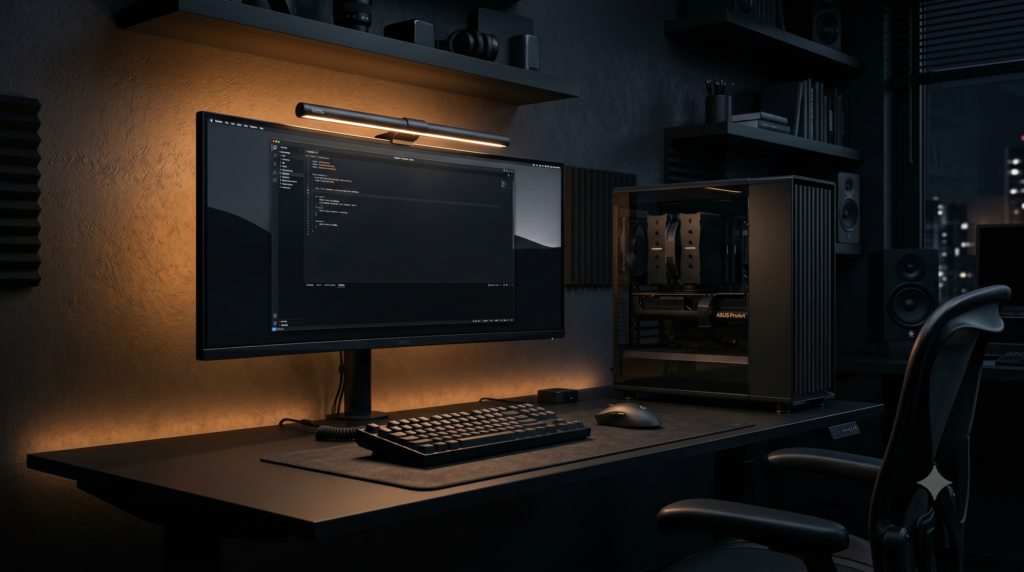
How to Build a Stealth Black Gaming Setup
For the last decade, the gaming industry has been obsessed with “Rainbow Puke.” If a product was designed for a gamer, it was guaranteed to feature sharp, aggressive plastic angles and 16 million flashing RGB colors. But as the gaming demographic has matured, a massive aesthetic rebellion has taken over the community: The Stealth Black Setup.
Also known as the “Anti-RGB” or “Blackout” aesthetic, a stealth setup draws inspiration from luxury sports cars, matte carbon finishes, and high-end corporate architecture. It relies entirely on texture, shadows, and brushed gunmetal rather than flashing neon lights. By day, it looks like the desk of a CEO. By night, it is a distraction-free, hyper-focused gaming rig.
The Anti-RGB Movement: Why Go Stealth?
| Factor | Standard RGB Setup | Stealth Black Setup |
|---|---|---|
| Visual Focus | Draws attention to the hardware | Draws attention to the monitor |
| Cable Management | Requires dozens of RGB wire hubs | Minimal wires (Hidden in shadows) |
| Vibe / Tone | High-energy, chaotic, flashy | Calm, focused, professional |
| Software Bloat | Heavy (Requires iCUE, Synapse, etc.) | Zero (No RGB software needed) |
At Desk & Console, we know that building a stealth setup is actually harder than it looks. If you buy the wrong shade of black or a glossy plastic part, it ruins the matte illusion. Here is the ultimate blueprint and the 5 exact components you need to build a flawless, high-inventory all-black gaming ecosystem.
A “zero RGB” setup doesn’t mean you sit in pitch darkness—that causes terrible eye strain. To make a stealth setup pop, you need Warm Bias Lighting. Use a monitor light bar or a warm-white (3000K) LED strip behind the back edge of your desk. It creates a soft halo that highlights the silhouette of your black hardware without blinding you.
Corsair 4000D Airflow Tempered Glass (Black)
Your PC case is the largest object on your desk. To achieve the stealth aesthetic, it cannot be a glowing aquarium of flashing lights. The Corsair 4000D Airflow (Black Edition) is an absolute masterpiece of industrial design and the undisputed king of blackout builds.
Unlike standard cases, the tempered glass side panel on the 4000D Black is heavily tinted. If you turn off the internal RGB in your PC, the glass looks almost completely opaque, hiding the ugly cables and circuit boards inside. The front panel features a matte steel triangular-mesh grille that intakes massive amounts of cold air to cool your GPU, without relying on cheap plastic aesthetics.
✓ What We Love
- Deeply tinted side panel hides internal PC clutter perfectly
- Matte black steel front panel looks incredibly premium and industrial
- Exceptional airflow keeps high-end components cool and quiet
- Minimalist Corsair branding (just a tiny yellow square)
✕ Keep in Mind
- Only comes with two basic black fans; you will want to buy extra stealth fans (like Noctua chromax.black) to fill it out
FLEXISPOT Electric Standing Desk (Matte Black)
A true stealth setup requires the desk surface itself to absorb light. If you use a glossy desk or a fake “carbon fiber” gaming desk, your monitor light will reflect off it, creating a distracting glare. The FLEXISPOT Electric Standing Desk in the “All-Black” configuration provides a massive, non-reflective canvas for your peripherals.
This desk is an absolute workhorse. The heavy-duty industrial black steel legs can lift your heavy PC, dual monitors, and peripherals effortlessly to standing height. Because the underside of the desk is pitch black, it acts as a visual void—if you use black zip ties and a black power strip, your cables will completely disappear into the shadows.
Buy FLEXISPOT Black DeskLogitech G915 TKL Wireless Keyboard (Carbon)
In a blackout setup, a chunky plastic gaming keyboard ruins the illusion. You need low-profile metal. The Logitech G915 TKL in the “Carbon” colorway is widely considered one of the sleekest, most attractive gaming keyboards ever engineered.
It is impossibly thin, built from a single plate of dark, brushed aircraft-grade aluminum. It looks like a piece of corporate tech art. While it does feature RGB, stealth enthusiasts simply turn the lighting to a static, dim, pure white (or off completely). The wireless connectivity eliminates ugly cables crossing your desk, and the low-profile tactile switches are incredibly responsive for gaming while remaining quiet enough for office work.
Buy Logitech G915 TKLLogitech G PRO X Superlight Wireless (Black)
The perfect companion to the G915 keyboard is a mouse that completely abandons “gamer” gimmicks. The Logitech G PRO X Superlight is the exact mouse used by the highest-earning esports professionals in the world, yet it looks incredibly subtle.
To achieve its terrifyingly light 63-gram weight, Logitech intentionally removed every single LED light from this mouse. There are no glowing logos or flashing scroll wheels. It is a smooth, perfect, matte black oval. It glides across your desk effortlessly, providing industry-leading sensor accuracy for flick-shots without drawing any unwanted visual attention to itself.
Buy Logitech SuperlightBenQ ScreenBar Monitor Light
In a dark, stealthy room, staring at a bright monitor will completely destroy your eyes. You need ambient light, but a traditional desk lamp clutters your minimalist aesthetic. The BenQ ScreenBar is the holy grail of minimalist desk lighting.
It clips securely to the top of your monitor. Instead of blasting light into your eyes or creating glare on your screen, its asymmetrical optical design throws a sharp, focused beam of light straight down onto your keyboard and desk mat. You can adjust the temperature dial to a soft, warm amber glow. This creates a gorgeous pool of cinematic light right over your matte black keyboard and mouse, establishing incredible depth and shadows in your room without a single drop of neon RGB.
Buy BenQ ScreenBarBuilding a stealth blackout setup is an exercise in extreme restraint. By utilizing the deeply tinted glass of the Corsair 4000D, your unlit PC components fade into the shadows. Pairing this with the brushed carbon of the Logitech G915 and the pure, non-RGB matte finish of the Superlight mouse ensures there are no distractions. Finally, bathing the desk in the warm, targeted glow of the BenQ ScreenBar elevates the entire setup from a basic “dark room” into an elite, cinematic command center.
Frequently Asked Questions (FAQ)
What is a stealth gaming setup?
A stealth gaming setup, often called a “Blackout” or “Anti-RGB” setup, is a design philosophy that completely eliminates flashing colored lights, rainbow effects, and aggressive ‘gamer’ branding. It relies entirely on matte black, carbon fiber, and gunmetal gray materials to create a mature, minimalist, and distraction-free workspace that looks just as good for office productivity as it does for gaming.
How do you hide cables in a blackout desk setup?
Black setups actually have a massive advantage for cable management: shadows. If you build a white setup, every single black cable stands out instantly. By using a matte black desk, black braided cables, and an under-desk cable raceway, your wires naturally blend into the dark shadows beneath the desk, becoming virtually invisible to the naked eye.
How do I light my room if my PC has no RGB?
A true stealth setup utilizes “Functional Lighting” rather than decorative lighting. You should mount a Monitor Light Bar (like the BenQ ScreenBar) to the top of your display to cast a warm, focused beam of white light directly onto your keyboard and mouse without hitting the screen. You can also place a warm amber bias-light behind the monitor to illuminate the wall, which drastically reduces eye strain while keeping the desk surface completely stealthy.