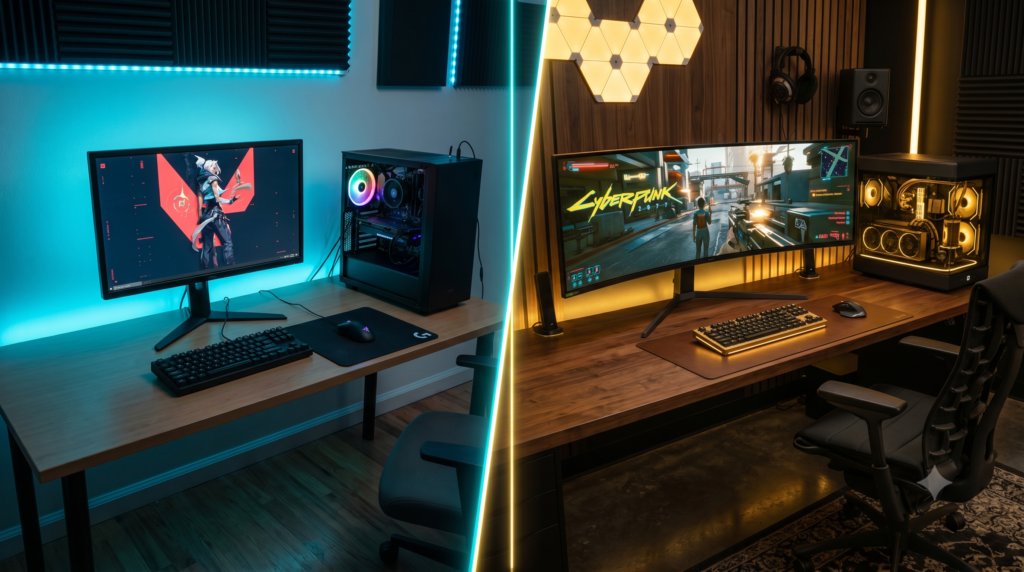
Budget vs Premium Setup: Is High-End Gear Worth It?
Building a home office or gaming desk setup is an exercise in extreme financial decision-making. You can easily build a fully functional setup for $500. Alternatively, you could easily spend $5,000 on boutique keyboards, OLED monitors, and designer chairs.
This leads to the ultimate question every PC builder asks: Is high-end gear actually worth the money? Or are you just paying a “gamer tax” for fancy RGB lights and a famous logo?
The truth is, it depends entirely on the peripheral. In some categories, budget tech has gotten so incredibly good that buying premium is a complete waste of money. In other categories, cheaping out will literally cause you physical pain and destroy your gaming experience. At Desk & Console, we pit the best evergreen budget gear against the absolute best premium gear in 5 main categories to tell you exactly where to save, and where to splurge.
The “Where to Spend” Matrix
| Desk Category | The Budget Route (Save) | The Premium Route (Splurge) |
|---|---|---|
| Gaming Mice | Highly Recommended | Only for elite esports pros |
| Mechanical Keyboards | Highly Recommended | Enthusiast luxury (Features & Speed) |
| Audio Headsets | Gets the job done | Worth it (Active Noise Canceling) |
| Ergonomic Chairs | Foam degrades quickly, poor lumbar | Worth it (Saves medical bills) |
| Monitors / Displays | Standard IPS is functional | Worth it (OLED changes everything) |
1. The Wireless Mouse Showdown
The gaming mouse market has experienced a massive revolution over the last few years. Flawless optical sensors and zero-latency 1ms wireless technology used to cost $150. Today, that technology has trickled down to the budget sector.
Logitech G305 LIGHTSPEED
The G305 is legendary. For under $40, it features the exact same zero-latency wireless technology as Logitech’s premium mice. It tracks flawlessly, fits almost every hand size, and a single AA battery lasts for months of heavy gaming.
Check G305 PriceLogitech G PRO X Superlight
The choice of elite esports pros. You are paying a massive premium to shave off 35 grams of weight compared to the G305. It feels like moving a feather across your desk, which drastically reduces wrist fatigue over an 8-hour gaming session.
Check Superlight Price🏁 Verdict: SAVE YOUR MONEY
Unless you are a top 1% ranked player in Valorant or CS2 where a 30-gram weight difference actually impacts your flick-shots, the Logitech G305 is all you will ever need. Diminishing returns hit gaming mice incredibly fast.
2. The Mechanical Keyboard Showdown
The mechanical keyboard market has evolved. Standard mechanical switches (Red, Blue, Brown) are now considered “budget” tech. Premium keyboards now use magnetic sensors to detect exactly how far down you press a key.
Razer Huntsman Mini (60%)
The Huntsman Mini brings blazing-fast optical switches to a budget-friendly price point. By eliminating the number pad and arrow keys, it frees up massive space on your desk for mouse movement. It is the perfect entry-level esports board.
Check Huntsman Mini PriceSteelSeries Apex Pro TKL
The Apex Pro TKL uses Hall Effect magnetic switches. You can digitally adjust the actuation point of every single key. Want your WASD keys to trigger instantly if you breathe on them? Set them to 0.1mm. It gives you a physical, measurable advantage.
Check Apex Pro TKL Price🏁 Verdict: SPLURGE (For Features)
If you are serious about competitive gaming, the upgrade to magnetic “Rapid Trigger” switches is worth the premium. The Apex Pro TKL actually improves your strafing speed in games, whereas budget boards simply rely on standard mechanical bottoms-outs.
3. The Gaming Headset Showdown
Good audio allows you to hear enemy footsteps through walls and fully immerse yourself in cinematic storylines. But how much should you pay for audio fidelity?
Razer BlackShark V2 X
The BlackShark V2 X is an absolute steal. It is incredibly lightweight, meaning it won’t give you a headache after hours of use. It provides excellent passive noise isolation and surprisingly clear positional audio for footsteps, easily beating headsets double its price.
Check BlackShark V2 X PriceSteelSeries Arctis Nova Pro Wireless
The Arctis Nova Pro is a technological marvel. It features Active Noise Cancellation (ANC) to block out PC fans, simultaneous Bluetooth to connect to your phone while gaming, and a dedicated base station. When your headset dies, you hot-swap the battery in 5 seconds and never plug it in.
Check Nova Pro Price🏁 Verdict: TIE (Depends on Lifestyle)
If you play games alone in a quiet room, SAVE your money; a wired Razer headset sounds phenomenal. However, if you work from home, have a noisy AC unit, or want to listen to Spotify on your phone while playing games, the ANC and hot-swappable batteries of the Nova Pro make it a massive quality-of-life splurge.
4. The Ergonomic Chair Showdown
The gaming chair market is notorious for selling cheap “racing-bucket” seats that actually destroy your lower back over time. Ergonomics is the one category where medical science must dictate your purchasing decisions.
SIHOO Ergonomic Office Chair
If you absolutely cannot spend more than $150, the SIHOO is the internet’s favorite budget chair. It ditches the awful “racing seat” design for a highly breathable mesh back. It offers excellent adjustability for the price, though the seat foam will begin to flatten after 18 months of heavy use.
Check SIHOO PriceSteelcase Series 1 Office Chair
Steelcase is the tier-1 rival to Herman Miller. The Series 1 features their patented “LiveBack” technology—a flexible polymer skeleton inside the backrest that physically twists and bends as your spine moves. It actively conforms to your body, ensuring perfect blood flow during 10-hour gaming sessions.
Check Steelcase Price🏁 Verdict: ABSOLUTELY SPLURGE
Physical therapy and chiropractor bills are significantly more expensive than a Steelcase Chair. Because premium chairs come with 12-year warranties, the “cost per year” is actually cheaper than buying a new $150 budget chair every two years when the cheap foam breaks down. Never cheap out on your spine.
5. The Monitor / Display Showdown
You can buy a $3,000 PC with an RTX 4090, but if you plug it into a cheap, washed-out monitor, your games will still look cheap. Your monitor dictates your actual visual reality.
LG 27GL83A-B 27-Inch IPS
This is the standard workhorse of PC gaming. 1440p resolution provides excellent sharpness, and 144Hz makes motion incredibly smooth. However, because it is an IPS panel, playing in a dark room will reveal “IPS glow,” where black shadows look milky and gray instead of pitch black.
Check Budget PriceAlienware AW3423DWF QD-OLED
OLED technology changes everything. Because OLED pixels emit their own light, they can completely turn off. This creates infinite, true inky blacks and blindingly vibrant HDR colors. Playing a cinematic game on a curved OLED monitor is a jaw-dropping, generational leap in visual quality.
Check Premium Price🏁 Verdict: SPLURGE IF YOU CAN
If your PC can handle it, stepping up to an OLED Monitor is the single most noticeable upgrade you can make to a setup. The contrast ratio and color depth of the Alienware completely obliterate budget IPS panels. It is worth every penny.
Frequently Asked Questions (FAQ)
What is the law of diminishing returns in PC building?
The law of diminishing returns dictates that as the price of a product increases, the actual performance benefit you receive gets smaller and smaller. For example, a $50 mechanical keyboard is a massive, highly noticeable upgrade over a $10 membrane keyboard (a 400% improvement). But a $200 keyboard is only marginally better than a $50 mechanical keyboard (maybe a 15% to 20% improvement). Knowing where this drop-off happens allows you to optimize your budget.
Are expensive gaming mice actually better?
For 95% of gamers, no. Modern budget wireless mice (like the Logitech G305) feature flawless optical sensors and zero-latency wireless tech that rival anything on the market. Premium $150 mice (like the Superlight) are built specifically for the top 1% of esports professionals who are willing to pay an extra $100 just to shave 30 grams of plastic off the chassis to maximize their flick-shot speeds.
Should I spend more money on my PC or my monitor?
A very common trap new PC builders fall into is spending $2,000 on a powerful gaming PC, but only having $150 left over for a cheap 1080p monitor. Your monitor is the physical lens through which you experience the PC’s power. It is always worth reallocating some of your budget to ensure you can afford a high-end 1440p or OLED display to actually see the graphics you paid for.