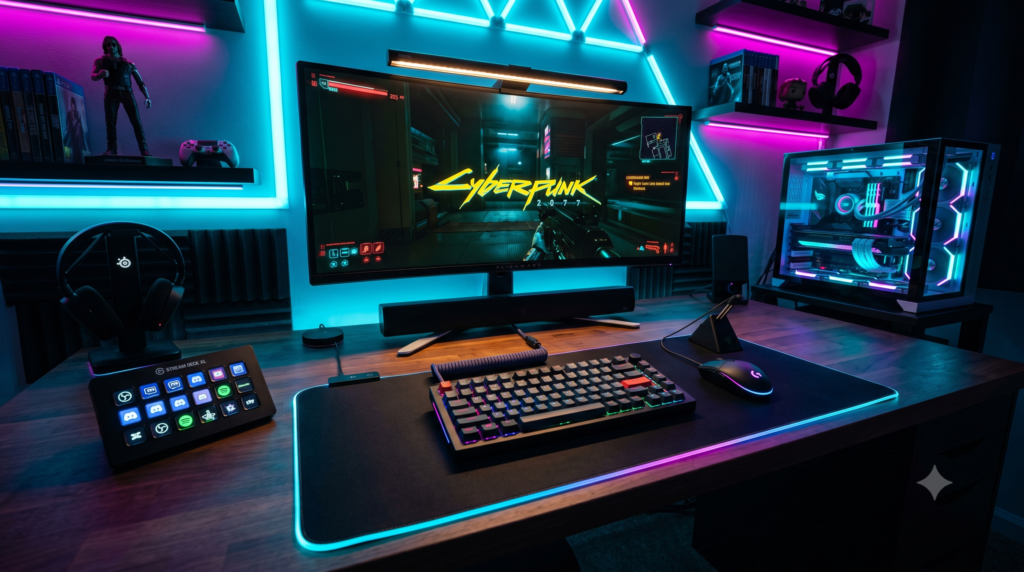
Essential Desk Accessories Every PC Gamer Needs
You spent thousands building the ultimate gaming PC. You have the best graphics card on the market, a blazing-fast 240Hz monitor, and a premium mechanical keyboard. But when you finally sit down to play, something feels incredibly off.
Your mouse cord keeps snagging on the edge of the desk. You have a massive rat’s nest of USB cables dangling behind your monitor. Staring at the bright screen in your dark room is giving you a massive headache. The reality is simple: A great PC isn’t enough if your desk is a cluttered mess.
At Desk & Console, we review hundreds of setups every year. We know exactly what separates an amateur desk from an elite, internet-breaking battle station in 2026. Here are the 5 absolute essential desk accessories every PC gamer needs to build a flawless, professional setup.
The Detail Difference: Basic vs. Pro Setups
| Desk Element | The Basic Setup | The Pro Setup |
|---|---|---|
| Cable Management | A tangled, dusty spiderweb on the floor | Hidden entirely in under-desk raceways |
| Mouse Surface | A tiny 8×8-inch office pad | An XXL Extended Mat for low-sensitivity aiming |
| Desk Lighting | Harsh ceiling light / Screen glare | Soft monitor light bars & Bias lighting |
| Hardware Control | Alt-tabbing out of full-screen games | Instant dedicated Macro Keypad |
You do not need to buy all wireless peripherals to make your desk look clean. By utilizing cable management trays, zip-ties, and routing your mouse/keyboard wires neatly down the back of your monitor stand, you can create the illusion of a wireless setup for a fraction of the price.
Elgato Stream Deck MK.2
There is a massive misconception that the Elgato Stream Deck is only for Twitch streamers. In reality, it is the ultimate macro keypad for any PC enthusiast. It features 15 physical buttons, each with a tiny, fully customizable LCD screen behind it.
If you are playing a full-screen game, you no longer have to Alt-Tab to the desktop to change things. You can program a button to instantly mute your Discord microphone, launch Spotify and play a specific playlist, turn on your room’s smart lights, or monitor your PC’s CPU temperatures. It completely streamlines your digital life into one sleek, tactile control panel.
✓ What We Love
- 15 LCD keys can display custom GIFs, icons, or live data
- Massive plugin store for Discord, Spotify, OBS, and smart home lighting
- Interchangeable magnetic faceplates to match your desk aesthetic
- The ultimate productivity tool for video editing and macros
✕ Keep in Mind
- It carries a premium price tag (though absolutely worth the investment)
Corsair MM700 RGB Extended Desk Pad
Using a tiny square mousepad is a massive handicap in modern PC gaming. If you play low-sensitivity shooters like Valorant or CS2, your mouse will constantly slide off the edge. You need an Extended Desk Pad that covers your entire workspace.
The Corsair MM700 is an absolute beast. It is large enough to comfortably hold a full-sized mechanical keyboard while leaving two feet of buttery-smooth glide space for your mouse. It features a thick, plush rubber base that absorbs keyboard typing sounds, and is wrapped in a vibrant, 360-degree dynamic RGB light ring that beautifully frames your peripherals in the dark.
Buy Corsair MM700 Desk PadBenQ ScreenBar Monitor Light
Playing PC games in a dark room creates severe eye strain because the bright light of your monitor sharply contrasts with the dark wall behind it. You need desk lighting, but a traditional lamp takes up valuable mouse space and causes awful glare on your screen. The BenQ ScreenBar solves this perfectly.
It clips securely to the top edge of your monitor. Instead of blasting light into your eyes or creating a terrible glare on your glass screen, its asymmetrical optical design throws a sharp, focused beam of light straight down onto your keyboard and mousepad. You can easily adjust the temperature dial to a soft, warm amber glow, creating a beautiful pool of cinematic light right over your hands while preserving the darkness of the room.
Buy BenQ ScreenBarRazer Gaming Mouse Bungee V3
If you use a wired gaming mouse, you know the pain of “cable drag.” When you make a fast flick-shot, the braided mouse cable catches on the edge of the desk or gets stuck under your monitor stand, completely ruining your aim.
The Razer Mouse Bungee V3 is a weighted, spring-loaded arm that sits on your desk. You snap your mouse cable into the elevated clip, leaving just enough slack for you to move freely. It holds the cable up in the air, preventing it from ever touching the desk surface. It completely eliminates friction and makes a standard wired mouse feel just as free as a $150 wireless mouse.
Buy Razer Mouse BungeeVIVO Under Desk Cable Management Tray
We saved the most important accessory for last. You can buy the most expensive PC components in the world, but if thick, ugly black power cords are dangling down the back of your desk like spaghetti, your setup will look cheap. Cable Management is non-negotiable.
The VIVO Steel Tray is the easiest to use on the market because it clamps directly to the back of your desk—meaning you don’t have to break out a power drill to install it. You simply drop your massive power strip and surge protector into the tray, plug all of your monitors and PC cables into it, and bundle the slack inside the metal basket. Instantly, all cables vanish from the floor, making your room look like a professional studio.
Buy VIVO Cable TrayBuilding a professional battle station is about minimizing friction. By organizing your heavy power strips with the VIVO Under Desk Tray, centering your aesthetic with a massive Corsair MM700 Desk Pad, and taking ultimate macro control with the Elgato Stream Deck, you elevate your physical desk to match the premium power of the PC sitting on top of it.
Frequently Asked Questions (FAQ)
What are the most important desk accessories for gamers?
The foundation of a great desk setup relies on three physical pillars: Cable Management (hiding wires with raceways and under-desk nets), Ergonomic Lighting (monitor light bars to reduce eye strain and bias lighting to create depth), and Surface Optimization (an extended desk pad for smooth, uninterrupted mouse tracking).
Do I need a Stream Deck if I don’t stream on Twitch?
Yes! The Elgato Stream Deck is actually a universal macro pad, and the majority of people who own one do not stream. Gamers use it to launch games, mute their Discord microphones, control Spotify playlists, change their smart room lighting, and monitor PC temperatures with a single button press without ever minimizing their full-screen game.
How do I hide cables on my gaming desk?
The secret to a pristine ‘wireless look’ is an under-desk cable management tray and cable sleeves. Instead of leaving your power strip on the floor, mount the power strip directly inside the tray under the desk. Route all your monitor and PC cables into a braided sleeve. Finally, drop just one single main power cable down the leg of your desk to the wall outlet. The rest of the wires will become completely invisible.