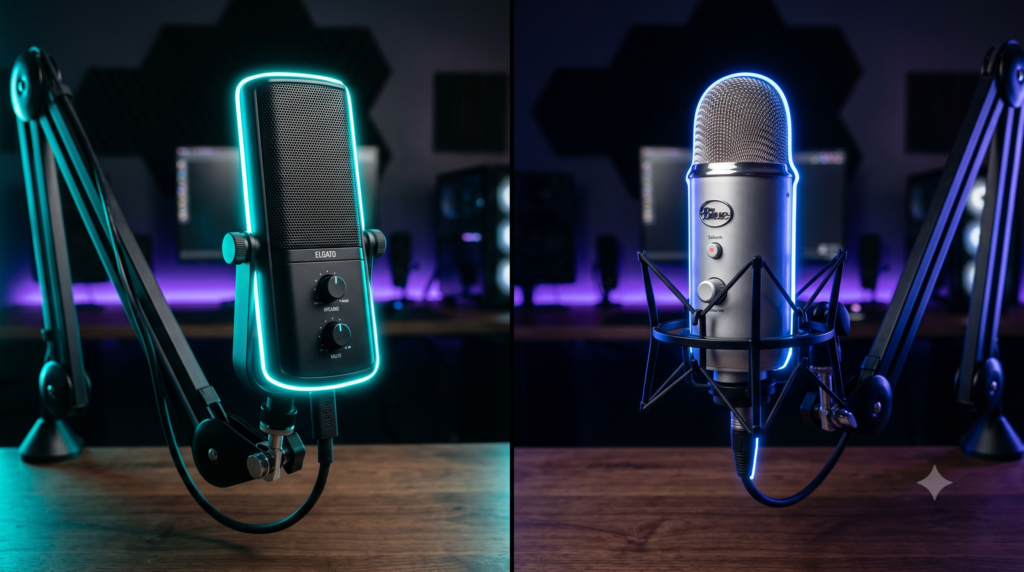
Elgato Wave:3 vs Blue Yeti: Best USB Mic for Streaming
In the world of content creation, there is one golden rule: Viewers will forgive bad video, but they will instantly click away from bad audio. If your stream sounds like you are trapped inside a tin can, or if your teammates are constantly complaining about hearing your mechanical keyboard clacking, your microphone setup is holding you back.
For PC streamers, XLR setups with external audio interfaces can be overly complicated and wildly expensive. This is why 90% of creators turn to premium USB Condenser microphones. And when it comes to USB mics, the market has been locked in a two-horse race for years: The legendary, battle-tested Blue Yeti vs the modern, software-driven Elgato Wave:3.
At Desk & Console, we’ve tested both of these titans extensively inside OBS Studio and Discord. If you are trying to figure out which microphone will elevate your Twitch, YouTube, or podcasting setup, here is our definitive, hype-free comparison.
1. Spec Comparison: The Raw Data
Before we discuss vocal warmth and background noise, let’s look at the hardware driving these microphones.
| Feature | Elgato Wave:3 | Logitech Blue Yeti |
|---|---|---|
| Sample Rate | 96 kHz / 24-bit | 48 kHz / 16-bit |
| Polar Patterns | Cardioid Only | Cardioid, Omni, Bi-directional, Stereo |
| Anti-Clipping | Yes (Hardware Clipguard) | No |
| Connection | USB-C | Mini-USB / Micro-USB |
| Weight (w/ Stand) | 1.3 lbs (Lightweight plastic) | 2.2 lbs (Heavy metal block) |
2. The Software Battle: Wave Link vs G Hub
Hardware is only half the battle. In modern streaming, the software that controls your microphone is arguably more important than the capsule itself. This is where the two mics diverge massively.
The Elgato Wave:3 Ecosystem: When you buy the Wave:3, you aren’t just buying a microphone; you are buying Wave Link. Wave Link is a digital audio mixer. It creates multiple “virtual audio cables” on your PC. This means you can separate your game audio, Spotify music, Discord chat, and microphone into different sliders. You can turn down the music for your stream, while keeping it loud in your headphones. For single-PC streamers, Wave Link is an absolute game-changer that negates the need for a physical $150 GoXLR.
The Blue Yeti Ecosystem: The Blue Yeti utilizes Logitech G Hub (Logitech acquired Blue Microphones). G Hub grants you access to “Blue VO!CE” filters. These are fantastic, studio-grade presets that can make your voice sound like a late-night radio host or a crisp esports caster instantly. However, G Hub lacks the advanced virtual routing and mixing capabilities of Elgato’s software.
Both software suites now support VST plugins. This means you can download free EQ plugins, Noise Gates, or AI noise removal tools (like NVIDIA Broadcast) and apply them directly to your microphone feed to eliminate background keyboard clicking completely!
3. Deep Dive: Elgato Wave:3
Elgato Wave:3 Premium Condenser Mic
The Elgato Wave:3 was engineered from the ground up strictly for streamers. It features a sleek, modern, rectangular aesthetic that looks fantastic on camera without blocking your monitor. The capacitive “tap-to-mute” sensor on the top is completely silent, meaning your stream won’t hear a loud *CLICK* when you cough.
The secret weapon of the Wave:3 is its proprietary Clipguard technology. If you get jumpscared in a horror game or scream during a clutch moment in a game, the hardware instantly reroutes your voice through a lower-volume signal path. Your voice will never “peak” or distort, completely saving your viewers’ eardrums. Paired with the incredible Wave Link mixing software, it is the ultimate streamer tool.
✓ What We Love
- Wave Link software is a free, digital GoXLR mixer
- Hardware Clipguard prevents audio distortion when yelling
- Lightweight design is very easy to mount on cheap boom arms
- Modern USB-C connection
✕ Keep in Mind
- The plastic build feels slightly cheaper than the metal Yeti
- Cardioid polar pattern only (Not ideal for recording an entire room)
4. Deep Dive: Blue Yeti
Logitech for Creators Blue Yeti
The Blue Yeti is the undisputed grandfather of USB microphones. Built like an absolute tank out of heavy metal, it exudes premium build quality. Out of the box, the Yeti provides a slightly warmer, deeper “radio broadcast” vocal tone compared to the Elgato.
Unlike the Wave:3, the Yeti features a multi-pattern selector switch. If you are recording a solo stream, you set it to Cardioid. If you are doing an in-person podcast with someone across the table, you set it to Bi-directional. If you are recording a D&D session with 5 people around a table, you set it to Omnidirectional. It is the undisputed king of versatility.
✓ What We Love
- Incredibly warm, rich “broadcast” sound profile
- 4 different polar patterns make it hyper-versatile
- Built like a tank (Heavy metal construction)
- Blue VO!CE software filters make tuning very easy
✕ Keep in Mind
- Extremely heavy; requires an expensive, high-tension boom arm
- The included desk stand transfers keyboard vibrations easily
- Uses an outdated Mini-USB connection on many models
5. The Mandatory Upgrade: Boom Arms
Elgato Wave Mic Arm LP (Low Profile)
No matter which microphone you buy, you must get it off your desk. If you use the heavy metal stands included in the box, the microphone will pick up the violent thud of every single keystroke and mouse flick. Getting the microphone closer to your mouth allows you to lower the input gain, naturally rejecting background noise.
The Elgato Wave Mic Arm LP is the best boom arm on the market right now. Instead of hovering over your monitors like a radio station arm, it sweeps *under* your monitors, keeping your camera view perfectly clean while delivering the microphone directly to your chin. It easily supports the weight of both the Wave:3 and the heavy Blue Yeti.
Buy Low Profile ArmIf you run a multi-person podcast, conduct in-person interviews, or record ASMR, the Blue Yeti is unmatched. Its multi-pattern capsules and durable metal build make it a versatile powerhouse for general recording.
However, if you are a solo PC gamer, streamer, or content creator, the Elgato Wave:3 is the undisputed champion. The anti-distortion Clipguard hardware and the unparalleled routing power of the Wave Link software make it the ultimate all-in-one audio solution for Twitch and YouTube.
Frequently Asked Questions (FAQ)
How do I stop my USB mic from picking up keyboard noise?
The most effective way to stop keyboard noise is to get the microphone off your desk using a Boom Arm. Desk stands absorb the physical vibrations of your keystrokes. Additionally, set your microphone’s polar pattern to “Cardioid” so it only picks up sound from the front, angle it away from your keyboard, and use a noise gate filter in OBS or Wave Link.
What is Elgato Clipguard technology?
Clipguard is a proprietary hardware feature built into the Elgato Wave:3. It actively analyzes your audio input in real-time. If you suddenly yell or scream during a game, Clipguard instantly reroutes the sound through a lower-volume signal path, preventing your audio from peaking, distorting, or blowing out your viewers’ ears.
Do I need an audio interface for the Wave 3 or Blue Yeti?
No. Both the Elgato Wave:3 and the Blue Yeti are USB condenser microphones. They have digital-to-analog converters built directly into the microphone itself. You simply plug the USB cable directly into your PC or Mac, and they are ready to record instantly without the need for a bulky XLR audio interface.