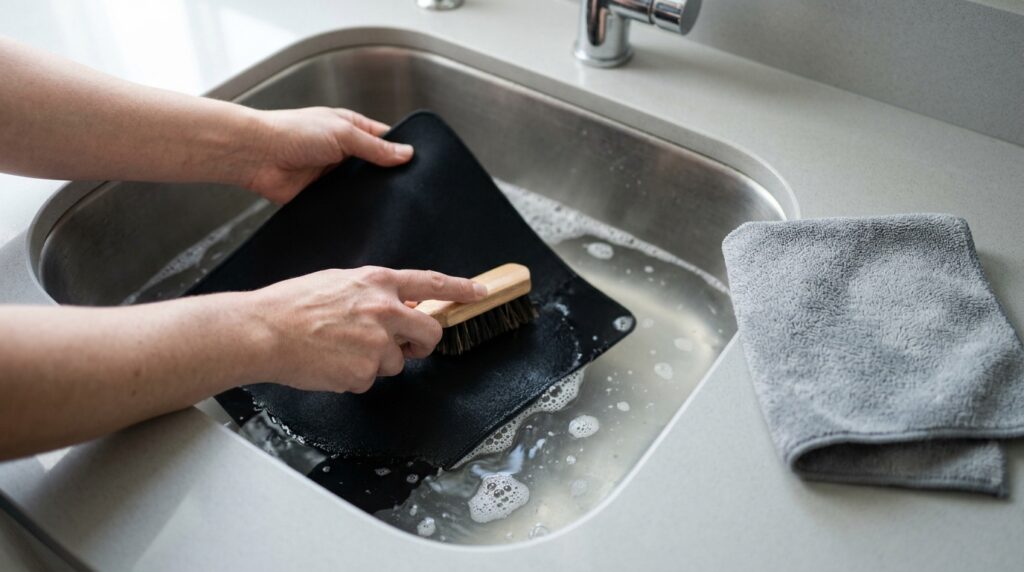
If your mouse feels slower, sticky or uneven than it used to, the pad is often the reason. Skin oil, dust and crumbs build up in the cloth and change how the mouse glides. Cleaning it takes a few minutes of work and some patience while it dries. Here’s how to do it without ruining the surface or the rubber base.
Step 1: Find out what kind of pad you have
This is the bit most guides skip, and it matters. Mouse pad makers don’t agree on washing, so the right method depends on your pad:
| Pad type | Safe method | Avoid |
|---|---|---|
| Plain cloth pad that the maker says you can wash (for example, SteelSeries cloth pads) | Hand wash in a sink with warm water and mild dish soap | Hot water, tumble dryer, direct heat |
| Cloth pad or desk mat the maker says to wipe only (for example, Logitech’s desk mats) | Wipe with a lightly damp lint-free cloth | Soaking, pouring water on it, machine washing |
| RGB or lit pad with a cable | Unplug it, then wipe with a wrung-out damp cloth, keeping the cable and control box dry | Submerging it in water |
| Hard plastic or glass pad | Wipe with a damp microfiber cloth | Abrasive cleaners and scourers |
If you still have the box or can find your pad on the maker’s website, check its care instructions. They override any general guide, including this one.
Step 2: Hand wash a cloth pad
For a plain cloth pad with no lights or cable, and where the maker allows washing:
- Shake or brush off loose dust and crumbs first. A lint roller also works well.
- Fill a sink or tub with warm water, not hot, and add a small squirt of mild dish soap.
- Lay the pad in the water and gently rub the surface with your hands or a soft brush, working in small circles. Spend extra time on the area where your wrist rests.
- Rinse it well with clean water until no suds come out. Leftover soap attracts dirt and can change how the surface feels.
- Press out the water. Roll the pad up loosely in a towel and press, or pat it with a dry towel. Don’t wring or twist it.
Step 3: Dry it properly (don’t rush this)
Lay the pad flat, cloth side up, somewhere with air moving around it. Keep it away from heaters, hair dryers and tumble dryers, because heat can warp the rubber base or peel the surface. Makers’ drying times range from a couple of hours to a day or more. SteelSeries suggests 24 to 36 hours for machine-washed pads, and Fnatic recommends at least 12 hours. Before you put it back on the desk, press the back with your hand. If it feels cold or damp at all, give it longer.
Quick clean for pads you can’t wash
- Brush or lint-roll the surface.
- Dampen a lint-free cloth with plain water and wring it out well.
- Wipe the surface in light, straight strokes. On a stain, dab rather than scrub.
- Leave it flat to air dry before using it.
How often to clean it
A quick brush or wipe every week or two keeps dust off the surface. Give it a full wash only when it looks grimy or your mouse starts feeling sticky or uneven. Many people find that’s every month or two. If the pad still feels bad after a clean, check your mouse feet and sensor too, because dust there can affect tracking.
Thinking it’s time for a new pad instead? See our budget gaming mouse pads compared, and our guide to mouse pad surfaces for low-sensitivity aim.
How we checked
Sources and limits (checked 4 November 2026)
- Washing and drying steps come from SteelSeries’ own cleaning guide and Fnatic’s support page.
- The “wipe only” guidance for Logitech, Razer Chroma and RGB pads comes from GameVexo’s summary of each maker’s support pages.
- We haven’t washed every pad type for this guide. Your pad’s own care instructions come first.
Cheap cleaning supplies
1. Microfiber Cleaning Cloths
Lint-free and soft, so they’re good for damp wipes and for gently pressing water out after a wash. They’re usually sold in multi-packs, and they’re handy for your monitor and keyboard too.
2. Soft-Bristle Cleaning Brush
Gets dust and dirt out of the cloth weave before and during a wash without roughing up the surface. Choose soft bristles, not a stiff scrubbing brush.
3. Lint Roller
A quick roll once a week picks up crumbs, hair and dust, so you need full washes less often. Refill sheets are cheap.
Frequently asked questions
Can I put my mouse pad in the washing machine?
Only if the maker says so. Some cloth pads are machine washable on cold and low tumble, but makers including Logitech say not to machine wash their desk mats. Check your pad’s care instructions first.
What soap should I use to clean a mouse pad?
A small amount of mild dish soap in warm water. Avoid bleach, strong solvents and abrasive cleaners.
How long does a mouse pad take to dry?
It depends on the pad and the room. Makers’ guidance ranges from a couple of hours to over a day. Dry it flat, away from heat, and only use it once the back feels completely dry.
How do I clean an RGB mouse pad?
Unplug it, then wipe the surface with a well wrung-out damp cloth, keeping the cable and control box dry. Don’t submerge it.
Why does my mouse still feel slow after cleaning the pad?
Check the mouse too. Dust on the mouse feet or near the sensor can affect glide and tracking.