
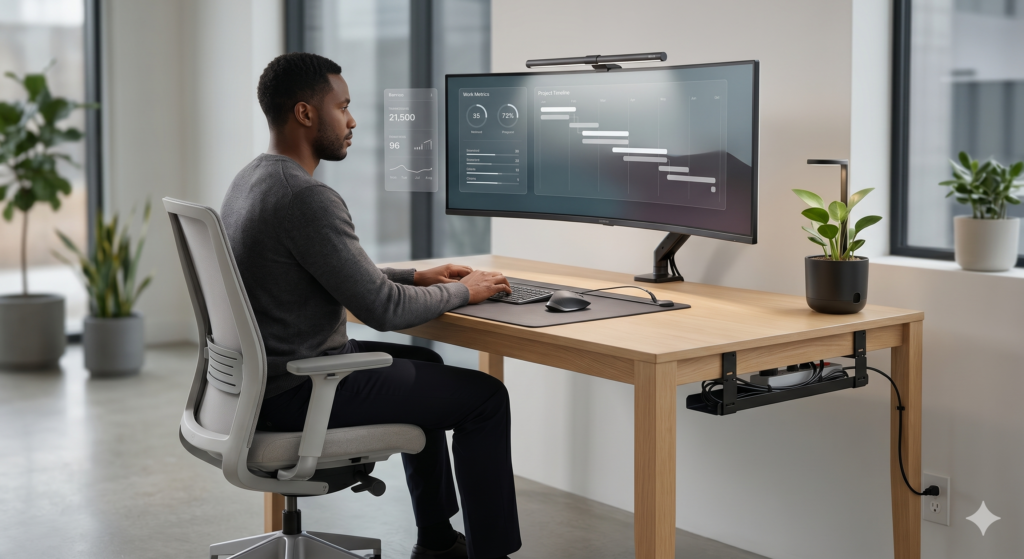
Minimalism is not about having an empty desk. It is about intentionality. In 2026, building a minimalist battlestation or home office means eliminating visual friction—hiding cables, maximizing surface area, and investing in hardware that serves a specific purpose.
When you sit down at a zero-clutter desk, your mental load immediately drops. You can focus entirely on the game you are playing or the project you are building. Bulky monitor stands, tangled USB cables, and scattered paperwork are productivity killers.
We analyzed the highest-rated gear on the market. Here is the ultimate blueprint and the exact Amazon products you need to architect a flawless minimalist desk setup.
1. Float Your Screens (Eliminate the Stand)
The fastest way to instantly make a desk look minimalist is to remove the massive, clunky plastic factory stands that come with your monitors. They consume up to 30% of your usable desk depth. By using a heavy-duty monitor arm, your screen appears to “float” above the desk, allowing you to slide your keyboard underneath when you need to read or write.
HUANUO Gas Spring Single Monitor Arm
With over 30,000 positive reviews, the HUANUO gas-spring arm is the gold standard for minimalist setups. It clamps cleanly to the back of your desk and features internal cable routing channels so your HDMI and power cables completely disappear down the spine.
2. Remove the Desk Lamp
Standard desk lamps cast harsh glare on your monitor and take up valuable corner space. To achieve a modern aesthetic, you need to transition to asymmetrical optical lighting. It looks incredibly futuristic and protects your eyes during late-night sessions.
BenQ ScreenBar Monitor Light
Instead of a bulky base that sits on your desk, this light bar clips securely directly to the top of your monitor. It casts a perfect, glare-free pool of light exactly onto your keyboard without shining into your eyes or washing out your screen.
3. Eliminate Peripheral Cables
You cannot have a minimalist desk if thick, braided USB cables are snaking across your mousepad. In 2026, wireless technology features sub-1ms latency, making wired mice and keyboards completely obsolete—even for competitive gaming.
Logitech MX Master 3S & MX Keys Mini
The undisputed kings of the minimalist desk. The MX Keys Mini removes the bulky numpad to free up mouse space, and the MX Master 3S features a whisper-quiet click and a luxurious electromagnetic scroll wheel. They look incredibly premium on any desk.
4. Frame Your Setup with a Premium Mat
A minimalist desk without a mat looks barren and cold. An oversized desk mat “frames” your keyboard and mouse, dampens the acoustics of your typing, and protects your expensive desk surface from scratches.
Orbitkey Desk Mat with Cable Management
Unlike cheap cloth gaming mats that fray at the edges, the Orbitkey mat is made from premium vegan leather. Its secret weapon is the built-in magnetic cable holder toolbar at the top, which stops your phone charging cables from slipping off your desk.
5. Route the Under-Desk Wires
A minimalist desk is instantly ruined if a “waterfall” of power cables is visible underneath it. Hiding your cables is the final, most crucial step to achieving a zero-clutter command center.
VIVO Under Desk Cable Management Tray
Instead of leaving your power strip on the floor, mount this heavy-duty metal tray beneath your desk. By placing your surge protector inside it, all of your PC and monitor cables run horizontally and out of sight, leaving only one single power cord dropping to the wall outlet.
The Bottom Line
Transitioning to a minimalist desk setup in 2026 is an investment in your focus and peace of mind. By getting your monitor off the desk, cutting the cords on your peripherals, and utilizing under-desk trays, your workspace will look like it belongs in a premium tech catalog.